


A 160-person fintech cut privileged access by 85% after moving elevated permissions to time-bound access. For IT teams auditing over-privileged accounts in Jira, that number exposes the real problem: finding excess access means little if nobody enforces the expiry. A spreadsheet can flag the account, and a reviewer can mark Revoke. If the decision still needs a manual handoff to the identity provider, standing privilege keeps winning.
Most teams treat this as an audit clean-up problem. I'd argue the account stayed over-privileged because the original workflow had no end condition. The audit arrived months later and pointed at the damage. By then, IT is trying to rebuild a decision from tickets, Slack messages, group lists, and somebody's memory.
Key Takeaways:
- Audit the full entitlement path, not just current group membership.
- Treat missing Jira evidence as an access exception that needs an owner.
- Separate permanent job access from temporary project or admin access.
- Make revocation part of the review, not a follow-up task.
- Feed every audit finding back into future request rules.
Why Over-Privileged Accounts Survive Every Audit
Over-privileged accounts survive because teams review current access without rebuilding the decision behind each entitlement. A useful privileged account audit connects who asked, who approved, what changed, and when access should end. If one link sits outside Jira, the reviewer is forced to guess.

A Current Account List Only Shows the Symptom
A group export tells you what access exists right now. It doesn't tell you whether that access is valid, whether the manager understood the role, or whether the person changed jobs six months ago. You're looking at the final state without seeing the path that created it. Not enough.
A privilege audit should work like a transaction ledger. Every grant needs an opening entry, and every revocation needs a closing entry tied to the same business reason. When either entry is missing, you don't have evidence. You have an unexplained balance sitting in an identity provider group.
Split Systems Turn Reviewers Into Investigators
At 3:40 on Thursday, an IT manager opens a quarterly access review and exports the admin groups from Okta. The original requests live in Jira, several approvals happened in Slack, and the expiry dates were tracked in a spreadsheet. One approver has left the company. The manager marks several accounts "Keep" because removing access feels riskier than accepting access nobody can explain.
Separate IGA portals can make sense for large companies with complex identity programs. Fair point. The split becomes expensive when employees still request access in Jira and IT must reconcile both systems by hand. Auditing over-privileged users then turns into digital archaeology, where every entitlement has to be reconstructed from several partial records.
Audit Findings Don't Remove Access
A 160-person fintech faced long-lived privileged access while growing through acquisitions. The team changed the workflow so access could be requested for a defined period and removed afterward. Privileged access dropped by 85%. The important part wasn't finding more accounts in a review. It was changing what happened after the finding.
Audits are exhausting when the same account appears quarter after quarter. Security flags it, IT asks the owner, the owner approves it again, and nobody changes the workflow that created the standing privilege. That gap between Jira evidence and identity enforcement is why Learn more about Multiplier belongs in the conversation, because the record and the actual access change need to stay connected.
The audit becomes useful only when it changes how access is granted next Monday.
How to Audit Privileged Access Inside Jira
A strong privileged access audit starts with evidence, not a spreadsheet export. Rebuild the path from request through removal, then test whether the same path can prevent the next over-privileged account. The review should produce enforceable changes, not a prettier list.
Diagnose Where Privilege Is Accumulating
Five questions will tell you whether you have an account problem or a workflow problem. Start by comparing privileged group membership against Jira issues, not employee directories. A person can be active and still have the wrong access. Employment status proves they work there. It doesn't prove they should administer a production system.
Look at the last two or three access reviews as well. If the same exceptions keep returning, the review process is documenting risk instead of reducing it. I've seen teams celebrate a completed certification while carrying nearly every exception into the next quarter. Completion rate looked good. Access stayed the same.
Ask these questions before you approve the audit scope:
- Can every privileged entitlement be traced to a Jira request?
- Does the ticket name the role or group that was granted?
- Can you identify the approver and business reason?
- Does temporary access have an expiry condition?
- Did prior revocation decisions change the identity provider?
Three or more "no" answers mean you should audit the workflow and the accounts together. Reviewing users alone will miss the cause.
Rebuild Every Entitlement From Its Jira Issue
An engineer requests an admin role for a migration project. Their manager approves the request, IT adds them to an identity provider group, and the Jira issue closes. Six months later, the group membership remains because the ticket tracked the grant but never defined the end. The account looks valid until somebody asks what the engineer is administering now.
For each entitlement, work backward from the identity provider group to the originating Jira issue. If you can't find that issue within 10 minutes, don't label the access approved based on memory or job title. Classify it as unsupported access and assign an owner to reattest or remove it. A hard rule feels strict, but it prevents "probably fine" from becoming the default decision.
Rebuild the record in this order:
- Identify the privileged group and current member.
- Find the Jira request that initiated access.
- Confirm the approver had authority over that role.
- Compare the approved role against the actual group membership.
- Find the expiry, review date, or revocation record.
Missing evidence should create work. It shouldn't create an automatic approval.
Separate Standing Access From Temporary Need
Permanent access is often a workflow default, not a business requirement. A requester needs an admin role for one incident, one migration, or one vendor setup. The form asks which application they need, but not how long they need it. IT grants access with no timer because that's what the ticket supports.
Temporary access does introduce friction. Someone may need an extension during an incident, and an expiry at the wrong moment can interrupt work. That downside is real. The answer is a fast extension path tied to the original approval, not permanent access for every possible future incident. If access can be requested and restored quickly, standing privilege becomes much harder to justify.
Use three access patterns:
- Core job access: Keep it standing, but review it when the person changes role or manager.
- Project access: Set an end date that matches the project or contract.
- Admin access: Grant it for the shortest practical window and remove it automatically.
A clean over-privileged account review should show which pattern applies to every sensitive entitlement. Anything else needs an owner and a reason.
The request, approval, timer, and removal chain becomes easier to judge when you can see it in one record, which is why See how Multiplier works is useful at this point.
Review Accounts by Risk and Usage
What should a reviewer see before clicking Keep? At minimum, they need the user's role, department, manager, group membership, approval history, and recent usage context. A name beside an application isn't enough. Reviewers need enough detail to challenge access without opening five other systems.
Alphabetical reviews make administration easier, but they treat a design tool license and a production admin role as equal decisions. They aren't. Start with high-impact groups, then review dormant accounts and role changes. An account with no recorded use for 90 days should trigger a closer look, though inactivity alone doesn't prove the access is wrong.
Review in this order:
- Privileged and administrative groups
- Accounts belonging to former managers or transferred employees
- Temporary access with missing or passed expiry dates
- Entitlements with no recent login activity
- Access without a Jira request or named approver
For lower-risk apps, inactivity may support removal after a warning period. For production or emergency roles, require the owner to restate the business need and set the next review condition. Same audit. Different evidence threshold.
Make Revocation Part of the Review
A spreadsheet records a decision. An identity provider enforces it. The gap between those two actions is where many access audits fail, because reviewers click Revoke and assume somebody else will complete the change later. Sometimes they do. Sometimes the ticket sits in a queue for two weeks.
The audit isn't complete until you verify the group membership changed and the action was written back to Jira. For group-based access, check that the user was removed from the mapped identity provider group. For a non-SSO application, assign the manual removal to a named owner and keep the issue open until evidence is attached. Different execution paths are fine. An unverified decision isn't.
Every revocation record should capture:
- The reviewer and decision date
- The group or entitlement being removed
- The reason for removal
- The identity provider change status
- Any manual follow-up required
- The Jira issue containing the final evidence
If your review dashboard says 100% complete while revocation tickets remain open, the metric is wrong. Measure enforced decisions, not submitted responses.
Turn Audit Exceptions Into Request Rules
The cleanest audit finding is one you don't need to find again. Every exception should change a request form, approval path, group mapping, expiry rule, or review trigger. Otherwise you've paid to understand the failure without fixing it. That's a rough trade.
Say five engineers received the same temporary admin role and all five kept it after their projects ended. Removing the accounts fixes today's list. Adding a required duration and automatic removal fixes the recurring pattern. If reviewers repeatedly approve a low-risk role, you might simplify the request path while keeping the Jira record. If they repeatedly revoke an entitlement after role changes, trigger a review when the employee moves teams.
A fintech nearing 1,200 employees had hundreds of routine requests arriving through Slack, email, and Jira. Each request could take 5 to 30 minutes because IT had to chase approval and assign the correct Okta group. After the request path and group changes were connected, access-request workload dropped by 80%. The big win wasn't faster clicking. It was removing repeated decisions from the queue while keeping an audit record.
Use audit findings to update four controls:
- Required request fields
- Approver ownership
- Role-to-group mappings
- Expiry and re-review conditions
A privileged account audit should reduce next quarter's workload. If the next review starts with the same exceptions, the process hasn't improved.
How Multiplier Makes Access Evidence Automatic
Multiplier connects Jira requests, approval decisions, identity provider changes, and review evidence in the same operating path. Employees stay in JSM or Slack, while access changes run through Okta, Entra ID, or Google Workspace groups. The audit record is produced during normal access work instead of rebuilt later.
Jira-Native Requests Preserve the Decision
The Application Catalog gives employees a Jira-native list of approved applications and roles. Each role maps to one or more identity provider groups, so the request names the exact access being asked for. Approval Workflows route the Jira issue to a manager, app owner, or specific user. Approvers can act in JSM or Slack, with the decision tied to the originating issue.
Once the request reaches the approved status, automated provisioning can add the user to the mapped identity provider group. The Jira issue receives the execution status, keeping the approval and change together. For SSO apps, downstream access depends on those group mappings. It doesn't directly click around inside individual SaaS applications, which matters when you scope what can be automated.
The core path covers three controls:
- Structured intake: Approved apps and roles appear in the JSM catalog.
- Recorded approval: The right manager or owner decides in Jira or Slack.
- Authoritative change: Group membership changes through the connected identity provider.
The 5 to 30 minutes previously spent chasing approval and assigning groups can be removed from routine requests. IT gets time back, while the evidence stays attached to the Jira work.
Time Limits and Reviews Close the Loop
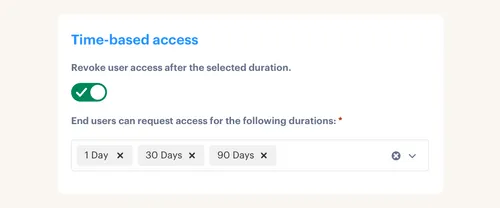
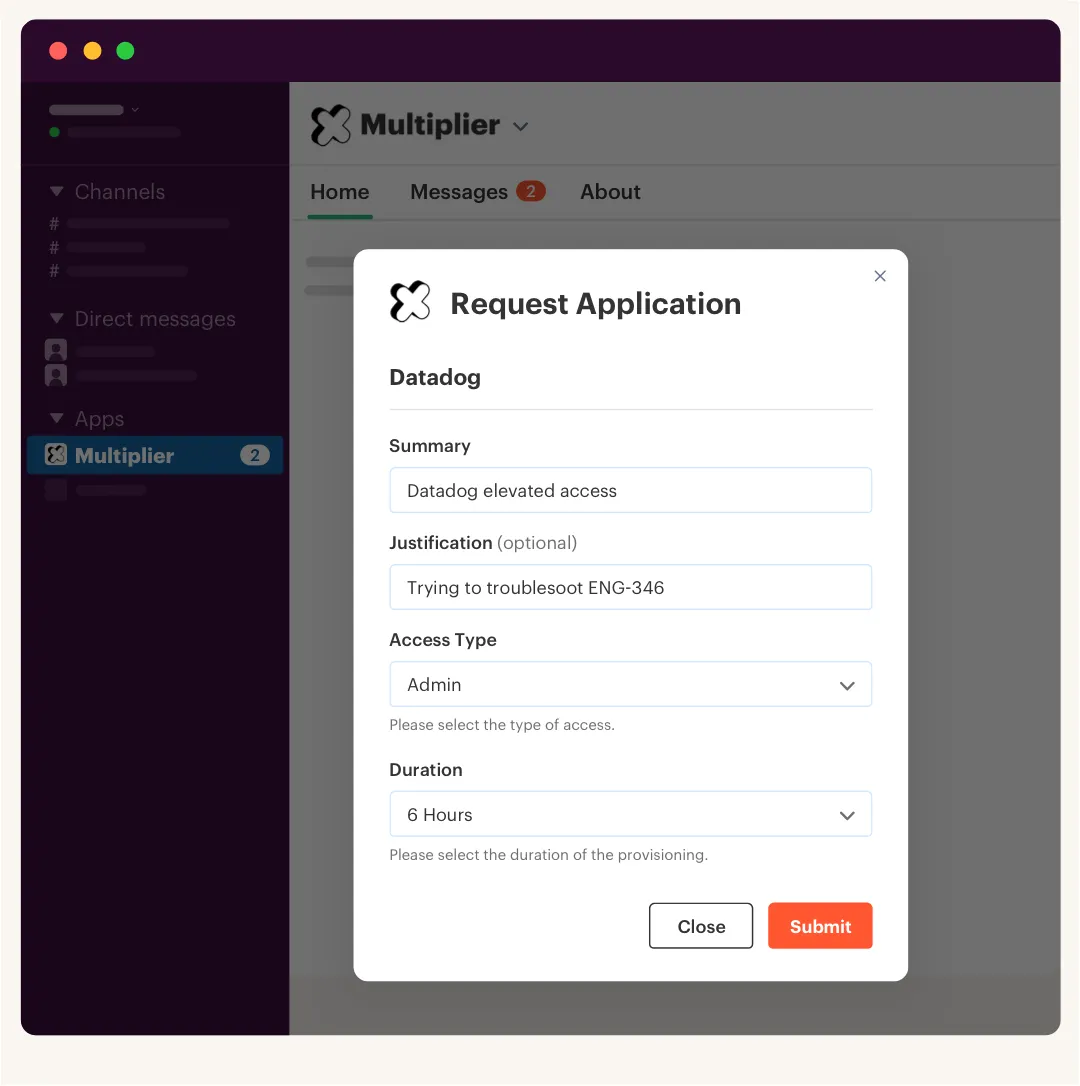
Time-Based Access lets requesters select a duration, such as 1, 6, or 24 hours. After approval, the user is added to the mapped identity provider group. When the timer expires, the group membership is removed and the change is recorded in Jira. Automatic removal only works where access is controlled through supported group membership, so manual grants still need a manual close-out.

Access Reviews run in JSM and show reviewers user details, group membership, last login data, and recommendations. A Keep or Revoke decision can remove the relevant identity provider group and create Jira evidence for the change. Requests, expiry, review, and removal stop being separate audit projects. They become one connected record.
Once those controls match the way your Jira workflows already run, Get started with Multiplier to map the catalog, group assignments, approval owners, and time limits that should govern your highest-risk access first.
What a Clean Privilege Audit Looks Like
A clean privilege audit can explain every sensitive entitlement from request through removal. Reviewers can see the business reason, approver, identity provider group, expiry condition, and final enforcement record without rebuilding the story in a spreadsheet. Over-privileged accounts become exceptions with owners, not mysteries carried into the next quarter.
Start with one high-risk application and trace ten privileged users back to Jira. The gaps will show you where the workflow breaks. Fix those request and removal rules before expanding the audit. Useful audit evidence is created by normal work.
Frequently asked questions
- How do I set up time-based access in Multiplier?
When submitting a request in the JSM portal or Slack, select the application and role, then choose a duration—1, 6, or 24 hours. After approval, Multiplier provisions the access and removes it automatically when the timer runs out.
- What if I need to revoke access after an audit?
Use Access Reviews in Multiplier to identify over-privileged users, mark them for revocation with a reason, and Multiplier removes them from the relevant identity provider groups and creates a Jira ticket for the change. The finding becomes an enforced action, not a spreadsheet note.
- Can I automate access requests in Slack with Multiplier?
Yes. Install the Multiplier Slack app, then employees type '/request' to see the same application catalog as in JSM. They pick the app and role, submit, and a Jira ticket is created automatically—same audit trail, no context switching.
- When should I conduct access reviews with Multiplier?
Quarterly works for most teams, but high-risk groups warrant more frequent reviews. Create a campaign in Access Reviews, assign reviewers, and they'll see last login dates and role changes alongside each decision. Start with privileged and admin groups before lower-risk apps.
- Why does my team struggle with access request approvals?
Usually because requests arrive from multiple places—Slack, email, Jira—with no consistent approval path. Multiplier's Approval Workflows route each request to the right person in Jira or Slack, so approvals stop getting lost. The Application Catalog puts all approved apps in one place, which cuts the back-and-forth.
Frequently Asked Questions
How do I set up time-based access in Multiplier?
When submitting a request in the JSM portal or Slack, select the application and role, then choose a duration—1, 6, or 24 hours. After approval, Multiplier provisions the access and removes it automatically when the timer runs out.
What if I need to revoke access after an audit?
Use Access Reviews in Multiplier to identify over-privileged users, mark them for revocation with a reason, and Multiplier removes them from the relevant identity provider groups and creates a Jira ticket for the change. The finding becomes an enforced action, not a spreadsheet note.
Can I automate access requests in Slack with Multiplier?
Yes. Install the Multiplier Slack app, then employees type '/request' to see the same application catalog as in JSM. They pick the app and role, submit, and a Jira ticket is created automatically—same audit trail, no context switching.
When should I conduct access reviews with Multiplier?
Quarterly works for most teams, but high-risk groups warrant more frequent reviews. Create a campaign in Access Reviews, assign reviewers, and they'll see last login dates and role changes alongside each decision. Start with privileged and admin groups before lower-risk apps.
Why does my team struggle with access request approvals?
Usually because requests arrive from multiple places—Slack, email, Jira—with no consistent approval path. Multiplier's Approval Workflows route each request to the right person in Jira or Slack, so approvals stop getting lost. The Application Catalog puts all approved apps in one place, which cuts the back-and-forth.


