

3,800 access requests in one year will expose every weak handoff in your identity lifecycle. Automating identity lifecycle work isn't mainly about writing better policies. It's about making the approved change through your identity provider, then writing the evidence back to Jira.
One four-person IT Ops team supported more than 420 employees this way. They fully automated 75% of access requests, which changed the job completely. Less time chasing approvals, less time adding people to groups, and more time on actual IT work.
Key Takeaways:
- Map every handoff before automating identity lifecycle changes.
- Use identity provider groups as the execution layer.
- Match each request path to its risk and reversibility.
- Make expiry part of the original access grant.
- Capture approval, provisioning, and revocation evidence in Jira.
Why Identity Lifecycle Policies Break in Daily Operations
Identity lifecycle policies break when approval, execution, and evidence happen in different systems. Jira records the request, Slack carries the decision, and an admin makes the actual change in Okta or Entra. Each tool may work properly on its own. The handoffs between them create the risk.
A policy can't add someone to an identity provider group
A least privilege policy can define who should get access. It can't perform the group change. Someone still needs to read the Jira ticket, confirm the approval, find the right identity provider group, and add the user. Later, someone needs to reverse that work.
At a high-growth AI company, the head of IT watched requests move between Slack and a Notion board during 4x headcount growth. Notifications got missed, approvals stalled, and provisioning stayed manual. For the IT lead, the frustrating part wasn't the volume alone. Nobody could trust the process to finish without a person pushing it along.
Approval and execution drift apart
Approval proves that someone agreed with a request. It doesn't prove access was granted correctly, for the right duration, or removed later. In finance, an approved payment isn't a completed transaction until settlement happens. Access governance works the same way.
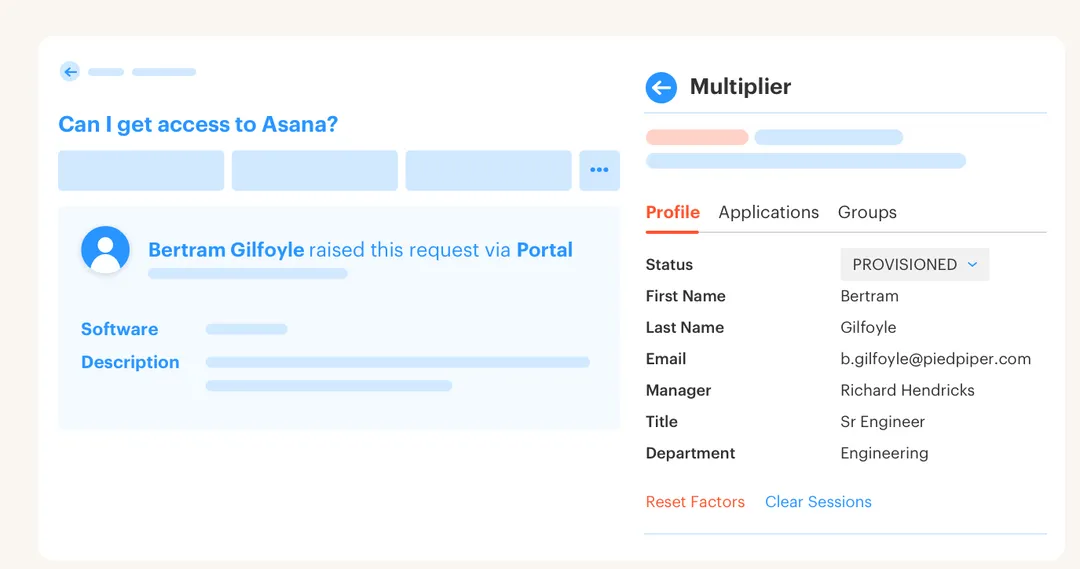
The drift starts with a small manual step. An admin copies a group name from a ticket, opens the identity provider, makes the change, and comments “done.” Honestly, the comment isn't evidence of what changed. It's evidence that someone said they changed it.
If Jira already owns intake, the Jira-native Multiplier model is a useful example of keeping the request and downstream identity change tied together.
Audit work grows from missing operational records
Audit evidence gets expensive when it's treated as a separate task. The request sits in Jira, the approval sits in Slack, the group assignment sits in Entra, and the reviewer decision lives in a spreadsheet. Months later, IT has to reconstruct the chain.
Manual handling does have a place. A rare non-SSO application with unusual access rules may need a human to provision it, and pretending otherwise creates bad automation. The real mistake is using the same manual path for mapped, repeatable access that could execute automatically. Which parts should you automate first?
How to Automate the Identity Lifecycle Without Losing Control
Automate the identity lifecycle by connecting each approved Jira state to a defined identity action, expiry rule, and evidence record. Start with repeatable group-based access, not every edge case. Once that path works, extend the same pattern to onboarding, role changes, offboarding, and access reviews.
Can you trace one request from start to finish?
Pick one common application and follow a real request. Don't read the policy document. Watch what the requester, approver, and IT admin actually do from submission through revocation. Every copy and paste step is a possible break.
The audit should also include waiting. A request sitting in Slack for two days may look like an approval problem, while the real issue is that Slack and Jira don't share a usable state. If the approver acts but the identity provider change still depends on IT, you've automated the notification. Not the lifecycle.
Ask four questions:
- Can the employee request a specific application and role in one place?
- Does approval trigger an authoritative identity provider change?
- Can temporary access expire without another ticket?
- Can you prove the grant and removal without collecting screenshots?
A “no” tells you exactly where the manual handoff lives.
Use identity provider groups as the execution target
Jira should decide when work is approved. Your identity provider should execute the access change through mapped groups. The application then receives the entitlement through its existing SSO and provisioning setup. One approved workflow state creates one predictable action.
A fintech company with nearly 1,200 employees used to handle hundreds of routine requests across Slack, email, and Jira. Each request could take 5 to 30 minutes because IT had to chase approval and manually assign the correct Okta group. After connecting the request path to automated provisioning, the company reduced IT workload from access requests by 80%. The big win wasn't a faster form. It was removing the admin step after approval.
If you're mapping the same Jira-to-group chain, see how Multiplier works against that exact handoff.
Give each access type the right path
Three paths cover most access requests: automatic approval, approval followed by automation, and tracked manual fulfillment. Mixing them together creates either too much friction or too little control. Low-risk access shouldn't wait behind production admin access. Sensitive access shouldn't inherit the rules for basic collaboration tools.
Your decision should come down to risk, reversibility, and execution method. If access maps to an identity provider group and can be removed safely, automate the change. If the role is elevated, add approval and expiry. If the application has no supported group-based path, keep the request in Jira and assign the manual work clearly.
A practical routing model looks like this:
- Low-risk, mapped access: Approve automatically and add the user to the mapped group.
- Sensitive, mapped access: Require the app owner or manager to approve before the group change.
- Temporary elevated access: Require approval, capture a duration, and remove access at expiry.
- Non-SSO or unusual access: Keep provisioning manual while preserving the Jira record.
Some security teams prefer approval on every request. That's reasonable when the environment is small or each entitlement carries real risk. At higher request volumes, universal approval often trains people to click approve without thinking, which weakens the control it was meant to protect.
Treat role changes as identity state changes
A transfer ticket looks simple until the employee keeps their old access. The person joins a new department, receives new groups, and retains entitlements from the previous role. Creating access is only half the job. Removing outdated access is where lifecycle automation earns its keep.

Start with the identity state you want after the workflow finishes. For onboarding, define the account, department groups, and baseline licenses. For a transfer, update the relevant user attributes before adding and removing groups. For offboarding, disable the account and remove the memberships your workflow supports.
A Jira workflow can represent the sequence:
- HR or IT submits the lifecycle request with the required user details.
- The right approver confirms the change where approval is needed.
- Each workflow transition triggers its defined identity action.
- Success or failure gets written back to the originating ticket.
- Exceptions stay assigned for human follow-up instead of disappearing into chat.
Post-change checks still matter. Identity data can be incomplete, and unsupported systems won't follow your group mappings. The goal isn't pretending exceptions don't exist. It's reducing the exception queue to the work that actually needs judgment.
Make expiry part of the original grant
Temporary access should include its removal condition before anyone approves it. Adding an expiry later depends on memory, another ticket, and someone being available at the right time. That isn't just inefficient. It turns short-term access into standing privilege.
For group-based access, let the requester select a defined duration, such as 1, 6, or 24 hours. Approval starts the access window. Expiry removes the same identity provider group membership used to grant access. The grant and revocation should appear on the same Jira record.
Automatic revocation isn't possible for every application. A manually created account outside your identity provider won't disappear because a timer ended, and claiming otherwise gives security false confidence. Keep those requests visible as manual revocation tasks until the application supports an authoritative path.
I prefer expiry by default for privileged roles. Permanent access can still exist where the job requires it, but it should be the deliberate exception. That shifts least privilege from policy language into normal operations.
Build audit evidence during the workflow
What should one access record prove? It should show who requested access, who approved it, which identity change ran, and when the entitlement ended. Those facts already exist during normal work. Capturing them later is optional rework created by a broken process.
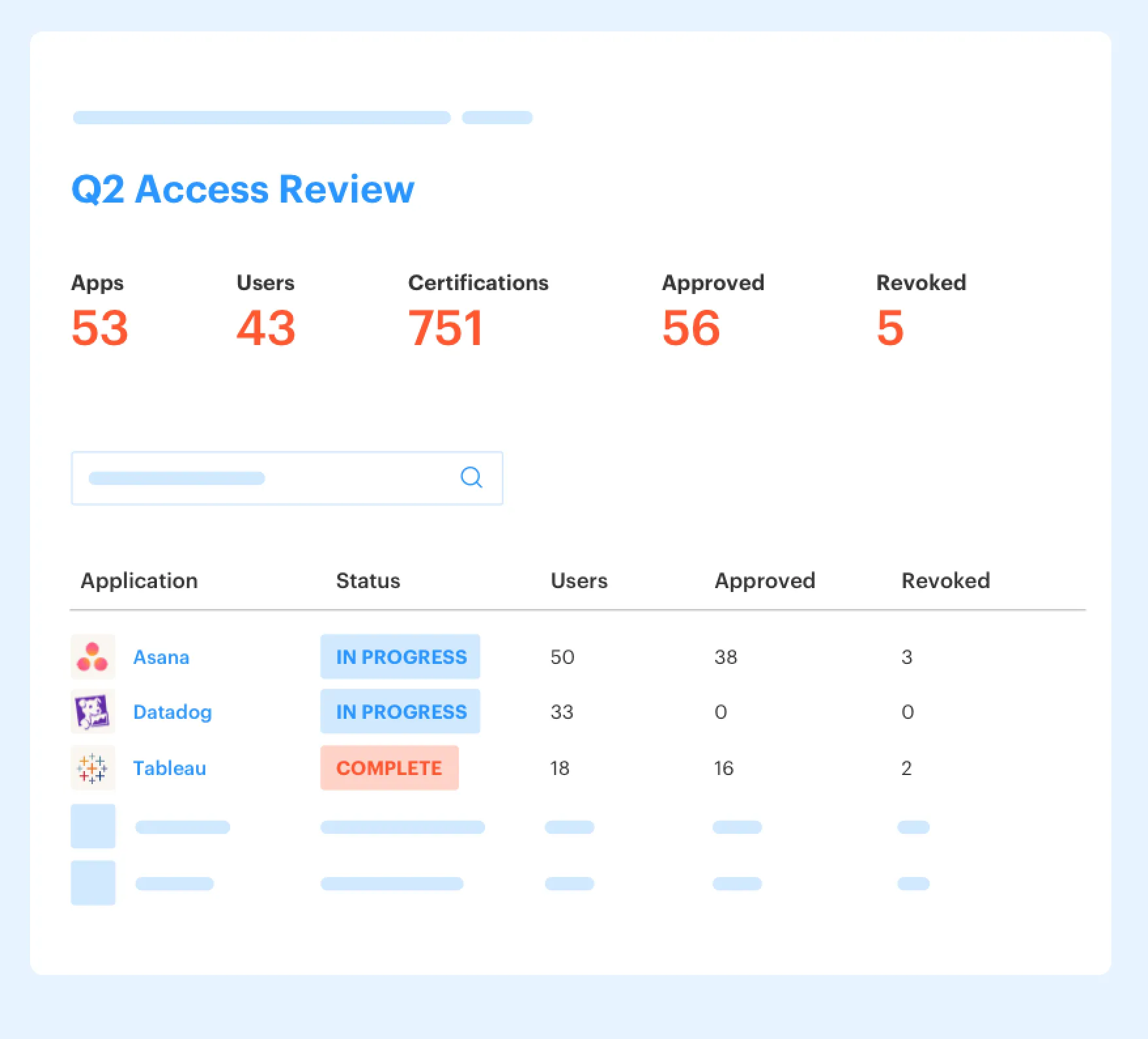
Access reviews should use the same logic. Reviewers need user details, current groups, and login context before deciding whether to keep or revoke access. A revoke decision should execute the identity provider change and create evidence, not become a second task for IT. I like boring audit records. Boring means the evidence was already there when someone asked for it.
At minimum, preserve:
- The requested application, role, and duration
- The assigned approver and final decision
- The identity provider action and its status
- The expiry or revocation event
- The review outcome and any export prepared for auditors
Once those rules are clear, the platform has a simple job: execute them from Jira and preserve the record.
How the Platform Connects Jira to Identity Operations
A Jira-native platform connects request intake, approval states, identity provider actions, and audit evidence on one issue. Employees keep using JSM or Slack, while IT defines the mappings behind the workflow. Routine changes can run without manual provisioning, and exceptions remain visible in Jira.
Approved Jira states trigger identity provider changes
The application catalog gives employees a controlled list of sanctioned apps and roles. Each role maps to one or more groups in Okta, Entra ID, or Google Workspace. Once the Jira issue reaches its configured approved state, Multiplier calls the identity provider and records success or failure back on the ticket.
Approval workflows can route requests to a manager, app owner, or specific user through Jira and Slack. Time-based access uses the same group path, then removes membership when the chosen duration ends. One boundary matters: provisioning works through identity provider groups, not direct browser actions inside individual SaaS applications. Manual and non-SSO grants still need a tracked human step.
Reviews and lifecycle actions preserve the audit chain
Post Functions can trigger supported identity lifecycle actions from Jira workflow transitions. Onboarding can create an Entra account and add mapped groups, while later transitions can update user details or disable an account. Each action writes its status back to the ticket. No separate script is required.
Multiplier also runs access review campaigns in JSM, where reviewers can see user attributes, group membership, and last login context. Keep or revoke decisions can remove users from relevant identity provider groups and create Jira records of the change. Results can be exported as CSV or pushed to Vanta, which avoids rebuilding the review from screenshots.
The operating record now includes:
- Request context: Application, role, requester, and duration
- Approval evidence: Assigned reviewer and decision
- Execution evidence: Identity provider action and status
- Review evidence: Keep or revoke decision with exportable results
Start with one mapped application where requests are frequent and the group action is reversible. If that path is ready to test, get started with Multiplier and run the full request-to-evidence flow inside Jira.
What Automation-First Least Privilege Changes
Automation-first least privilege makes the approved outcome happen by default. Access is granted through an authoritative identity provider path, temporary privileges expire, and Jira retains the evidence. IT spends less time moving data between tools because routine lifecycle work no longer waits for manual execution.
Policy still matters. You need clear owners, sensible access levels, and a manual path for exceptions. Yet policy without execution leaves the hardest work sitting in an admin queue. Policy sets intent. Automated execution makes least privilege real.
Frequently asked questions
- How do I automate access requests in Multiplier?
To automate access requests using Multiplier, start by integrating it with your identity provider like Okta or Azure AD. Next, set up the Application Catalog within Jira Service Management (JSM) to display approved applications. Employees can then submit requests through JSM or Slack, which automatically creates a Jira ticket. Once the request is approved, Multiplier will handle provisioning by adding users to the correct identity provider groups, reducing manual work and ensuring a smooth process.
- What if I need to revoke access for a temporary role?
If you need to revoke access for a temporary role, ensure you set up Time-Based Access in Multiplier. When submitting the access request, the requester can choose a duration (like 1, 6, or 24 hours). After approval, Multiplier will automatically remove the user from the mapped group once the time expires, eliminating the need for manual follow-up and ensuring least privilege is maintained.
- Can I track access approvals in Multiplier?
Yes, you can track access approvals in Multiplier. When a request is submitted through JSM or Slack, it creates a Jira ticket that captures the entire approval workflow. Approvers receive notifications and can approve or deny requests directly from their email or Slack. Once approved, Multiplier updates the ticket with provisioning status, keeping all evidence linked to the original request, which simplifies audits and compliance.
- When should I use manual provisioning instead of automation?
Manual provisioning should be used for non-SSO applications or unusual access scenarios that require specific handling. In these cases, you can still capture approval and retain an audit trail through Multiplier. For most routine access requests, however, you should aim to automate using the identity provider groups to streamline the process and reduce the workload on your IT team.
- Why does my access request process seem slow?
Your access request process may be slow due to fragmented systems where approvals happen in one tool, and provisioning in another. To streamline this, use Multiplier to integrate Jira Service Management with your identity provider. By keeping all requests, approvals, and provisioning actions within a single system, you can minimize delays and improve the overall efficiency of your access management.
Frequently Asked Questions
How do I automate access requests in Multiplier?
To automate access requests using Multiplier, start by integrating it with your identity provider like Okta or Azure AD. Next, set up the Application Catalog within Jira Service Management (JSM) to display approved applications. Employees can then submit requests through JSM or Slack, which automatically creates a Jira ticket. Once the request is approved, Multiplier will handle provisioning by adding users to the correct identity provider groups, reducing manual work and ensuring a smooth process.
What if I need to revoke access for a temporary role?
If you need to revoke access for a temporary role, ensure you set up Time-Based Access in Multiplier. When submitting the access request, the requester can choose a duration (like 1, 6, or 24 hours). After approval, Multiplier will automatically remove the user from the mapped group once the time expires, eliminating the need for manual follow-up and ensuring least privilege is maintained.
Can I track access approvals in Multiplier?
Yes, you can track access approvals in Multiplier. When a request is submitted through JSM or Slack, it creates a Jira ticket that captures the entire approval workflow. Approvers receive notifications and can approve or deny requests directly from their email or Slack. Once approved, Multiplier updates the ticket with provisioning status, keeping all evidence linked to the original request, which simplifies audits and compliance.
When should I use manual provisioning instead of automation?
Manual provisioning should be used for non-SSO applications or unusual access scenarios that require specific handling. In these cases, you can still capture approval and retain an audit trail through Multiplier. For most routine access requests, however, you should aim to automate using the identity provider groups to streamline the process and reduce the workload on your IT team.
Why does my access request process seem slow?
Your access request process may be slow due to fragmented systems where approvals happen in one tool, and provisioning in another. To streamline this, use Multiplier to integrate Jira Service Management with your identity provider. By keeping all requests, approvals, and provisioning actions within a single system, you can minimize delays and improve the overall efficiency of your access management.


