

A 160-person fintech cut privileged access by 85% after moving to time-bound access. More than 1,300 approved access requests got automatically revoked the moment their windows closed. Removing redundant privileges in a growing company gets a lot easier when access is built to expire on its own.
Most teams run this backwards. They approve requests in Jira or Slack, provision the access somewhere else entirely, then cross their fingers that an access review catches the leftover permissions months down the line. Chat bots can make approvals faster, sure. What they don't do is govern the identity change or guarantee the thing ever gets removed.
Key Takeaways:
- Make your identity provider the authority for provisioning and removal.
- Map each application role to a specific identity provider group.
- Give elevated access an expiry unless permanent access is justified.
- Connect every approval to both a grant event and a removal event.
- Review access after role changes instead of waiting for the quarter.
- Track manual grants in Jira even when automatic removal isn't possible.
Why Redundant Privileges Survive Access Reviews
Redundant privileges survive because approvals, provisioning, and removal all live in different systems. Jira records the request. Slack records the decision. The identity provider controls the actual group. Once those three steps split apart, nobody can reliably confirm that approved access got removed when the work wrapped up.
Approval Doesn't Mean the Change Happened
Late Friday, an IT admin opens a Jira ticket for temporary production access. The manager already approved it in Slack, so the admin flips over to Okta, hunts down the right group, adds the engineer, then drops a comment on the ticket. The incident resolves over the weekend. Monday comes and nobody owns the removal. That access just sits there.
Access removal works more like garbage collection than spring cleaning. If every permission has an owner and an expiry condition, old access gets cleared as part of normal operations. If not, the team waits for a quarterly review and tries to reconstruct why each group membership exists in the first place. That's exactly where redundant access piles up.
A complete request needs four linked facts: who asked, who approved, what changed in the identity provider, and what ends the access. Miss any one of them and you've created manual cleanup for future you. Pretty basic stuff. And still, most access stacks only ever capture the first two.
Faster Approval Can Still Create Standing Access
A Slack bot makes it easier to approve access. Fair enough. People already live in Slack, and nobody's asking for another portal to log into. The weakness is what happens after the click, because a fast approval that leads to a manual group assignment is still a manual governance process wearing a nicer coat.

One high-growth AI company learned this the hard way during 4x headcount growth. Its IT team had been tracking requests through Slack and Notion, chasing missed notifications, provisioning access by hand. After connecting requests and approvals directly to identity provider provisioning, a four-person IT Ops team supported more than 420 employees and fully automated 75% of 3,800 access requests. Do the math on that. That's a handful of people governing thousands of access changes without drowning.
The useful part wasn't the chat interface. It was the chain from request, to approval, to authoritative identity change. If your process stops at the approval button, the Jira-native access model shows how the ticket itself can govern what happens next.
Chat can speed up a decision. It can't remove redundant privileges unless that decision controls the identity provider and carries an end condition. The fix starts by making every privilege answer a few operational questions before it's ever granted.
How to Remove Redundant Privileges at the Source
Removing redundant privileges at the source means controlling grants through identity provider groups, defining when access ends, and recording the full change in Jira. Access reviews still matter. They just become a check on the system rather than the main cleanup crew. You stop most stale access before a reviewer ever lays eyes on it.
Find Where Access Stops Being Traceable
Where does redundant access actually sneak into your process? Almost always at the first handoff that can't be traced. A request might have a clean Jira issue and a valid approval, but the group assignment happens by hand with no expiry attached. Months later, the reviewer sees a membership with no usable reason behind it.
Start with ten recent privileged access requests and follow each one through the full path. Find the Jira issue, the approval, the identity provider change, and the removal event. Here's the rule I'd use: if more than two of those ten lose their trail at the same handoff, fix that handoff before you launch another review campaign. Otherwise you're just inspecting a process that keeps recreating the exact same problem.
Ask these questions during the audit:
- Can you tie every active entitlement to a current Jira request?
- Can you see the exact identity provider group that grants it?
- Does the request name an owner who can defend permanent access?
- Is there an expiry, lifecycle event, or review date that removes it?
- Can you prove the removal happened without asking an admin?
Removing redundant privileges in Jira-based environments starts with traceability. If you can't explain why a piece of access exists in under two minutes, the record isn't complete enough. That two-minute test catches more junk than most quarterly reviews do.
Make Identity Provider Groups the Execution Layer
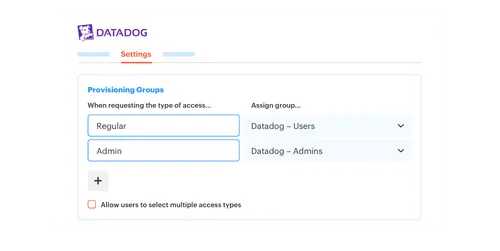
Your identity provider should execute access changes, not just store identities. Map each application role to a specific group in Okta, Entra ID, or Google Workspace. Approval then becomes a plain instruction: add the user to that mapped group. Removal takes the same route in reverse.
Group-based provisioning creates a clean causal chain. The Jira issue shows why the person needed access. The approved workflow decides which group they receive. The identity provider pushes that membership to connected applications through your existing SSO setup, and later removes it from the same authoritative place. One door in, same door out.
Document the mapping in this order:
- Application and role: Define what the requester actually receives.
- Identity provider group: Name the group that controls that role.
- Approval rule: Specify the manager, app owner, or named approver.
- Removal condition: Set an expiry, lifecycle event, or review rule.
Not every application supports group-driven provisioning, and that's a real limitation I won't paper over. If an entitlement can't be managed through an identity provider group, label it as manual, assign it an owner, and set a dated review task in Jira. Don't pretend a manual grant carries the same enforcement as an automated one. It doesn't, and treating them as equals is how stale access hides in plain sight.
Split Baseline Access From Temporary Privilege
A payroll analyst who uses the payroll system every day probably needs permanent baseline access. That same person does not need permanent admin rights for a one-hour configuration change. Treat both grants the same way and you get either too much friction or too much standing privilege. Usually both, weirdly.
Elevated roles for production, security settings, sensitive data, and administration should default to time-bound access. Requesters pick a duration that matches the work, say 1, 6, or 24 hours. Once approved, the identity provider grants the mapped group and pulls it back when the window closes. No follow-up ticket. No calendar reminder that never gets set.
Use a simple decision rule:
- Daily job requirement: Permanent access can be valid, with a named owner and periodic review.
- Task-specific elevated access: Set a short expiry tied to the expected work.
- Incident access: Grant a defined window and allow a controlled extension if needed.
- Unknown duration: Start temporary, then make people bring a stronger reason for permanent access.
Permanent access isn't automatically the villain here. Forcing people to re-request the same basic tool every single morning would be ridiculous, and they'd hate you for it. The target is redundant privilege, not useful access. Know the difference before you start swinging.
Connect the Grant and Revocation Events
One approved access window needs two identity changes: add the user when the window starts, remove them when it ends. Automating only the first change makes provisioning faster but leaves cleanup completely untouched. Half the workflow is still done by hand, which is the half that creates your stale access.
The request record should carry both events from the start. Approval triggers the group addition. The expiry clock starts at the same moment, not whenever someone remembers to set a reminder. When the timer hits zero, group removal executes and the outcome gets written back to the Jira issue.
The full sequence should look like this:
- The employee requests an application role and duration.
- The correct approver accepts or denies the request.
- Approval triggers the mapped identity provider group assignment.
- Expiry triggers removal from that same group.
- Jira records both the grant and the removal outcome.
The approval-to-revocation handoff is the part most teams skip right over, so see the complete provisioning flow across Jira and the identity provider. If your evidence trail stops at approval, you can't actually prove least privilege was ever enforced.
Treat Role Changes as Access Removal Events
Transfers create more redundant privileges than new hires, and it catches everyone off guard because the employee stays active. Offboarding gets all the attention. Internal moves look harmless, so the person picks up new groups while keeping every scrap of access from the old role. Three transfers later, their permissions read like an employment history instead of a job description.
A department, manager, or role change should trigger an access decision within one business day. Review the old group memberships before adding the new role package, then keep only the overlap that's still justified. A Jira workflow can carry the request, decision, change, and evidence together in one place. Removing redundant privileges in lifecycle changes is far cheaper than digging them out during an audit.
Quarterly reviews still earn their keep. They catch exceptions, bad mappings, and access that no automated rule ever understood. Asking a quarterly campaign to clean up every single transfer, though, is just too slow. A privilege that went stale in January shouldn't get to hang around until April because the spreadsheet only runs once a quarter. Known lifecycle events should trigger immediate action. Periodic reviews should catch what the lifecycle process missed. Those are two different jobs.
Review Usage and Role Fit Together
A high-growth company can process thousands of access requests in a single year. At that volume, reviewers can't lean on memory, and they shouldn't. They need the user's job details, group memberships, last login, and original access reason sitting in one view. Otherwise the easiest answer is always “keep,” and keep is how you got here.
Login data alone isn't enough, which trips a lot of teams up. Some critical accounts get used rarely, while a frequently used tool might no longer fit the employee's role at all. The better review combines usage with role fit, then makes the reviewer explain the exceptions out loud. That one small change cuts rubber-stamping more than any new dashboard will.
Use conditional rules instead of broad judgment:
- If usage exceeds the app's inactivity threshold, require a reason to keep access.
- If the employee changed department, review old role groups first.
- If the entitlement has no owner, stop automatic renewal or approval.
- If removal is selected, execute it through the identity provider instead of starting another cleanup list.
Manual and non-SSO access won't always support automatic removal. Keep those grants in the review scope anyway, with a Jira task assigned to whoever owns the revocation. Removing redundant privileges in mixed environments comes down to being honest about which changes are actually enforced and which still need a human to pull the trigger.
Once the group mapping, expiry, and review rules are clear, the only question left is execution. Who makes sure every approved Jira issue actually produces the right identity change?
How Multiplier Connects Approval to Identity Changes
Multiplier connects Jira approvals to identity provider group changes, so the decision and the execution stay tied to one record. It maps application roles to groups in Okta, Entra ID, or Google Workspace. When access expires, the same identity layer removes the membership and records the change in Jira.
Group Mapping Makes Approval Executable
Multiplier's Application Catalog lets employees choose a sanctioned app and role through JSM or Slack. Each role maps to one or more identity provider groups. When the Jira issue reaches the configured approved status, the provisioning action calls the identity provider and adds the requester to those mapped groups.

Approval workflows can route decisions to the requester's manager, an app owner, or a named user. Approvers act through JSM or Slack, while Jira stays the system of record. Provisioning outcomes, including success or failure comments, go back to the originating issue. The evidence follows the work instead of getting rebuilt from scratch later.
The main controls work together:
- Role-to-group mapping: The requested role determines the identity provider group.
- Workflow-based provisioning: An approved Jira status triggers the group assignment.
- Recorded execution: The Jira issue captures the provisioning outcome.
- Controlled approvals: Managers, app owners, or named users make the decision.
Multiplier provisions through identity provider groups. It doesn't directly provision inside individual SaaS applications when no supported group path exists. Those manual grants still need a tracked Jira workflow and a human removal step. No pretending otherwise.
Time-Based Access Closes the Cleanup Loop
Multiplier makes elevated access temporary by letting requesters choose a duration, such as 1, 6, or 24 hours. Once approved, the user is added to the mapped identity provider group and the timer starts. At expiry, group membership is removed and the change is recorded on the Jira issue.
Automatic revocation requires group-based provisioning, and that caveat matters when you're planning coverage. A purely manual or non-SSO grant can't be removed automatically. Start with the applications where identity provider groups already control access, then keep the remaining exceptions visible in Jira rather than burying them in a chat thread nobody rereads.
That setup goes straight at the failure that creates redundant access in the first place. Approval no longer ends with “someone should remove this later.” The expiry controls the removal, and the ticket proves it happened. To put that model to work on your own JSM and identity stack, put the workflow into practice.
Make Redundant Access the Exception
Redundant access becomes the exception when every grant has an authoritative path and a defined ending. Jira carries the reason and the approval. Your identity provider executes the change. Time-bound access, lifecycle events, and reviews decide when the privilege should disappear.
Start with one high-risk application and map its roles to identity provider groups. Add a clear approval rule, then wire both provisioning and removal into the Jira workflow. Once that one works, repeat it across the next application. Then the next.
Access should end because the work ended. Not because an auditor found it three months later.
Frequently asked questions
- How do I set up time-based access for my team?
To set up time-based access using Multiplier, follow these steps: 1) In your Jira Service Management (JSM) portal, navigate to the Application Catalog. 2) When creating or editing an access request, ensure you enable the time-based access option, allowing requesters to choose durations like 1, 6, or 24 hours. 3) Once a request is approved, Multiplier will automatically provision access and set a timer for removal when the duration expires. This helps minimize standing privileges and ensures access is only granted when necessary.
- What if I need to revoke access before the expiry time?
If you need to revoke access before the expiry time, you can do this through the Jira ticket associated with the access request. Simply locate the ticket, and you should find an option to manually remove the user from the identity provider group. This action will update the ticket with the revocation details, ensuring your records remain accurate and complete. Getting to it quickly keeps your permissions clean.
- Can I track access requests and approvals in Jira?
Yes, you can track access requests and approvals directly in Jira using Multiplier. Each access request submitted through the JSM portal or Slack creates a Jira ticket that captures all relevant details, including the requester, approver, and status of the request. Multiplier also logs provisioning outcomes, so you have a complete audit trail for every request. This integration helps streamline your access management process and ensures that all actions are documented for compliance purposes.
- When should I conduct access reviews?
You should conduct access reviews regularly, ideally after significant role changes or at least quarterly. Using Multiplier's Access Review feature, you can create campaigns to review user access based on defined criteria. It helps catch inappropriate access and flag stale permissions before they become a problem. The reviews should include an evaluation of last login dates and role fit to make informed decisions about keeping or revoking access.
- Why does my team need to map roles to identity provider groups?
Mapping roles to identity provider groups is fundamental to effective access management. When access is granted, the user lands in the right group automatically — provisioning and revocation both follow the same path. With Multiplier, each application role is linked to a specific identity provider group, allowing for streamlined access requests and ensuring that permissions are granted based on defined roles. This mapping helps maintain least privilege and reduces the risk of overprovisioning.
Frequently Asked Questions
How do I set up time-based access for my team?
To set up time-based access using Multiplier, follow these steps: 1) In your Jira Service Management (JSM) portal, navigate to the Application Catalog. 2) When creating or editing an access request, ensure you enable the time-based access option, allowing requesters to choose durations like 1, 6, or 24 hours. 3) Once a request is approved, Multiplier will automatically provision access and set a timer for removal when the duration expires. This helps minimize standing privileges and ensures access is only granted when necessary.
What if I need to revoke access before the expiry time?
If you need to revoke access before the expiry time, you can do this through the Jira ticket associated with the access request. Simply locate the ticket, and you should find an option to manually remove the user from the identity provider group. This action will update the ticket with the revocation details, ensuring your records remain accurate and complete. Getting to it quickly keeps your permissions clean.
Can I track access requests and approvals in Jira?
Yes, you can track access requests and approvals directly in Jira using Multiplier. Each access request submitted through the JSM portal or Slack creates a Jira ticket that captures all relevant details, including the requester, approver, and status of the request. Multiplier also logs provisioning outcomes, so you have a complete audit trail for every request. This integration helps streamline your access management process and ensures that all actions are documented for compliance purposes.
When should I conduct access reviews?
You should conduct access reviews regularly, ideally after significant role changes or at least quarterly. Using Multiplier's Access Review feature, you can create campaigns to review user access based on defined criteria. It helps catch inappropriate access and flag stale permissions before they become a problem. The reviews should include an evaluation of last login dates and role fit to make informed decisions about keeping or revoking access.
Why does my team need to map roles to identity provider groups?
Mapping roles to identity provider groups is fundamental to effective access management. When access is granted, the user lands in the right group automatically — provisioning and revocation both follow the same path. With Multiplier, each application role is linked to a specific identity provider group, allowing for streamlined access requests and ensuring that permissions are granted based on defined roles. This mapping helps maintain least privilege and reduces the risk of overprovisioning.


