


Your employee app catalog gets judged the first time a new hire asks for Figma at 9:04 AM Monday and the ticket sits in Jira while Okta waits for someone to touch the group. The break happens when the catalog, Jira approval, and identity provider group don't move together. Employees think they requested access, IT thinks approval is pending, and security thinks the record will be clean later. That's where employee app catalogs integrated with the systems you already use start to matter.
Most companies try to fix access by buying more governance. Bigger portal, more policy, more approval steps. But if the work still starts in Jira, gets approved in Slack, gets provisioned in Okta or Entra, and gets audited in spreadsheets, you didn't fix the problem. You just made the maze more expensive.
The better move is to make the app catalog the front door, Jira the record, and the identity provider the system that actually grants access.
Key Takeaways:
- Employee app catalogs only work when they're connected to the systems where access work already happens.
- Jira should be the system of record for access requests, approvals, and audit evidence.
- Your identity provider should make the actual access change, not a person copying group names by hand.
- Time-bound access matters because standing privilege grows by default if no one owns expiry.
- The catalog needs role mapping, approval routing, and revocation logic before it becomes real governance.
- A separate IGA portal can add control, but it often slows down the people doing the work.
- The goal isn't more process. The goal is access that's fast, approved, provisioned, revoked, and auditable.
Why Separate Access Portals Slow Down Employee App Catalogs
Separate access portals slow down employee app catalogs because they split the work across too many systems. Employees request access in one place, approvals happen somewhere else, provisioning happens in the identity provider, and audit evidence gets rebuilt later. At small volume, that works. At scale, it fails fast.

The portal isn't the workflow
Most IT teams don't start with a broken access process. They start with a normal one. Someone needs Figma, GitHub, Salesforce, or a finance tool, so they submit a ticket or drop a message in Slack. IT checks who owns the app, asks a manager to approve, adds the user to the right group, then comments on the ticket. Fine.
Then the company grows. 100 employees becomes 300, and 300 becomes 700. Suddenly the same process is creating hundreds of tiny interruptions every month. The employee app catalog was supposed to clean this up, but if that catalog lives outside Jira, now you have another surface area to manage. Another login. Another place for someone to forget to look.
I get why teams buy a separate portal. It feels cleaner, and it looks like governance. And for some very large enterprises with dedicated identity teams, maybe that's valid. For most mid-market IT teams already living in Jira Service Management, the separate portal becomes a second operating system. That's the cost people underestimate.
Employee app catalogs integrated into Jira work differently because they don't ask people to change where work happens. The request starts in the same place as every other IT request. The approval sits on the same record. The provisioning event gets written back to that same issue. If the goal is to keep Jira as the record while access still flows through your IDP, Learn more about Multiplier and look at how the request path changes when the catalog lives inside JSM.
The real bottleneck is the handoff
Access work breaks at the handoff. Not at the policy. Not at the catalog tile. The handoff.
A requester knows what app they need, but not always which role. The manager knows whether the person should have access, but not which identity provider group maps to that role. IT knows the group, but doesn't always know whether the approval was valid. Security wants least privilege, but doesn't want to slow down every low-risk request. Everyone has a piece of the answer. No one owns the full chain.
Here's a rule of thumb worth stealing: if a single access request touches more than three systems before it's granted, expect at least one of those handoffs to stall in a given week. Three is roughly the point where nobody feels ownership of the whole chain, because the work looks like someone else's problem at every step.
Videoamp is a good example. As they grew from 100 to 500 employees, Tuesdays became the access request pileup day. New hires started Monday, then the IT queue filled up with specialized app requests the next day. The catalog wasn't just a nicer front end. It created a structured intake path with sanctioned apps and roles, which gave IT enough information to act without chasing people all day.
The audit trail gets messy after the fact
Audits become painful when evidence is created after the work is done. Someone approved in Slack, someone provisioned in Okta, someone added a Jira comment, and someone exported a spreadsheet. Then, three months later, IT has to prove who approved what, when access was granted, and whether it was removed.
That game is exhausting. And honestly, it's avoidable.
The real issue isn't that teams don't care about audit evidence. It's that their access process treats evidence like a separate task. When employee app catalogs are integrated with Jira and the identity provider, the ticket becomes the chain of custody. Request, approval, grant, expiry, revocation. All of it should tie back to the original issue.
Without that, you end up with a governance process that looks good in a vendor deck but still depends on screenshots, comments, and memory. Not exactly confidence-inspiring.
How Integrated App Catalogs Actually Reduce Access Risk
Integrated app catalogs reduce access risk by turning access into a controlled workflow, not a pile of requests. The catalog standardizes what employees can ask for, Jira records who approved it, and the identity provider makes the actual change. That creates speed without giving up control.
Diagnose whether your catalog is just intake
Before you call your catalog integrated, run through five questions. Can each role map to a specific identity provider group? Does approval trigger provisioning without an admin logging into Okta, Entra, or Google Workspace? Does the ticket show the final status of the change? Does access expire automatically for temporary roles? Is revocation captured on the same record? If you answered no to two or more, you have intake, not governance. Useful, but not the same thing.
A lot of app catalogs are basically prettier forms. They collect requests, they might show app logos, and they might even route approvals. But the real question is whether the catalog controls the full access path or just starts it.
A practical exercise works well here. Pick your 10 most requested apps. Map every available role to its identity provider group. Check whether each role has an owner or manager approval path. Confirm whether provisioning happens from the approved Jira issue. Confirm whether revocation creates evidence on the same record.
If you can't complete that exercise for 80% of your common requests, the catalog isn't ready to carry access governance. That's not a moral failure. It just means IT will still be stuck doing the important work manually.
Use the identity provider as the enforcement layer
Okta, Entra, or Google Workspace should be the system that actually adds and removes users from the right groups. Jira can capture the request, Slack can make approvals fast, and the app catalog can standardize the options. But the identity provider is where access changes have to become real.
When access is provisioned through identity provider groups, you get a much cleaner model. A Figma Editor role maps to a group. A GitHub Admin role maps to a different group. A finance system Viewer role maps to another. Once the approval happens, the workflow adds the user to the right group and records the outcome. No copy and paste. No guessing.
The mistake is treating the identity provider like an admin console someone visits after approval. That keeps the riskiest part of the process manual. If the group name is wrong, access is wrong. If the admin forgets to remove the user later, standing privilege grows. If the ticket doesn't capture what changed, audit evidence is weak.
Synthesia ran into this at scale. The company grew 4x and had access requests tracked through Slack channels and Notion boards. With 3,800+ requests processed in a year, manual provisioning would have buried the team. Once the app catalog and approvals connected to Okta, 75% of access requests became fully automated. A 4-person IT Ops team could support 420+ employees because the identity provider became the execution layer, not another manual stop.
Make temporary access the default for risky roles
Standing privilege is sneaky. Someone needs admin access for an incident, a migration, or a one-off project. The request is valid, the approval is valid, the grant is valid, and then no one removes it.
Not because people are careless. Because expiry is rarely built into the request.
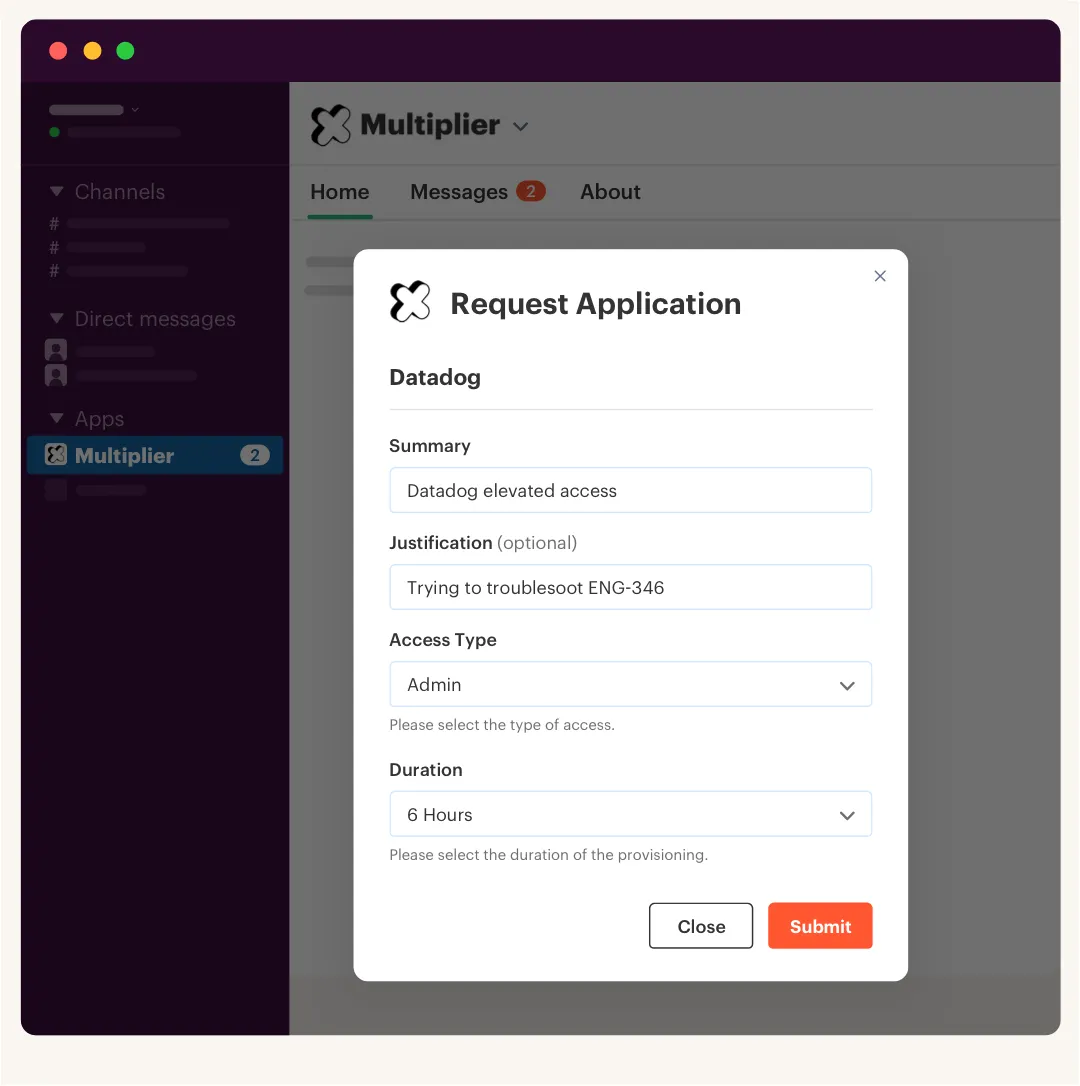
For elevated access, the catalog should ask for duration at the moment of request. 1 hour, 6 hours, 24 hours. Maybe longer for certain cases, but the decision should be explicit. If the role is sensitive and the request has no expiry, assume you're creating standing privilege. That's the rule I prefer.
Some teams will push back here, and fair enough. Temporary access can feel annoying when engineers are trying to move fast, especially during a production incident where they need admin rights right now. That pain is real, and pretending otherwise is how security teams lose credibility. The nuance is that just-in-time access works only if provisioning is fast. If someone waits 2 days for temporary access, they'll fight the process. If approval and provisioning take under 10 minutes, the friction drops and the security posture gets much better.
A practical threshold: any role with admin rights, production access, customer data access, or broad export ability should have time-bound access by default. If someone needs it permanently, force a different approval path. That one rule catches a lot of risk before it becomes normal.
Route approvals based on risk, not habit
What if you only had three approval paths in the entire company, and every app request had to fit into one of them? That's the exercise worth running. Most teams create one generic approval flow and then wonder why everything feels slow.
App catalogs integrated with Jira should route based on the app, role, and requester context. A manager approval may be fine for standard SaaS access. An app owner should approve admin access. A specific security reviewer may need to approve production or finance systems. The point isn't more approvals. The point is the right approval.
Luno's access process shows why this matters. With nearly 1,200 employees, requests came through Slack, email, and Jira, and IT had to chase managers before manually assigning Okta groups. Routine requests took 5 to 30 minutes each. After moving to a self-service app store with approvals in Jira and Slack, they reduced IT workload on access requests by 80%. Same company. Same access needs. Better routing.
If you want a simple rule, use three buckets:
- Auto-approve low-risk, standard apps where access is expected for the role.
- Manager approve apps tied to job function or department need.
- App owner or security approve elevated roles, sensitive data, or admin access.
One interruption to the list: the auto-approve bucket is where most teams get nervous, and that's usually a signal your catalog roles are too broad, not that auto-approve is wrong.
That gives you control without turning every request into a committee meeting. And because the approval is tied to the Jira issue, the audit story becomes much easier to tell.
Keep the catalog small enough to trust
A giant app catalog can become its own problem. If every tool, group, role, and edge case gets dumped into the catalog, employees get confused and IT loses trust in the data. The catalog becomes a junk drawer.
Start with the apps that create the most request volume or the highest risk. Usually that's 20 to 30 apps. Add the obvious roles first, Viewer, Editor, Admin. Then add more only when request data shows a pattern. I wouldn't try to model every possible exception on day one. That's how good projects get stuck in planning.
The better approach is to make the catalog feel boring. Employees see sanctioned apps, IT sees clean role mappings, security sees approvals and expiry where needed, finance sees fewer unused licenses over time. Not flashy. Just dependable.
A useful operating rhythm is monthly catalog hygiene. Look at the top requested apps, denied requests, manual exceptions, inactive roles, and stale owners. Remove what no one uses. Fix confusing role names. Add missing approval owners.
Treat access reviews as cleanup, not the main control
Access reviews matter. They just shouldn't be your only line of defense. If every quarter you discover hundreds of people with access they don't need, the review process isn't the problem. Your day-to-day provisioning model is.
The better model is prevention first, cleanup second. The app catalog should standardize access. Approvals should route correctly. The identity provider should provision and revoke. Time-bound access should reduce standing privilege. Access reviews should catch what still slipped through, validate ongoing need, and remove stale access with evidence.
That shift changes the tone of reviews. Instead of a panic exercise where managers rubber-stamp giant spreadsheets, reviewers get a smaller set of decisions with useful context. Who has access? What group are they in? When did they last log in? Should they keep it or lose it?
One red flag: if your access review creates decisions but revocation happens in a separate manual queue, you're carrying risk longer than you need to. Keep and revoke decisions should turn into action. Otherwise, the review just creates another list for IT to chase.
How Multiplier Connects Jira, Slack, and Identity Providers
Multiplier connects Jira, Slack, and identity providers by making Jira Service Management the place where access is requested, approved, provisioned, reviewed, and documented. Employees use a Jira-native app catalog or Slack request flow, while access changes happen through identity provider groups in Okta, Entra, or Google Workspace.
Jira-native catalog with IDP group provisioning
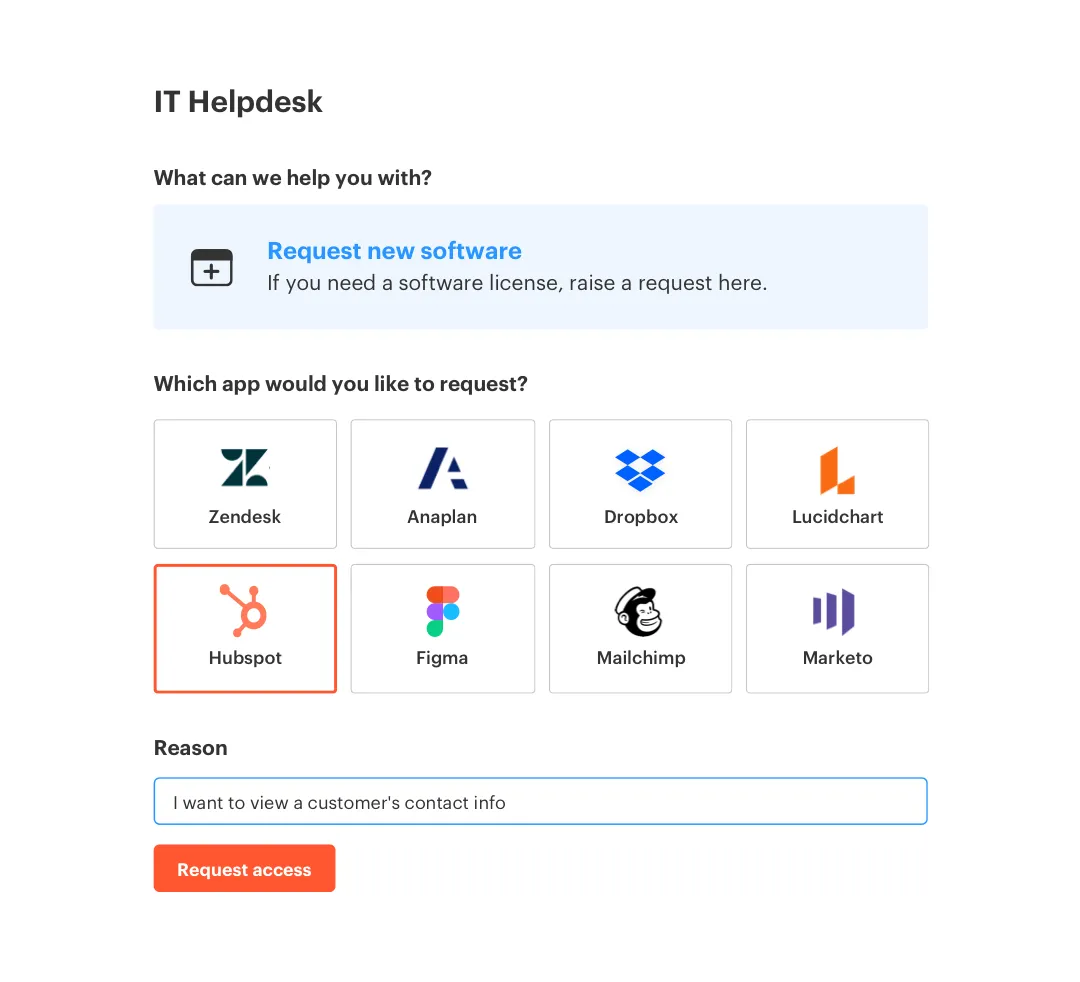
Multiplier's Application Catalog gives employees a sanctioned app store inside Jira Service Management. They can browse approved apps, choose roles, and submit requests without going to a separate IGA portal. Behind the scenes, each role maps to identity provider groups, which matters because the catalog isn't just collecting forms. It creates a path from request to approved access.
Once a Jira issue reaches the configured approved status, Multiplier provisions through the identity provider group mapping. For SSO apps, that means the IDP group controls the entitlement and the Jira ticket captures what happened. That directly addresses the messy handoff from earlier, where IT had to approve in one place, provision in another, then rebuild evidence later.
Multiplier also supports approvals from managers, app owners, or specific users, with notifications through JSM and Slack. The access decision stays tied to the ticket, which makes the audit record much cleaner. If your team is trying to replace scattered Slack approvals, manual group changes, and spreadsheet evidence with one connected workflow, Get started with Multiplier and start with your highest-volume apps.
Time-bound access and reviews inside the same record
Multiplier's Time-Based Access makes temporary access a normal part of the request. A requester can choose a duration like 1, 6, or 24 hours, and after approval, Multiplier adds the user to the mapped identity provider group. When the timer expires, it removes the group membership and records the change in Jira.

That's the part that matters. The revocation isn't a calendar reminder, and it isn't a follow-up ticket someone might ignore. It happens through the same identity provider model, then gets written back to the access record. For admin roles, production systems, or sensitive tools, that changes the risk profile fast.
Multiplier's Access Reviews also run in Jira. Reviewers can see user attributes, groups, last login data, and recommendations, then mark Keep or Revoke. When revocation is selected for supported IDP-group access, the removal can be executed and documented through Jira. Multiplier's Auto Reclaim can also identify inactive users from identity provider login data and revoke access after the configured warning and grace period, which is especially useful when SaaS licenses keep hanging around after people stop using the app.
The Cleaner Path for Access Requests
Employee app catalogs integrated with Jira and your identity provider give IT a better operating model. Not because catalogs are new. Because the catalog becomes the front door to a workflow that can actually enforce decisions.
The big shift is simple. Stop treating access as a ticket someone has to manually finish. Treat it as a governed workflow where the requester, approver, identity provider, and audit trail all connect. That's how you get faster access without letting standing privilege grow in the background.
Start with 20 common apps. Map the roles. Route the approvals. Provision through the identity provider. Add time limits where risk is high. Once that loop works, scale it. Mission accomplished, access stops being the thing everyone complains about.
Frequently asked questions
- How do I set up time-bound access for sensitive roles?
To set up time-bound access with Multiplier, you can follow these steps: 1) When submitting an access request through the Jira Service Management (JSM) portal or Slack, select the desired application and role. 2) Choose a duration for access, such as 1, 6, or 24 hours, during the submission process. 3) After approval, Multiplier will automatically provision the access and set a timer to revoke it once the duration expires. This ensures that sensitive roles have limited access, reducing the risk of standing privileges.
- What if I need to approve access requests quickly?
If you need to speed up the approval process, consider using Multiplier's integrated approval workflows. You can set default approvers for applications, which streamlines the decision-making process. When an access request is submitted, the designated approvers receive notifications via Jira and Slack, allowing them to approve or deny requests with just one click. This keeps the process efficient and ensures that approvals are tied directly to the original Jira ticket, making it easier to track and audit.
- Can I customize the application catalog for my team?
Yes, you can customize the application catalog in Multiplier to fit your team's needs. Admins can add sanctioned applications to the catalog and define roles for each app (e.g., Viewer, Editor, Admin). You can also tag applications for specific requirements, such as manual provisioning. This ensures that employees only see the applications relevant to their roles, simplifying the request process and maintaining control over access.
- When should I conduct access reviews?
It's a good practice to conduct access reviews regularly, typically on a quarterly basis. With Multiplier's Access Reviews feature, you can create campaigns that include only the applications marked as 'Approved.' Assign reviewers to assess user access based on their last login dates and relevance. This helps identify inactive users and ensures that access remains appropriate, reducing the risk of overprovisioning and enhancing security.
- Why does my access request process feel slow?
If your access request process feels slow, it may be due to fragmented workflows across multiple platforms. Using Multiplier can help streamline this by integrating access requests directly within Jira Service Management. This means requests, approvals, and provisioning all happen in one place, reducing delays caused by context switching between different systems. By ensuring that the entire process is connected, you can significantly improve response times and reduce bottlenecks.
Frequently Asked Questions
How do I set up time-bound access for sensitive roles?
To set up time-bound access with Multiplier, you can follow these steps: 1) When submitting an access request through the Jira Service Management (JSM) portal or Slack, select the desired application and role. 2) Choose a duration for access, such as 1, 6, or 24 hours, during the submission process. 3) After approval, Multiplier will automatically provision the access and set a timer to revoke it once the duration expires. This ensures that sensitive roles have limited access, reducing the risk of standing privileges.
What if I need to approve access requests quickly?
If you need to speed up the approval process, consider using Multiplier's integrated approval workflows. You can set default approvers for applications, which streamlines the decision-making process. When an access request is submitted, the designated approvers receive notifications via Jira and Slack, allowing them to approve or deny requests with just one click. This keeps the process efficient and ensures that approvals are tied directly to the original Jira ticket, making it easier to track and audit.
Can I customize the application catalog for my team?
Yes, you can customize the application catalog in Multiplier to fit your team's needs. Admins can add sanctioned applications to the catalog and define roles for each app (e.g., Viewer, Editor, Admin). You can also tag applications for specific requirements, such as manual provisioning. This ensures that employees only see the applications relevant to their roles, simplifying the request process and maintaining control over access.
When should I conduct access reviews?
It's a good practice to conduct access reviews regularly, typically on a quarterly basis. With Multiplier's Access Reviews feature, you can create campaigns that include only the applications marked as 'Approved.' Assign reviewers to assess user access based on their last login dates and relevance. This helps identify inactive users and ensures that access remains appropriate, reducing the risk of overprovisioning and enhancing security.
Why does my access request process feel slow?
If your access request process feels slow, it may be due to fragmented workflows across multiple platforms. Using Multiplier can help streamline this by integrating access requests directly within Jira Service Management. This means requests, approvals, and provisioning all happen in one place, reducing delays caused by context switching between different systems. By ensuring that the entire process is connected, you can significantly improve response times and reduce bottlenecks.


