


A 500-person company doesn't break onboarding because it forgot to write a policy. It breaks because every new hire needs 8-12 apps, 3 approvers, 2 identity groups, and someone in IT still has to make sure the access actually happened.
When you're trying to build onboarding workflows with pre-approved access, the temptation is to make a big list. Sales gets these tools, Finance gets those tools, Engineering gets this other stack. Sounds clean. For about 10 minutes.
The real issue is that pre-approved access isn't really pre-approved if someone still has to chase approvals, add users to groups, and rebuild evidence later. That's just manual work with a nicer label.
Key Takeaways:
- Pre-approved access only works when approval, provisioning, and evidence live in the same workflow.
- Jira is already where onboarding work happens for a lot of IT teams, so access governance should connect there instead of creating another portal.
- The identity provider should be the source of truth for actual access changes, not a spreadsheet or Slack thread.
- Role-based bundles are useful, but they need exceptions, expiry, and audit history built in.
- Time-bound access matters because onboarding creates a lot of temporary privilege that no one remembers to remove.
- The best onboarding workflows with pre-approved access reduce back-and-forth without creating standing privilege.
Why Pre-Approved Access Breaks When It Leaves Jira
Pre-approved access breaks when the approval record, the request, and the actual identity change live in different systems. Jira may hold the ticket, Slack may hold the decision, Okta or Entra may hold the access, and a spreadsheet may hold the audit trail. That split creates delays and makes onboarding harder than it needs to be.

The policy is usually cleaner than the workflow
Most onboarding access policies look good on paper. A new Account Executive gets Salesforce, Gong, Slack, Google Workspace, and maybe a few enablement tools. A new engineer gets GitHub, Jira, Datadog, and a few internal systems. Simple enough.
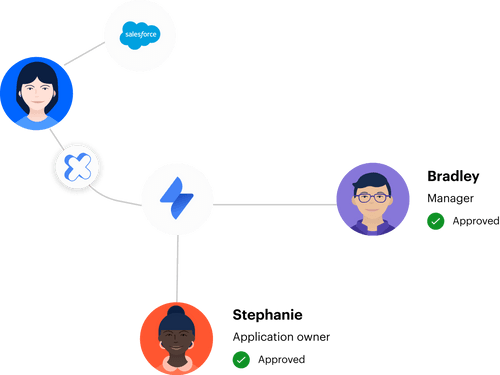
Then Monday 9:12 AM happens. The hiring manager forgot to specify the territory, the app owner is on vacation until Thursday, and the new AE needs elevated access for 24 hours to finish setup because the template only covers basic access. Now the IT person is deciding, on a Slack thread with 6 people, whether to block the new hire or grant broad access and clean it up later. I've seen this movie before. Everyone means well, but the system nudges them toward shortcuts.
The hidden cost is the handoff
At Videoamp, growth from 100 to 500 employees turned Tuesdays into access-request pileup day. New hires started on Monday, then the queue filled up the next day with missing details and unclear app ownership. A ticket gets created in Jira, someone approves in Slack, IT checks the identity provider, adds the person to the right group, then leaves a comment so they can prove it later. It works at 10 hires a month. It gets painful at 50.
Here's a rough rule: if more than 3 systems touch a single access request, expect at least one handoff to drop within the first quarter. Not a huge mystery. Onboarding workflows with pre-approved access are only useful if the request already contains enough context to act on it.
If that Jira-native access catalog is the missing piece in your current flow, Learn more about Multiplier and look at how intake maps back to the ticket your team already uses.
Pre-approved should not mean permanent
Pre-approved access can accidentally become standing access. You approve a role bundle once, then forget that some of those permissions were only needed for setup, training, or a temporary project. Two years later, that new hire is now a senior manager with admin access to a system they haven't opened since week two.
For security teams, that's maddening. For IT teams, it's exhausting. You get blamed for slow onboarding when you add friction, and blamed for overprovisioning when you remove it. The better answer is not another policy doc. The better answer is access that is easy to grant, easy to trace, and easy to remove when the window closes.
How to Build Onboarding Workflows With Pre-Approved Access
Strong onboarding workflows with pre-approved access start by separating standard role access from exception access. Standard access should move fast through mapped groups. Exception access should carry more context, tighter approval, and often an expiry. Once you make that split, onboarding becomes a system instead of a weekly scramble.
Start with roles that actually repeat
A role bundle should come from the access patterns you see every month, not the org chart you wish you had. If 90% of Customer Success Managers need the same 6 apps, that's a good bundle. If only 40% need a tool, it probably belongs in a request catalog instead.
I like using a simple cutoff. If a role-access pairing happens in 8 out of 10 hires, pre-approve it. If it happens less often, make it requestable with the right approver. That keeps the workflow tight without pretending every employee in a department does the same job. Because they don't.
A basic first pass looks like this:
- Pull the last 30-60 days of onboarding requests.
- Group requests by department and role.
- Mark apps used by at least 80% of hires in that role.
- Map each role to the identity provider groups that grant access.
- Move everything else into a controlled request flow.
The important part is the group mapping. Without that, you're just naming a bundle. With it, approval can trigger the right identity change without someone manually clicking around.
Keep Jira as the work record, not the side record
Jira should not be the place where people file a request and then leave to do the real work somewhere else. That's where these workflows get messy. The ticket becomes a receipt, not a workflow. Six months later, someone asks what happened, and the answer is scattered across Slack, Okta admin logs, and someone's memory.
The cleaner model is to make Jira the work record. The employee request starts there, the approval state lives there, and the identity provider change writes back there. When the auditor asks who approved GitHub admin for the new engineer last April, you point at one issue and you're done.
Some teams will argue that a dedicated IGA portal gives them more control. That's a reasonable read. Big identity governance suites can be strong for deep policy modeling and complex certifications. The catch is that most onboarding pain isn't caused by missing theory. It's caused by operational drag. People are waiting, tickets are bouncing, and IT is doing copy-paste work between systems that should already talk to each other.
Use Slack for decisions, not as the system of record
Slack is great for approvals because people actually respond there. Email approval queues are where requests go to age like milk. A Slack DM with Approve or Deny gets handled in the flow of work. In my experience, response times drop from days to hours when you move approvals into the tool people already have open.
Still, Slack should not become the evidence layer. That's the trap. If someone approves in Slack, the decision still needs to connect back to the Jira issue and the access change. Otherwise you're creating a chat-first experience with audit debt underneath it. Looks fast. Costs you later.
The rule I like: approvals can happen in chat, but evidence must land in the ticket. That gives you speed without losing traceability. It also keeps the manager or app owner experience light, which matters more than most teams admit.
Make exception access expire by default
Exception access is where onboarding risk piles up. A new engineer needs temporary admin access to configure a system. A finance hire needs elevated access for month-end setup. A support lead needs a tool during training. All reasonable.
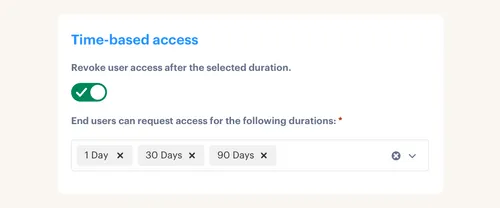
The mistake is treating those exceptions like normal access. If someone only needs the permission for 1 hour, 6 hours, or 24 hours, the workflow should ask for a duration up front. Then the removal should happen without a human follow-up task. Otherwise the cleanup becomes a future ticket no one opens.
Here's the trade-off I want to be honest about: forcing expiry on every exception will annoy some senior engineers who don't want to re-request the same access every quarter. That friction is real. But the alternative is a slow accumulation of standing privilege that shows up in your next audit as a 40-page finding. Pick your headache.
For teams trying to make expiry part of the normal request path, See how Multiplier works inside Jira and Slack rather than pushing employees into a separate access portal.
Build the workflow around the identity provider
The identity provider is where access should actually change. Jira can manage the request. Slack can capture the approval. But Okta, Entra, or Google Workspace should be the authority that adds or removes group membership.
That sounds obvious. A lot of teams still break this chain. They approve in one system, manually provision in another, then document the outcome somewhere else. At low volume, it's annoying. At high volume, it becomes the reason onboarding feels broken.
A good workflow should answer 5 questions before launch:
- Which identity provider group grants each app role?
- Which Jira status means the request is approved?
- Who approves exceptions by app or role?
- Which access should expire automatically?
- Where does the proof of grant and removal get written?
If you can't answer those questions, don't automate yet. You'll just automate confusion. Better to take one role, one department, or one app group and get the pattern right first.
Review access by usage, not just memory
Quarterly access reviews often turn into a rubber stamp because reviewers don't have enough context. They see a name, an app, maybe a role. Then they keep access because removing it feels risky. Nobody wants to break someone's workday.
Usage context changes the conversation. If a user hasn't logged into an app in 90 days, that's useful. If they changed departments 4 months ago and still hold the old role's access, that's useful. If their group membership no longer matches their role, that's useful too. The review should show enough information for a manager or app owner to make a real decision in under 30 seconds per user.
Synthesia is a good example of why this matters. The company grew from 100 to 400+ employees in 2 years, and a 4-person IT Ops team still had to maintain strict access control. They processed 3,800+ access requests in a year, with 75% fully automated. That kind of volume doesn't work if every review depends on memory and manual follow-up.
The Operating Model That Makes Pre-Approved Access Work
Pre-approved access works when each access path has a different level of friction based on risk. Low-risk standard access can be fast. Higher-risk roles need explicit approval and expiry. Reviews then catch drift over time instead of trying to fix every mistake months later.
Put access into 3 buckets
Start with 3 buckets. Not 12. Not a giant matrix that no one reads. Three buckets is enough to make better decisions without turning onboarding into a governance science project.
The buckets look like this:
- Default role access: Pre-approved apps that most people in the role need on day 1.
- Requestable access: Approved apps that need manager or app owner approval.
- Temporary elevated access: Sensitive permissions that require duration and automatic removal.
That split makes the workflow easier to explain. Employees know where to go. IT knows what should happen next. Security knows which paths carry the most risk. When something breaks, you can tell whether the problem is the bundle, the approval rule, or the provisioning step.
Treat onboarding as a supply chain
Onboarding is basically a supply chain for access. The hiring trigger starts the process. Role data tells you what should be included. App owners approve exceptions. The identity provider delivers the entitlement. Jira holds the proof.
If one link is manual, the whole chain slows down. If role data is wrong, the bundle is wrong. If approval is stuck in email, provisioning waits. If the identity group isn't mapped, IT has to guess. Not ideal.
The practical move is to map the flow from trigger to evidence. For each app, write down the current path and the desired path. Where does the request start? Who approves? Which group changes? What proves completion? When does access end? The gaps become very obvious, very fast.
Measure the backlog you prevent
A lot of IT teams only measure tickets closed. That's useful, but incomplete. The better metric is how many requests never became manual work in the first place.
For these workflows, track the boring stuff. Percentage of requests auto-approved. Percentage provisioned through identity provider groups. Average approval time. Number of temporary grants auto-revoked. Number of access review revocations completed without manual cleanup. Boring metrics are usually where the money is.
One threshold I like: if more than 25% of standard onboarding access still requires manual IT action, the workflow isn't really pre-approved. It's partially documented. That's different. And once you see that number, the next improvement usually jumps out at you.
How Multiplier Executes Access Through Jira
Multiplier makes the onboarding access model practical by keeping requests, approvals, provisioning, and evidence inside Jira Service Management and Slack. It provisions through identity provider groups, so access changes stay authoritative in Okta, Entra, or Google Workspace. The goal is not more process. The goal is fewer manual handoffs.
Jira-native catalog for approved apps
Multiplier's Application Catalog gives employees a Jira-native place to request sanctioned apps and roles. They can use the JSM portal or Slack, and the request creates a Jira issue instead of floating around in chat or email. Apps marked approved appear in the catalog, and roles map to identity provider groups.
That matters because the catalog turns onboarding workflows with pre-approved access into something employees can actually use. A new hire doesn't need to know which admin owns which app. They pick the approved app, select the role, and submit the request. For custom or non-SSO apps, IT can still capture the approval trail even if provisioning stays manual.
Provisioning through the identity provider
Multiplier provisions access by calling the identity provider after the Jira workflow reaches the approved state. Each catalog role maps to one or more groups in Okta, Entra, or Google Workspace. When approval happens, the group membership changes and the Jira issue gets updated with the outcome.

That fixes the broken handoff from earlier. Instead of asking IT to approve, switch tabs, add the user, then paste proof back into the ticket, the workflow drives the change from the ticket. Multiplier doesn't directly provision inside every individual SaaS app. It works through identity provider group membership, which is exactly the right place for SSO-based access to be controlled.
Time-bound access and review evidence
Multiplier also supports time-based access, which matters for onboarding exceptions. Requesters can choose a duration like 1, 6, or 24 hours, and after approval the user is added to the mapped identity provider group. When the window expires, Multiplier removes the group membership and records the change in Jira.
Access Reviews keep the model honest after onboarding. Reviewers see user attributes, group memberships, last login, and recommendations in JSM, then choose Keep or Revoke. Revocations can remove users from relevant identity provider groups and create Jira tickets documenting the change. If your current process still depends on screenshots and quarterly spreadsheet cleanup, Get started with Multiplier and compare that to evidence created as the work happens.
Build Onboarding Around Access That Expires
Pre-approved access is a good idea. It just needs operational teeth. If the workflow doesn't provision through the identity provider, capture approvals in Jira, and remove temporary access automatically, you're still relying on humans to remember every detail.
And humans are bad at that. Not because they're careless. Because IT teams are already buried in onboarding, support, compliance, vendor changes, and random Slack requests that all feel urgent at the same time.
The win is focus. Build the repeatable role bundles. Push actual access changes through the identity provider. Keep the audit trail in Jira. Make exceptions expire. Once that system is in place, onboarding gets faster without turning least privilege into a policy nobody can enforce.
Frequently asked questions
- How do I set up time-based access for new hires?
To set up time-based access for new hires using Multiplier, follow these steps: 1) When submitting an access request through the Application Catalog in Jira Service Management (JSM), select the desired application and role. 2) Choose a duration for the access, like 1, 6, or 24 hours. 3) After approval, Multiplier will automatically provision the access and set a timer to revoke it once the time expires. This keeps temporary privileges from piling up without manual follow-up.
- What if I need to request an app not listed in the catalog?
If you need an app that isn't in the Application Catalog, navigate to the JSM portal, select the 'Request Access' type, and look for an 'Other' option. Provide as much context as possible so approvers can make an informed decision. Even if provisioning stays manual, your request is tracked in Jira for audit purposes.
- How do I manage approvals for access requests?
When an employee submits a request through JSM or Slack, the ticket automatically moves to 'Waiting for Approval'. Approvers get notifications in both JSM and Slack and can approve or deny with a single click. All approvals are captured directly in Jira, so the audit trail stays intact.
- Can I automate access revocation after a project ends?
Yes. When creating the access request, specify how long the access is needed. Once the project is done, Multiplier automatically revokes access when the time expires — no manual cleanup required. This keeps your security posture clean without depending on someone to remember.
- When should I conduct access reviews for my team?
Quarterly or bi-annually works for most teams. With Multiplier's Access Review feature, you can create review campaigns with a start and end date, assign reviewers, and launch. Reviewers see last login dates and usage context, which makes decisions faster and less likely to rubber-stamp everything.


