


Synthesia processed 3,800+ access requests in a year, and 75% became fully automated. That's the bar now for scaling approvals for AI teams, because manual Slack threads break long before the security requirements go away. The mistake is treating approval speed and governance like separate projects, when they're really the same workflow with different failure modes.
Most teams try to fix this with more approval paths. More Slack messages, more Jira statuses, more people in the loop. That feels responsible at first, because AI companies are usually security-conscious by default. Adding more gates doesn't create better governance, though. It usually creates more places for the process to break.
The real issue is that approvals are treated like decisions, when they should be treated like the start of an enforceable access workflow.
Key Takeaways:
- Scaling approvals for AI teams fails when approval decisions are separated from provisioning, expiry, and audit evidence.
- Chat bots can make requests faster, but they don't enforce time-bound access or prove what changed.
- The approval record should live where IT already works, usually Jira Service Management and Slack.
- Provisioning should happen through the identity provider, so changes are authoritative and reversible.
- The simplest test is this: if you can't prove who approved, what changed, and when it ended from one record, the process isn't ready to scale.
Why AI Access Approvals Break When Headcount Spikes
AI access approvals break at scale because the request path and the governance path usually split apart. The employee asks in Slack, the ticket lives in Jira, the access change happens in Okta or Entra, and the evidence gets rebuilt later. That works at 50 people. It gets messy at 500.

Approval Speed Can Hide a Broken Access Model
Picture an IT admin at an AI company on a Tuesday at 2:47 PM. A new ML engineer needs GitLab Maintainer, Datadog, and elevated access to a staging model registry by end of day. The manager thumbs-up in Slack in 4 minutes. The admin then opens Okta, hunts for the right group, second-guesses whether "Maintainer" maps to the ML repo or the platform repo, DMs the tech lead, waits 22 minutes for a reply, adds the user to one group, forgets the second, and closes the Jira ticket with a one-line note. Two weeks later, an auditor asks who approved elevated staging access, and nobody can produce a clean record.
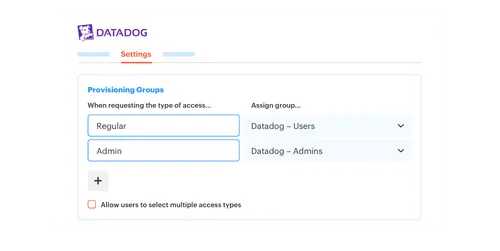
That's the whole problem in one afternoon. Fast approval isn't the same as controlled access. A manager clicking approve in Slack feels like progress, and to be fair, it's better than waiting 2 days for an email response. The gap starts after the approval. Someone still needs to add the user to the right group, make sure the access matches the role, remember whether it should expire, then document enough evidence for an audit. That whole chain is where scaling approvals for AI starts to fall apart.
I've seen teams get pretty proud of their Slack approval flow, and I get it. It feels modern. It feels lightweight. If the Slack action doesn't trigger a governed change through the identity provider, though, you've only moved the bottleneck downstream. The request got faster, the control didn't get stronger. That's not really governance. It's a faster yes.
Think about an AI company hiring 20 people in a month. New engineers need GitLab, observability, internal apps, data tools, and maybe elevated access during onboarding. Each request looks reasonable on its own. The hidden cost is the replay work, because IT has to interpret the approval, execute the change, close the ticket, and keep evidence clean enough for later. If the same person is approving in Slack and fixing groups in Okta all afternoon, the process has already lost.
If the approval queue is already living in Jira and Slack, the next question is whether that same record can carry the governance too, which is why teams often start by looking at Learn more about Multiplier.
Chat Alone Doesn't Give You Least Privilege
Chat is great for speed. No argument there. People live in Slack, so approvals in Slack reduce friction and missed notifications. Chat alone doesn't know whether access should expire in 1 hour, 6 hours, or 24 hours, though. It doesn't know which identity-provider group maps to the role. It doesn't create a complete record of the grant and revoke. Not without the rest of the system doing real work behind it.

A chat-only approval flow is like a boarding pass with no gate system behind it. You can scan it quickly, and everyone feels like the line is moving. If the gate doesn't know who boarded, where they were allowed to go, and when access should close, though, the scan didn't solve the control problem. It only created a nice moment at the front.
That matters more for AI teams because access requests often touch sensitive systems. Training data, internal tools, customer-facing environments, admin panels. The more serious the access, the less you can rely on "approved in Slack" as the whole story. You need the approval, the provisioning event, and the expiry tied together.
And you need it before the audit. Not during.
How to Scale AI Access Approvals Without Losing Control
Scaling approvals for AI requires a single operating model: request in the service desk, approve where people work, provision through the identity provider, and record every change on the ticket. The trick isn't adding more process. It's removing the gaps between the decision and the actual access change.
Check Whether Your Approval Flow Can Survive 10x Volume
10 access requests per week can hide a lot of sins. 100 per week exposes everything. Before you change tools or add another approval layer, look at the current flow and ask where the work actually happens. Not where the policy says it happens. Where humans are clicking, chasing, copying, pasting, and cleaning things up later.
The fastest diagnostic is pretty simple. Pull 20 recent access requests and check each one against these 5 questions. Can you tell who requested the access? Can you tell who approved it? Can you tell which group changed in the identity provider? Can you tell whether access ended? Can you prove all of that without opening 4 systems? If the answer is no on more than 3 out of 20, you're going to create audit debt at scale. Not maybe. Definitely.
A lot of IT teams don't love this exercise because it feels a bit like grading your own homework. Fair, but it's useful, and you'll usually see 3 buckets emerge pretty quickly:
- Clean requests: Approval, provisioning, and evidence are all tied to one ticket.
- Half-clean requests: Approval is visible, but the actual access change is somewhere else.
- Messy requests: The request, approval, provisioning, and evidence all live in different places.
Here's the rule I'd use: if fewer than 60% of your sample lands in the Clean bucket, do not automate anything yet. Automating a messy request just creates messy automation, faster. Clean requests can be automated. Half-clean requests need identity-provider mapping. Messy requests need intake repair first. Fix the intake before chasing fancy governance.
Keep Jira as the System of Record
Jira is already where a lot of IT work happens. That's why pulling identity governance into a separate portal often creates more friction than control. Employees request access in one place, approvers respond somewhere else, admins make changes in the identity provider, then audit evidence gets stitched back together after the fact. Everyone is working. The system isn't.
A better pattern is to make Jira the record that everything attaches to. The access request creates the issue, the approval moves the issue, the identity-provider change writes back to the issue, and the expiry writes back to the same issue. When someone asks what happened 3 months later, you don't need a Slack search, a spreadsheet, and a screenshot folder. You have the ticket.
I know the counterargument. Dedicated IGA portals exist for a reason, and for huge enterprises with deep certification needs, they can make sense. That's a fair read. For mid-market and high-growth teams already running on Jira Service Management, though, another portal often creates an adoption problem. Employees won't use it, approvers forget it exists, and IT ends up reconciling it with Jira anyway. At that point, the portal becomes another place to check, not a better way to govern.
A practical rule: if 70%+ of access-related work already starts in Jira or Slack, don't move the work to another portal unless you have a very strong reason. Put governance where the work already starts. That's usually the faster path to real control.
Route Approvals Based on Risk, Not Habit
Not every access request deserves the same approval path. Giving someone Viewer access to a low-risk app shouldn't go through the same process as granting Admin access to a production system. That sounds obvious, and yet a lot of teams still route everything through the manager because it's easy to explain. Easy to explain doesn't always mean right.
I'd split requests into risk bands. Low-risk access can be auto-approved or manager-approved. Medium-risk access should go to the app owner. High-risk access should be time-bound, routed to a specific owner, and logged with extra care. The point isn't to make security more complicated. The point is to stop wasting human attention on routine requests while making risky access harder to grant by accident.
A simple decision rule works well:
- Low-risk app, low-risk role: auto-approve or manager approve.
- Business app with paid license: app owner or manager approval.
- Sensitive data or elevated role: app owner approval plus time limit.
- Production or privileged access: short duration, explicit approval, automatic revoke.
That last part matters. If high-risk access doesn't expire, you don't really have just-in-time access. You have standing access with a nicer request form. And standing access is where AI teams get into trouble, because people move fast, projects change, and old privileges hang around long after the need is gone.
Provision Through the Identity Provider
The identity provider should be the authority for access changes. Not the ticket, not the Slack approval, not a spreadsheet. Once the right person approves, the access change should flow through Okta, Entra ID, or Google Workspace groups so the downstream app gets the right entitlement. That keeps the system consistent and gives IT a clean place to reverse the change.
This is where a lot of approval programs stall. They design the decision flow, but they don't map the roles to identity-provider groups. So the request says "Figma Editor" or "GitLab Maintainer," but the admin still has to know which group to add. That knowledge lives in someone's head. Maybe two people. And when those people are busy, the queue sits.
The fix is not complicated, but it is detailed. Create a catalog of approved apps. Map each role to the right identity-provider group. Define the approval owner for each app or role. Decide whether the request can be time-bound. Then test the whole thing on 10 common apps before rolling it wider. Not 100 apps. Start with the 10 that create the most ticket volume.
At Luno, rapid growth pushed hundreds of routine access requests through Slack, email, and Jira. IT had to chase approvals and manually assign Okta groups, which meant each standard request could take 5-30 minutes. After moving to Jira Service Management with automated group-based provisioning, they reported an 80% reduction in IT workload on access requests. That kind of improvement usually doesn't come from "approvals are faster." It comes from removing the manual identity-provider step after approval.
The same pattern applies to AI teams. If you're approving quickly but still provisioning manually, you haven't scaled the workflow. You've only sped up the first half. For teams trying to connect approvals to identity-provider execution, the most useful demo is one that shows the request, approval, group change, and ticket evidence in the same flow, so See how Multiplier works.
Make Expiry the Default for Elevated Access
Elevated access should usually have an end time. Not because people are careless. Because people are busy. An engineer gets access during an incident, fixes the issue, jumps into the next meeting, then the permission stays open. Nobody meant to create standing privilege. It just happened.
For AI companies, temporary access is especially useful because sensitive work often happens in bursts. A model eval, a customer escalation, a production investigation, a data pull. Those jobs don't always need permanent access, and they often shouldn't have it. If the requester can choose 1 hour, 6 hours, or 24 hours, the approval decision becomes much cleaner. The approver isn't saying "yes forever." They're saying "yes for this window."
There is a tradeoff worth naming honestly. Time-bound access requires clean group mapping. If a tool isn't connected through SSO or group-based provisioning, automatic removal may not work. That's a real limitation, and pretending otherwise creates false confidence. The practical answer is to start with the apps where identity-provider groups already control access. Get expiry working there first. Then decide whether the remaining apps are worth manual tracking, catalog-only requests, or deeper integration later.
Stavvy is a good example of why this matters. After funding and acquisitions, they had long-lived privileged access that didn't match the risk level anymore. By moving to time-bound access, they reduced privileged access by 85% and had 1,300+ access requests automatically revoked after approved windows. That's the point. The access wasn't just approved faster. It ended when it was supposed to end.
Treat Reviews as Cleanup, Not the Main Control
Access reviews are necessary, but they shouldn't be your first line of defense. If your only control is a quarterly review, then you're letting access drift for 90 days and hoping reviewers catch it later. That's a lot of trust to put in a spreadsheet and a tired app owner.
A better model is daily enforcement first, review second. Requests should be approved with the right owner, provisioning should run through the identity provider, and elevated access should expire. Inactive licenses should be reclaimed based on login activity. Then access reviews become a way to validate the system, not a giant cleanup project every quarter.
A useful threshold: if reviewers revoke more than 10-15% of access during a campaign, your day-to-day process is probably too loose. High revoke rates usually mean access is being granted too broadly, not expiring when it should, or staying attached to people after role changes. The review didn't create the problem. It exposed it.
Reviewers also need context. Name, department, group, role, last login, and recommendation matter. Without context, reviews become rubber-stamping. And once reviewers start rubber-stamping, audit readiness becomes theatre. Everyone went through the motions. Nobody really knows if the access still makes sense.
How Multiplier Keeps Access Governance in Jira
Multiplier keeps access governance inside Jira Service Management and Slack, while provisioning changes through your identity provider. Employees request approved apps from a Jira-native catalog, approvers act in Jira or Slack, and approved changes flow through Okta, Entra ID, or Google Workspace groups with evidence written back to Jira.
The Catalog Makes Requests Consistent
Multiplier starts with the Application Catalog inside JSM, which matters because intake quality drives everything after it. Employees browse approved apps, pick the right role, and submit the request through Jira or Slack. Behind the scenes, those roles map to identity-provider groups, so the approval isn't just a loose instruction for IT. It becomes a deterministic workflow.

Multiplier also supports approval routing to managers, app owners, or specific users. Routine requests can move quickly, while higher-risk roles still go to the right person. Once approved, Multiplier provisions through identity-provider groups and writes status back to the Jira issue. The ticket becomes the record of who asked, who approved, what changed, and whether the change worked.
That's the callback to the earlier problem. If standard requests used to take 5-30 minutes because IT had to chase approval and assign groups manually, the catalog plus automated provisioning removes the handoff. Not by adding another portal. By making the existing Jira flow carry more of the work.
Time-Bound Access and Reviews Close the Loop
Multiplier's Time-Based Access makes elevated access temporary by default when access is controlled through mapped identity-provider groups. A requester can choose a duration like 1, 6, or 24 hours. After approval, Multiplier grants the mapped group access, starts the timer, removes the group membership at expiry, and records the revoke on the Jira issue. Clean. Very useful for AI teams dealing with production systems or sensitive data.
Multiplier also runs Access Reviews in JSM. Reviewers see user attributes, groups, last login, and recommendations, then mark access as Keep or Revoke. When access is revoked, Multiplier removes the user from the relevant identity-provider groups and creates Jira evidence. Auto Reclaim can also identify inactive users from identity-provider login data, apply inactivity thresholds and grace periods, then revoke access and create the ticket when the user stays inactive.
Multiplier isn't magic, and I don't think teams should pretend any access tool is. Group mapping still matters. SSO coverage still matters. App ownership still matters. If the real goal is scaling approvals for AI without scattering work across tickets, chat, identity providers, and spreadsheets, though, keeping the workflow in Jira and Slack while executing through the identity provider is the cleanest pattern I've seen. For teams ready to make that operating model real, Get started with Multiplier.
Scaling AI Approvals Starts Where Work Happens
Scaling approvals for AI isn't about adding more approvers. It's about connecting the decision to the access change, the expiry, and the evidence. Once those pieces live in different systems, IT ends up doing reconciliation work instead of governance work.
The better path is pretty clear. Keep intake in Jira. Let people approve in Slack when that's where they work. Push the actual change through the identity provider. Make elevated access expire. Run reviews with context. Do that, and approvals stop being a queue and start becoming a controlled access system.
That's the whole game. Fast access, without losing the plot.
Frequently asked questions
- How do I set up automated provisioning with Multiplier?
To set up automated provisioning with Multiplier, first ensure you have integrated it with your identity provider like Okta or Azure AD. Then, create an access request through the Application Catalog in Jira Service Management (JSM). When an employee submits a request, Multiplier will automatically route it to the appropriate approver based on your defined workflows. Once approved, Multiplier provisions access by managing identity provider groups, eliminating manual steps for your IT team. Access requests are streamlined and every change is tied back to a Jira ticket for audit purposes.
- Can I use Multiplier for time-based access?
Yes, you can use Multiplier for time-based access. When an employee submits a request for elevated access, they can choose a duration, such as 1, 6, or 24 hours. After approval, Multiplier provisions the access and automatically sets a timer to revoke it once the time expires. This feature helps maintain least privilege by ensuring that access is temporary and reduces the risk of standing privileges in your organization.
- What if I need to revoke access quickly?
If you need to revoke access quickly, you can do this directly within the Jira ticket created by Multiplier. Simply navigate to the ticket, and you’ll see options to revoke access. Once you mark access for revocation, Multiplier will automatically remove the user from the relevant identity provider groups and document the change in Jira. Your access governance stays current without chasing approvals or reconciling changes across multiple systems.
- How do I track access reviews with Multiplier?
To track access reviews using Multiplier, you can create an access review campaign directly in Jira Service Management. Start by selecting the applications you want to include in the review and assign reviewers for each app. Reviewers will receive notifications to evaluate user access based on criteria like last login and role. After the review is completed, Multiplier will automatically update the relevant identity provider groups based on the reviewers' decisions, ensuring that all changes are logged in Jira for audit purposes.
Frequently Asked Questions
How do I set up automated provisioning with Multiplier?
To set up automated provisioning with Multiplier, first ensure you have integrated it with your identity provider like Okta or Azure AD. Then, create an access request through the Application Catalog in Jira Service Management (JSM). When an employee submits a request, Multiplier will automatically route it to the appropriate approver based on your defined workflows. Once approved, Multiplier provisions access by managing identity provider groups, eliminating manual steps for your IT team. Access requests are streamlined and every change is tied back to a Jira ticket for audit purposes.
Can I use Multiplier for time-based access?
Yes, you can use Multiplier for time-based access. When an employee submits a request for elevated access, they can choose a duration, such as 1, 6, or 24 hours. After approval, Multiplier provisions the access and automatically sets a timer to revoke it once the time expires. This feature helps maintain least privilege by ensuring that access is temporary and reduces the risk of standing privileges in your organization.
What if I need to revoke access quickly?
If you need to revoke access quickly, you can do this directly within the Jira ticket created by Multiplier. Simply navigate to the ticket, and you’ll see options to revoke access. Once you mark access for revocation, Multiplier will automatically remove the user from the relevant identity provider groups and document the change in Jira. Your access governance stays current without chasing approvals or reconciling changes across multiple systems.
How do I track access reviews with Multiplier?
To track access reviews using Multiplier, you can create an access review campaign directly in Jira Service Management. Start by selecting the applications you want to include in the review and assign reviewers for each app. Reviewers will receive notifications to evaluate user access based on criteria like last login and role. After the review is completed, Multiplier will automatically update the relevant identity provider groups based on the reviewers' decisions, keeping the access record accurate and audit-ready without manual reconciliation.


