


You opened the renewal sheet this week and found apps nobody could confidently own. Finance wants enterprise SaaS spend cuts, IT wants fewer tickets, and Security wants proof that revoked access is actually gone. Everyone is looking at the bill.
That bill is the last step, not the first. SaaS waste starts months earlier, when access gets approved without an expiry, provisioned by hand, and forgotten after a role change. Cut the access drift and the spend follows.
Key Takeaways:
- Treat access data as the starting point for SaaS spend cuts.
- Map every paid role to an identity provider group.
- Default elevated access to a fixed expiry.
- Use reliable login activity to flag inactive licenses.
- Connect access review decisions directly to revocation.
- Keep approvals, provisioning, and evidence in one workflow.
Why SaaS Spend Cuts Fail at the Access Layer
SaaS spend cuts fail when procurement works from billing data while IT works from access tickets. The billing data shows what you bought, but it rarely proves who still needs access. Real savings start when every approval, group assignment, expiry, and revocation produces usable evidence.

Renewal Data Arrives After the Waste
A renewal spreadsheet can show contract value and license count. It can't tell you why a developer still has an admin role from a project that ended four months ago. By the time finance finds the mismatch, you've already paid for the access across several billing cycles. Too late.
The renewal sheet is a closing ledger. It records the bill after months of access decisions have already happened. If you want enterprise SaaS spend cuts, work on the transaction engine behind access, not just the closing ledger.
Spreadsheets still have a valid role. Finance needs a clean place to model renewal options and compare contract terms. I get the logic. The mistake is treating that sheet as the source of truth for whether access remains justified.
Manual Requests Create Paid Slack Everywhere
At one fast-growing AI company, a four-person IT team supported more than 420 employees while processing over 3,800 access requests in a year. Before automation, requests lived across Slack channels and a Notion board. Approvals got missed, provisioning stayed manual, and IT spent its time chasing people. Once 75% of requests became fully automated, the team could handle the volume without matching headcount growth.
Now connect that to SaaS spend. Manual provisioning encourages broad access because repeating the same request is annoying for everyone involved. Manual revocation gets pushed behind onboarding and support work. Licenses remain assigned because nobody wants to break access for a user who might still need the app.
A connected approval and provisioning flow changes that tradeoff. If your biggest leak sits between approval and the identity provider, Multiplier's Jira-native access workflow shows what that connected handoff looks like.
Separate Governance Portals Break the Evidence Chain
What happens after Jira says approved? In a split workflow, an admin opens the identity provider, finds the right group, adds the user, and returns to Jira with a comment. If access should expire later, someone creates a reminder. Or doesn't.
Separate IGA platforms can make sense for large companies with complex governance programs and teams dedicated to running them. That's a fair use case. The problem starts when employees still request access in Jira, managers still approve in Slack, and IT must reconcile a second portal by hand.
Every handoff weakens the evidence. Approval exists in one system, provisioning in another, while renewal data sits somewhere else again. You can't make reliable SaaS cost cuts from a chain nobody can reconstruct without screenshots and spreadsheet cleanup.
The fix starts before the renewal meeting.
How to Cut Enterprise SaaS Spend Through Access Control
Cut enterprise SaaS spend by tying each paid entitlement to a request, owner, group, expiry, and usage signal. Access control becomes the operating layer for cost control. Procurement can then negotiate from current entitlement data instead of asking every department to remember what its people use.
Start by Finding Where Entitlements Outlive Work
SaaS waste usually appears where access survives the reason it was granted. A contractor finishes. An employee changes teams. A production incident closes, but the elevated role stays. Nobody made a bad decision at the start, yet the entitlement keeps running.
Before changing tools or renegotiating contracts, inspect whether your access process can answer basic ownership questions. If three of the four answers require separate systems, your renewal data isn't ready for action. Frankly, buying another spend dashboard won't fix the missing access trail.
Ask these questions:
- Can you trace each paid role to an approved request?
- Can you identify the current owner responsible for that role?
- Can you see when temporary access should end?
- Can you prove that a revoke decision changed the identity provider?
If you miss one answer, clean up the field or workflow. If you miss three, fix access governance before chasing larger enterprise SaaS spend cuts.
Classify Access by Cost, Risk, and Duration
Three fields make access policies far more useful: license cost, role sensitivity, and expected duration. A basic viewer seat shouldn't follow the same process as a production administrator role. Treating them equally creates either too much friction or too much standing access. Usually both.
Start with the business reason for access. Someone who needs a design tool for their permanent role may justify ongoing access with periodic review. A finance employee covering quarter-end work might need a paid role for one month. An engineer responding to an incident may need elevated access for six hours.
A practical classification looks like this:
- Standard access: Ongoing access tied to the person's current role.
- Temporary paid access: A license required for a project with a known end date.
- Elevated access: Sensitive permissions granted for a short window.
- Exception access: A manual or non-SSO grant that requires an owner and follow-up date.
The tradeoff is real. More access classes mean more policy work up front. Still, four clear classes are easier to run than one generic approval flow followed by months of manual cleanup.
Make the Identity Provider the Execution Point
Approval without execution is paperwork. A manager can approve the right request in Jira, but the control still fails if an admin assigns the wrong group or forgets the change. The identity provider should execute the approved state because that's where group membership becomes authoritative.
Map each sanctioned application role to one or more identity provider groups. When the ticket reaches its approved status, the workflow should add the requester to the mapped group. Revocation should reverse the same change. No one has to interpret a comment and guess which entitlement matches “Figma access.”
The basic flow is:
- The employee requests a specific application and role.
- The workflow identifies the correct approver.
- Approval moves the Jira issue into an approved status.
- The identity provider adds the mapped group membership.
- The ticket records whether the change succeeded or failed.
At a fintech company with nearly 1,200 employees, routine requests once required IT to chase managers and assign Okta groups by hand. Connecting approval to provisioning reduced the IT workload for access requests by 80%. The surprising connection is that SaaS cost control gets easier when IT stops touching every request, because precise access no longer creates a labour penalty.
Default Elevated Access to an Expiry
Why does a six-hour task create a permanent entitlement? Because permanent access is easier to grant when expiry depends on a person remembering to remove it. That default is backwards.
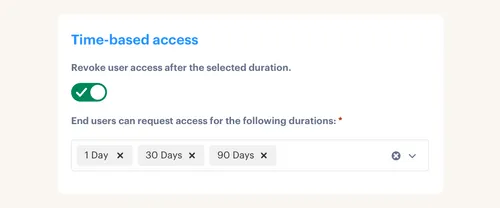
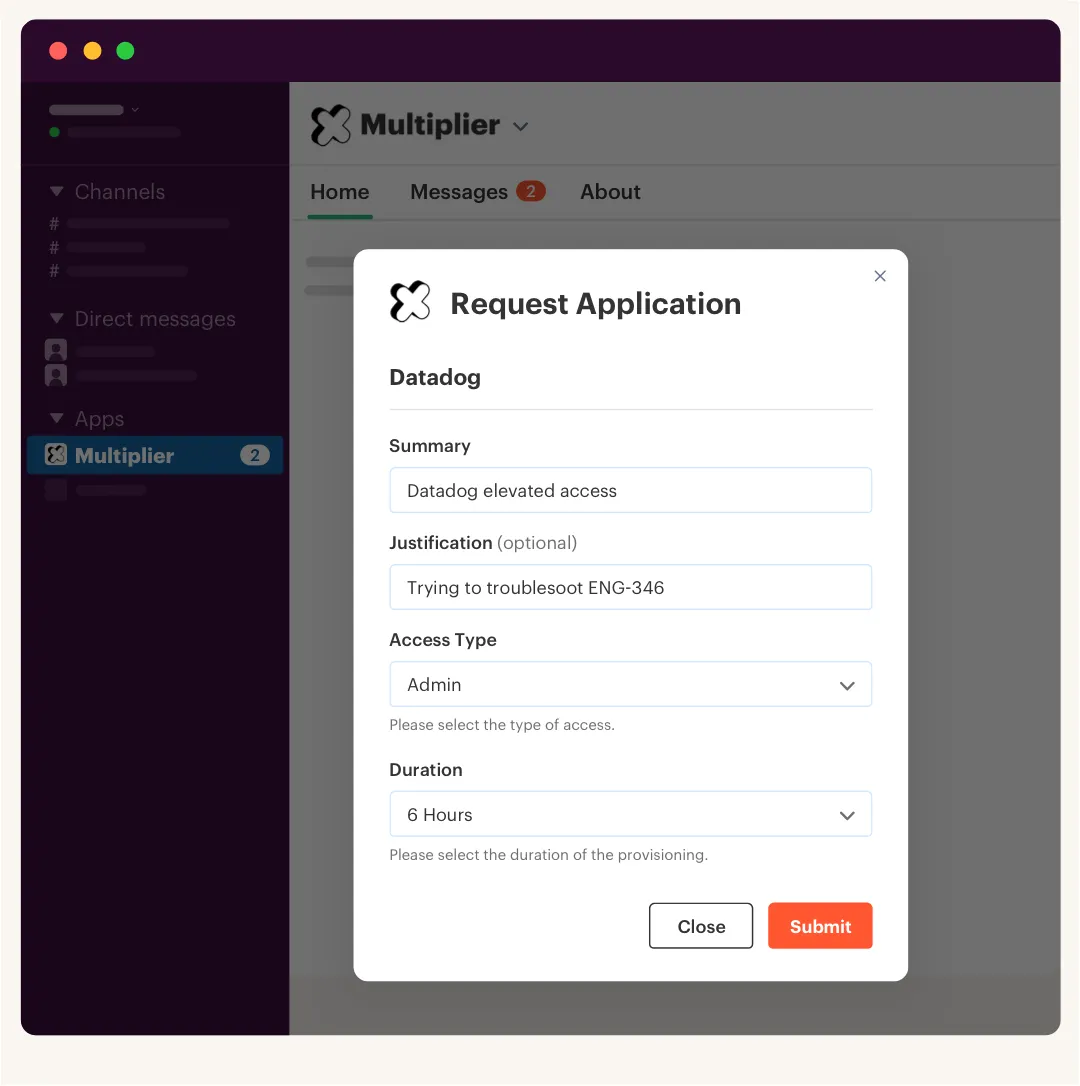
Time-bound access changes the default state. The requester picks a duration such as one, six, or 24 hours, the appropriate owner approves it, and group membership ends when the timer expires. Security gets fewer standing privileges, while finance stops paying for access that was only needed during a short task.
Start with roles where duration is obvious:
- Production access for incident response
- Admin rights for configuration work
- Contractor access tied to an engagement
- Paid specialist tools used for a fixed project
Permanent access will still exist. It should. Requiring daily requests for tools people use in their normal jobs creates needless friction and teaches users to avoid the process. The stronger rule is conditional: if the business need has an end date, the entitlement should have one too.
The practical version of that policy is easier to understand when you see how Multiplier works across Jira approval, group provisioning, and automatic expiry.
Use Login Activity Before Renewal Negotiations
A 30-day inactivity threshold can expose obvious candidates for reclamation before a renewal. It isn't a universal rule, though. Payroll software, tax tools, and quarterly planning apps may be valuable even when people don't log in every week.
Set thresholds by application usage pattern. For a daily collaboration tool, 30 days without a login is a strong signal. For quarterly software, use a longer period and check the person's role before revoking. Send a warning first, give the user a grace period, then remove access if inactivity continues.
Not every app exposes reliable login data through the identity provider. That's a real limit. Apps without current telemetry shouldn't be fed into automatic reclamation, because false inactivity can remove valid access and create more work than it saves.
Usage data also can't answer whether an app should exist at all. It tells you who appears inactive, not whether two active tools overlap. Procurement still needs contract and category analysis. Access data makes that analysis cleaner by removing dead assignments first.
Turn Access Reviews Into Enforced Decisions
An access review that ends in a spreadsheet hasn't cut spend. A manager can mark 20 users for revocation, but nothing changes until somebody removes those users from the right groups. Review completion and revoke completion are different events.
Run reviews with enough context to support an actual decision. Reviewers need the user's role, department, group membership, and last login date where available. They should select keep or revoke, explain exceptions, and know who owns the application. More context reduces the habit of approving everyone because investigation takes too long.
Once a reviewer chooses revoke, the workflow should execute that change through the identity provider and record it. Manual and non-SSO applications are the exception, since they may still require a person to remove access inside the app. Assign those exceptions an owner and a due date instead of pretending the spreadsheet completed the work.
Enterprise SaaS spend cuts become repeatable when reviews change access, not just report on it. At that point, renewal planning stops being an annual cleanup project. It becomes a summary of controls already running throughout the year.
How Multiplier Connects Jira Approvals to Provisioning
The platform connects Jira requests to identity provider group changes, so approved access can be granted and removed without a separate provisioning queue. Time-based policies remove temporary group membership at expiry. Usage-based reclamation can also recover inactive licenses when reliable login data is available.
Group Mappings Turn Approvals Into Authoritative Changes
Multiplier maps application catalog roles to groups in Okta, Entra ID, or Google Workspace. When a Jira issue reaches the configured approved status, the product calls the identity provider and adds the requester to the mapped group. Success or failure is written back to the Jira ticket. Approval and execution stay tied together.

Time-Based Access uses the same group model. A requester can choose a duration such as one, six, or 24 hours, then the group membership is removed when that period ends. The request, approval, grant, and expiry remain attached to the Jira issue, which gives IT a usable record without rebuilding evidence later.
Group-based provisioning has a clear boundary. It doesn't directly click through individual SaaS applications that lack identity provider provisioning. Manual and non-SSO grants still need a person to perform the in-app change, even though the request and approval can remain recorded in Jira.
Login Policies Reclaim Licenses After Real Inactivity
Auto Reclaim uses last-login data from connected identity providers for applications in scope. Admins set inactivity thresholds, grace periods, and group exclusions. Users receive a warning, and access is revoked if they remain inactive after the grace period. A Jira ticket records the removal.
The feature is available on the Advanced edition and depends on accurate identity provider telemetry. An application without usable login data can't support reliable automatic reclamation. I like that boundary because it keeps the policy tied to evidence instead of pretending every app exposes the same signals.
Together, automated provisioning, fixed access windows, and inactivity policies attack SaaS waste where it begins. Finance gets cleaner entitlement data, IT avoids a second cleanup queue, and Security can see why access existed and when it ended. If you want those controls to run from the same Jira record, get started with Multiplier and map one high-volume application first.
Make SaaS Savings Part of Normal Access Work
SaaS savings become repeatable when access workflows create the data required for renewal decisions. Map roles to identity provider groups, expire temporary access, reclaim licenses using reliable activity data, and enforce revoke decisions. Procurement then works from current access state instead of departmental memory.
Start with one application that has clear group mappings and frequent requests. Measure how many grants, expiries, and revocations execute without manual work. Then expand to the next app. Enterprise SaaS spend cuts stop being a finance event when every access decision carries its own cleanup plan.
Frequently asked questions
- How do I automate access requests in Multiplier?
To automate access requests using Multiplier, start by integrating it with your identity provider like Okta or Azure AD. Then, set up the Application Catalog in Jira Service Management (JSM) to display the apps employees can request. When an employee submits a request through JSM or Slack, Multiplier will automatically handle the approval workflow and provisioning based on the configured roles. This streamlines the process and reduces manual work for your IT team.
- What if I need to revoke access for multiple users at once?
If you need to revoke access for multiple users, consider using the Access Reviews feature in Multiplier. You can create a review campaign in JSM that includes all the users and applications you want to assess. Reviewers can mark users for revocation directly within the campaign, and Multiplier will automatically execute the changes in the identity provider, making sure a smooth and documented process.
- When should I use time-based access for roles?
You should use time-based access for roles that require elevated permissions for a limited duration, such as during an incident response or a specific project. With Multiplier, requesters can select a duration (like 1, 6, or 24 hours) when submitting their access request. This ensures that access is automatically revoked once the time expires, reducing the risk of long-lived privileges and unnecessary costs.
- How do I track inactive licenses using Multiplier?
To track inactive licenses, use the Auto Reclaim feature in Multiplier. Set inactivity thresholds for applications based on their usage patterns. For example, if a user hasn't logged in for 30 days, Multiplier can automatically send them a warning. If they remain inactive after a grace period, their access will be revoked, and a Jira ticket will document the removal. This helps optimize your SaaS spend by reclaiming unused licenses.
- Can I customize the approval workflow in Multiplier?
Yes, you can customize the approval workflow in Multiplier. Admins can map workflow statuses to different approval stages and designate default approvers for each application. This allows you to tailor the approval process based on the sensitivity of the access request, making sure that the right people are involved in the decision-making process.
Frequently Asked Questions
How do I automate access requests in Multiplier?
To automate access requests using Multiplier, start by integrating it with your identity provider like Okta or Azure AD. Then, set up the Application Catalog in Jira Service Management (JSM) to display the apps employees can request. When an employee submits a request through JSM or Slack, Multiplier will automatically handle the approval workflow and provisioning based on the configured roles. This streamlines the process and reduces manual work for your IT team.
What if I need to revoke access for multiple users at once?
If you need to revoke access for multiple users, consider using the Access Reviews feature in Multiplier. You can create a review campaign in JSM that includes all the users and applications you want to assess. Reviewers can mark users for revocation directly within the campaign, and Multiplier will automatically execute the changes in the identity provider, making sure a smooth and documented process.
When should I use time-based access for roles?
You should use time-based access for roles that require elevated permissions for a limited duration, such as during an incident response or a specific project. With Multiplier, requesters can select a duration (like 1, 6, or 24 hours) when submitting their access request. This ensures that access is automatically revoked once the time expires, reducing the risk of long-lived privileges and unnecessary costs.
How do I track inactive licenses using Multiplier?
To track inactive licenses, use the Auto Reclaim feature in Multiplier. Set inactivity thresholds for applications based on their usage patterns. For example, if a user hasn't logged in for 30 days, Multiplier can automatically send them a warning. If they remain inactive after a grace period, their access will be revoked, and a Jira ticket will document the removal. This helps optimize your SaaS spend by reclaiming unused licenses.
Can I customize the approval workflow in Multiplier?
Yes, you can customize the approval workflow in Multiplier. Admins can map workflow statuses to different approval stages and designate default approvers for each application. This allows you to tailor the approval process based on the sensitivity of the access request, making sure that the right people are involved in the decision-making process.


