

At 9:07 AM, your new hire pings IT in Slack asking for GitLab access. By lunch, the ticket is still bouncing between three managers who weren't sure who owned the approval. The mistake is thinking a chatbot fixes access management, when the real failure is that requests, approvals, provisioning, expiry, and audit evidence all live in different places. If you're asking how does automation fix that, the answer is straightforward: move the whole access workflow into the system where IT already works, not add another portal for people to ignore.
I've seen this pattern a bunch. A company grows from 100 to 400 employees, and the access process that felt fine at 80 people starts to break. Requests come through Slack, approvals happen in threads, someone updates groups in the identity provider, and then audit season shows up asking for proof nobody kept clean.
The real win with automation is not speed by itself. Speed without governance just creates faster chaos. The win is taking the request, approval, provisioning, expiry, review, and evidence trail, then forcing all of it through one system of record. If your access work already lives in Jira and Slack, Learn more about Multiplier and look at what happens when governance stays there too.
Key Takeaways:
- Automation fixes access work when it removes handoffs, not when it adds another portal.
- Chat bots are useful for requests and approvals, but they're not governance unless the action is tied to a system of record.
- Jira is usually the natural home for access governance because the work, ownership, and audit trail already pass through it.
- Time-bound access should be the default for admin, production, and sensitive data roles.
- Access reviews work better when the reviewer can act inside the same workflow where evidence is captured.
- If a request needs more than 2 manual handoffs, it's a strong candidate for automation.
Why Access Automation Breaks When It Lives Outside Work
Access automation fixes the wrong problem when it only speeds up the front door. A faster request form doesn't solve approval drift, manual provisioning, standing privilege, or missing evidence. The fix has to connect the whole chain, from request to revocation, in the system IT already uses every day.

Chat Requests Create the Illusion of Control
A Slack request feels fast because the employee gets an answer quickly. The problem starts after that answer. Someone still has to know the right approver, find the right group, make the change in Okta or Entra, update the Jira ticket, and remember whether the access was temporary. If even one of those steps happens outside the record, your audit trail is now a story people have to reconstruct later.
Picture a workplace tech manager at 4:47 PM on Thursday. A sales leader DMs them in Slack asking for Salesforce admin access because a customer issue is blocking a $180K renewal. The manager approves in the thread, IT adds the user to a group in Okta, and everyone feels good because the problem got solved in 11 minutes. Three months later, nobody remembers why that access was granted, whether it should still exist, or where the approval actually lives. Painful stuff.
I get why teams do it. Chat is where people are. Nobody wants to force a busy employee into a heavyweight identity portal for a simple request. Chat alone is a hallway conversation, though. It can start the workflow, but it shouldn't be the place where governance ends.
Separate IGA Portals Add Control but Lose Adoption
A dedicated IGA portal can make sense for a large enterprise with a heavy governance team and long implementation cycles. Fair point. If you have thousands of apps, custom policies everywhere, and a mature identity team, a deep IGA suite can be the right fit. The problem is that many mid-market IT teams don't have the staff or appetite for that kind of operating model.

The hidden cost is adoption. Employees already know how to file Jira tickets. Approvers already live in Slack. IT already measures work in Jira Service Management. When governance moves into a separate portal, you're asking the whole company to learn a second access path just so the control model feels cleaner on paper. In my experience, that's where shadow workflows come back. People go around the process because the process feels heavier than the request.
A good access workflow should feel like airport pre-check for a frequent traveler. You still verify identity, check the right signals, and keep a record. You just don't make every passenger walk through a different terminal for the same flight. The control is baked into the route, not bolted on at a separate checkpoint.
The Cost Shows Up During Audits
The audit problem isn't that teams lack evidence. Usually, the evidence exists somewhere. The problem is that it's scattered across tickets, Slack threads, email approvals, identity provider logs, spreadsheets, and screenshots. According to the Verizon 2024 Data Breach Investigations Report, stolen credentials and privilege misuse remain major patterns in security incidents, which means access history can't be treated as admin cleanup.
At Luno, access requests were coming through Slack, email, and Jira as the company approached 1,200 employees. IT had to chase approvals and manually assign Okta groups. Standard requests were taking 5 to 30 minutes each, and the team later reduced access request workload by 80% after moving to a Jira-centered access process. That's the part people miss. The savings weren't just in provisioning. The bigger gain was that the evidence stopped living everywhere.
So the better question is not "how does automation fix the request form?" It's whether automation can make the right access decision, execute it, remove it when it expires, and leave proof behind without forcing IT to become a detective.
How Automation Fixes Access Governance Without Adding Another Portal
Automation fixes access governance by making the right workflow the easiest workflow. Requests should start where employees already work, approvals should route to the right owner, provisioning should run through the identity provider, and every action should write back to the ticket. That's how does automation fix both speed and control at the same time.
Diagnose the Access Workflow Before You Automate It
Pull 20 recent access requests from Jira right now and trace each one from request to closure. Not what the policy says happened. What actually happened. If more than 30% of those requests needed a Slack follow-up, a manual identity provider change, or a screenshot pasted into a ticket, the workflow is not ready for scale. It's being held together by human memory, which is the worst kind of audit trail.
I've made the opposite mistake in other parts of ops. You take a broken process, add tooling, and then wonder why everyone still complains. So before touching automation, look for the points where work leaves the record. Run the same review against these questions:
- Did the request include the app, role, reason, and duration up front?
- Was the approver clear without IT having to ask around?
- Did provisioning happen from an approved system, not a manual guess?
- Was expiry required for elevated access?
- Could an auditor understand the decision without asking IT for context?
If you answer no to 2 or more, start with workflow design before tool configuration. That's how does automation fix the actual bottleneck instead of just speeding up the intake form.
Put the System of Record Before the Interface
Slack is a great interface. Jira is a better record. That distinction matters because employees want the fastest path, while IT and security need a durable trail of who asked, who approved, what changed, and when it changed back. If the interface and the record are separate, the record usually loses.
The rule I like is straightforward. Let employees request in chat if that's how they work, but make every request create or update a Jira issue. Let approvers act in Slack if that gets decisions made faster, but write the approval back to the same ticket. Let the identity provider make the entitlement change, but tie success or failure to the originating request. Clean chain. No side quests.
At Synthesia, the old workflow involved Slack channels and Notion boards while the company grew 4x. Access requests got missed because notifications got missed. After moving to an app catalog and automated approval workflow tied to Jira Service Management and Okta, 75% of access requests became fully automated, while a 4-person IT Ops team supported 420+ employees. That's the difference between chat as a conversation layer and chat as part of a governed workflow.
If you're trying to figure out where the system of record should live, ask one question: where will the auditor go first? If the answer is Jira, then governance should be designed around Jira from the beginning.
Use Thresholds to Decide What Gets Automated First
Not every access request deserves the same automation treatment. Some requests are rare, sensitive, or too ambiguous to automate fully on day one. The goal is not to remove judgment from every decision. It's to remove repetition where judgment is already predictable.
Start with volume and risk. If an app gets more than 25 requests per month and the approval pattern is consistent, automate intake, routing, and identity provider group assignment. If an app has fewer than 5 requests per month but grants admin or production access, automate expiry first. If an app has no SSO or no clean group mapping, keep provisioning manual but still capture the request, approval, and audit trail in Jira.
A useful first wave usually looks like this:
- Low-risk, high-volume apps: Automate approval routing and group-based provisioning.
- High-risk elevated access: Require approval and time-bound expiry.
- Manual or non-SSO apps: Keep the ticket trail clean, even if fulfillment stays manual.
- Dormant licenses: Reclaim based on login inactivity once telemetry is reliable.
What works best, in my view, is sequencing automation around confidence. Don't automate a request just because it's annoying. Automate it when the inputs are clear, the approver is known, and the identity provider group mapping is reliable. That's how does automation fix access without creating a different kind of risk.
Make Time-Bound Access the Default for Risky Roles
Standing admin access is usually a convenience decision that turns into a security problem. Someone needed elevated rights for a task, nobody wanted to slow them down, and the access stayed because cleanup is nobody's favorite job. Multiply that across engineering, finance, support, and data tools, and suddenly least privilege becomes a quarterly spreadsheet exercise.
Use a simple rule. If the role grants admin access, production access, customer data access, or sensitive financial data access, make the requester choose a duration. Common windows are 1 hour for emergency work, 6 hours for a project task, or 24 hours for a longer operational need. If someone needs the same elevated role more than 3 times in a month, don't just keep extending it. Review whether their job role has changed or whether the underlying process is broken.
NIST's zero trust guidance pushes the idea that access decisions should be explicit, contextual, and continuously evaluated. Time-bound access puts that idea into day-to-day practice. You're not just approving access. You're approving access for a job, for a window, with an end state already defined.
Stavvy is a good pattern here. After funding and acquisitions, they had long-lived privileged access they needed to reduce. By using just-in-time access tied to Jira Service Management and Slack, they cut privileged access by 85% and had 1,300+ access requests automatically revoked after approved windows. That's how automation fixes the cleanup problem nobody wants to own manually.
Treat Access Reviews as Execution, Not Attestation
Quarterly access reviews often become a weird ritual. Export a spreadsheet. Send it to managers. Ask them to mark keep or revoke. Chase them. Merge changes. Then hope someone actually removes the access. It creates the appearance of governance, but the real control only happens when review decisions trigger action.
A better review process starts with context. Reviewers should see the user, department, title, group, app, last login, and recommendation in one place. If someone hasn't logged in for 90 days, the default question shouldn't be "do they still need this?" It should be "what evidence says they still need this?" Small wording change. Big behavior change.
Use these review rules:
- If last login is older than 90 days, recommend revoke unless the owner gives a reason.
- If the user changed departments in the last 30 days, review all old team app access.
- If a user has admin access, require explicit keep with a reason.
- If a reviewer marks revoke, trigger removal through the identity provider group.
- If the app is not connected to SSO, create a manual removal ticket and track closure.
Access reviews only work when the decision and the removal are connected. Without that connection, you're not governing access. You're collecting opinions in a spreadsheet.
Separate License Waste From Security Risk
SaaS license cleanup and access governance overlap, but they're not the same job. A user who hasn't logged into a design tool for 45 days might be a spend issue. A user who has standing admin access to production after a project ended is a risk issue. Treating both as the same review queue makes teams slow and unfocused.
The cleaner approach is to set different thresholds. For license waste, start with 30 days of inactivity, then send a warning before removal. For privileged access, use time-bound grants from the start, so cleanup happens automatically. For broad department tools, look at inactivity plus employment changes, because a role change often explains why access should end even if the license is still active.
This is where automation fixes a second-order problem. The first-order problem is "people have access they don't need." The second-order problem is "IT can't tell which access is waste, which access is risk, and which access is normal." Once you split those categories, the workflow gets a lot easier.
If you want to see what this looks like inside a Jira-native model, See how Multiplier works and pay attention to how requests, approvals, provisioning, and review evidence stay connected.
How Multiplier Anchors Access Work in Jira
Multiplier makes access automation practical by keeping governance inside Jira Service Management and Slack. Employees request through a Jira-native catalog or Slack, approvers act in JSM or Slack, and provisioning runs through identity provider groups. The record stays in Jira, which is the part that makes the workflow auditable.
Jira-Native Requests and Identity Provider Provisioning
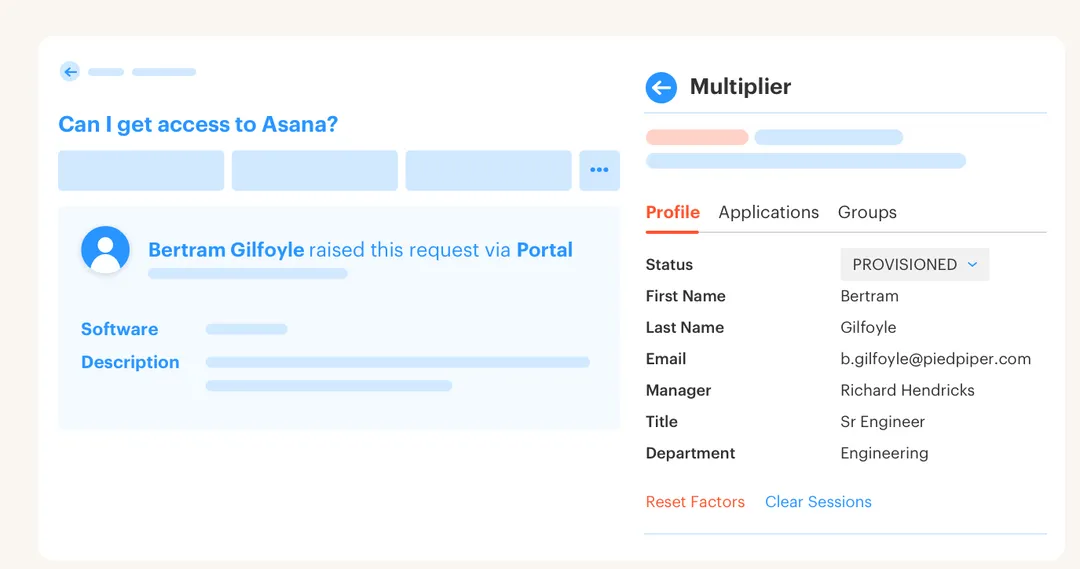
Multiplier starts with the Application Catalog inside JSM, where employees browse approved apps, select a role, and submit a request with the right context. The same catalog can be reached from Slack for common request flows, but the Jira issue remains the record. That matters because your approval, provisioning status, and evidence all stay tied to the same request.

Once approved, Multiplier provisions through mapped identity provider groups in Okta, Entra ID, or Google Workspace. It doesn't directly provision every individual SaaS app. That boundary is important. For SSO apps, group-based provisioning can push the right entitlement through the identity provider, while Multiplier writes success or failure back to the Jira ticket. The 5 to 30 minute manual group assignment problem from the Luno-style workflow gets replaced by a governed handoff between Jira and the identity provider.
Approval Workflows route decisions to managers, app owners, or specific users in JSM and Slack. For teams that already live in Jira, that's the practical unlock. No new IGA portal to teach. No Slack-only approval floating outside the ticket. No spreadsheet trying to become an audit system after the fact.
Time-Bound Access, Reviews, and License Reclamation
Multiplier also handles the parts of governance that usually get ignored after the request is approved. Time-Based Access lets requesters choose a duration like 1, 6, or 24 hours, then removes the mapped group membership when the window expires. Access Reviews run in JSM with reviewer context like user attributes, groups, last login, and recommendations, so keep or revoke decisions can turn into actual identity provider changes.
Auto Reclaim covers the SaaS waste side by using identity provider login telemetry to find inactive users, send warning emails, and revoke access after the grace period when policy conditions are met. It's available on the Advanced edition, and it depends on accurate last-login data from connected identity providers. Not magic. Just a clean way to stop paying for unused access when the signal is good.
Multiplier isn't trying to replace every identity governance pattern in the enterprise. The better read is that it fixes the operating gap for Jira-heavy IT teams: request in the place employees know, approve in the place approvers respond, provision through the identity provider, and leave the proof in Jira. If that's the model you want, Get started with Multiplier and compare it against your last 20 access tickets.
What Changes When Access Work Runs in Jira
How does automation fix access governance? It fixes it by connecting the decision, the change, the expiry, and the evidence in one workflow. Not by adding another place for employees to forget.
The old way made IT choose between speed and control. The better way is more direct. Keep the interface where people work, keep the record where IT works, and make the identity provider execute the change. Once that happens, access requests stop being a queue of interruptions and start becoming a repeatable operating system for least privilege.
Frequently Asked Questions
How do I set up time-bound access using Multiplier?
To set up time-bound access with Multiplier, 1) When submitting an access request through the Jira Service Management (JSM) portal or Slack, select the desired application and role. 2) Choose a duration for access, such as 1, 6, or 24 hours. 3) Once approved, Multiplier will automatically provision access and set a timer to revoke it when the time expires. This helps enforce least privilege and reduces the risk of standing access.
What if I need to reclaim licenses for inactive users?
If you want to reclaim licenses for inactive users, you can use Multiplier's Auto Reclaim feature. 1) Set inactivity thresholds (e.g., 30 days) and grace periods for notifications. 2) Multiplier will automatically identify users who exceed the inactivity threshold and send them a warning email. 3) If users remain inactive after the grace period, Multiplier will revoke their access and generate a Jira ticket to document the removal, helping optimize your SaaS spend.
How do I create an access review campaign in Multiplier?
To create an access review campaign in Multiplier, 1) Go to the Access Reviews section in JSM and click on 'New Review.' 2) Fill in the campaign details, including the name, applications in scope, start and end dates, and assign reviewers. 3) Once ready, click 'Start Campaign' to notify reviewers. This process replaces manual spreadsheet-driven reviews and ensures a unified approach to managing user access.
Can I automate access requests through Slack?
Yes, you can automate access requests through Slack using Multiplier. 1) Employees can type `/request` in any Slack channel or use the Multiplier app to open the application catalog. 2) They select the desired application and role, then submit the request. 3) A Jira ticket will be created automatically, and approvers will receive notifications in Slack for quick decision-making, streamlining the access request process.
When should I consider automating access workflows?
You should consider automating access workflows when you notice frequent manual handoffs or delays. 1) If more than 30% of recent access requests required follow-ups or manual changes, it's a sign that the workflow isn't scalable. 2) Automating requests and approvals through Multiplier can reduce bottlenecks and improve efficiency. 3) Focus on high-volume, low-risk requests first to gain quick wins and gradually expand automation to more complex scenarios.


