


200 new employees in a year can make your access model look broken fast. And securing integrations between IDPs gets a lot harder when the real workflow lives in Jira, approvals happen in Slack, and the final change happens somewhere else. On paper, the identity provider is the source of truth. In practice, the ticket is where the business decision happened.
A lot of teams try to fix this with another portal. I get why. Dedicated identity governance tools feel safer because they look more formal. But if your IT team still has to reconcile Jira tickets, Slack approvals, Okta groups, screenshots, and spreadsheets, you didn't secure the integration. You just added another place to check.
The better move is to make the identity provider execute the decision, not host the whole workflow. Jira should hold the request, approval, context, and evidence. The IDP should make the access change. That distinction matters.
Key Takeaways:
- Securing integrations between IDPs starts with deciding where the access decision lives.
- Chat bots alone don't solve governance because they rarely enforce expiry, review, and audit evidence.
- Jira can be the system of record for access requests while the IDP remains the source of truth for group membership.
- Time-bound access should be the default for privileged roles, not an exception.
- Access reviews only matter if revocations actually happen after the reviewer clicks “Revoke.”
- The strongest IDP integration is reversible, logged, and tied back to the original business request.
Why IDP Integrations Break When Work Lives Elsewhere
IDP integrations break when the request, approval, provisioning action, and audit evidence live in different tools. The identity provider may hold the group membership, but Jira usually holds the business context. When those two records drift apart, securing integrations between IDPs becomes a reconciliation problem instead of an access control problem.

The hidden tax is split ownership
The real issue isn't whether Okta, Entra ID, or Google Workspace can add someone to a group. They can. The real issue is whether the approval, the reason, the expiry, and the actual group change are tied together in one place. When they're not, IT becomes the glue. And glue work is expensive.
Picture a workplace technology manager at 9:14 on a Tuesday. A new sales hire needs Salesforce Admin for 24 hours because RevOps is out. The request starts in Jira, the manager approves in Slack, someone from IT checks the group mapping in Okta, then a screenshot gets pasted into the ticket. Two weeks later, no one is fully sure whether the access was removed. Everyone did their job. The system still failed.
I've seen this pattern a lot in fast-growing companies. Not because the teams are sloppy. Usually the opposite. They're careful, they're trying to move fast without breaking security, and they're stuck between tools that each own one slice of the workflow. Jira owns intake, Slack owns urgency, and the IDP owns enforcement. Audit wants a clean story across all of it.
And that's where the hidden tax shows up. Every handoff creates a little room for confusion. Every manual group assignment creates room for the wrong role. Every screenshot becomes stale the second access changes again. If your access process feels like a relay race, the baton is the risk.
If your Jira issues already carry the business context, the next logical question is how much of the governance record can live there too. That’s the operating model behind Learn more about Multiplier.
Chat approval is not the same as governance
Slack is great for getting a yes or no quickly. It is not, by itself, a governance layer. A chat approval can answer “did someone approve this?” but it often doesn't answer “what access was granted, for how long, through which group, and was it actually removed?” That's the gap.
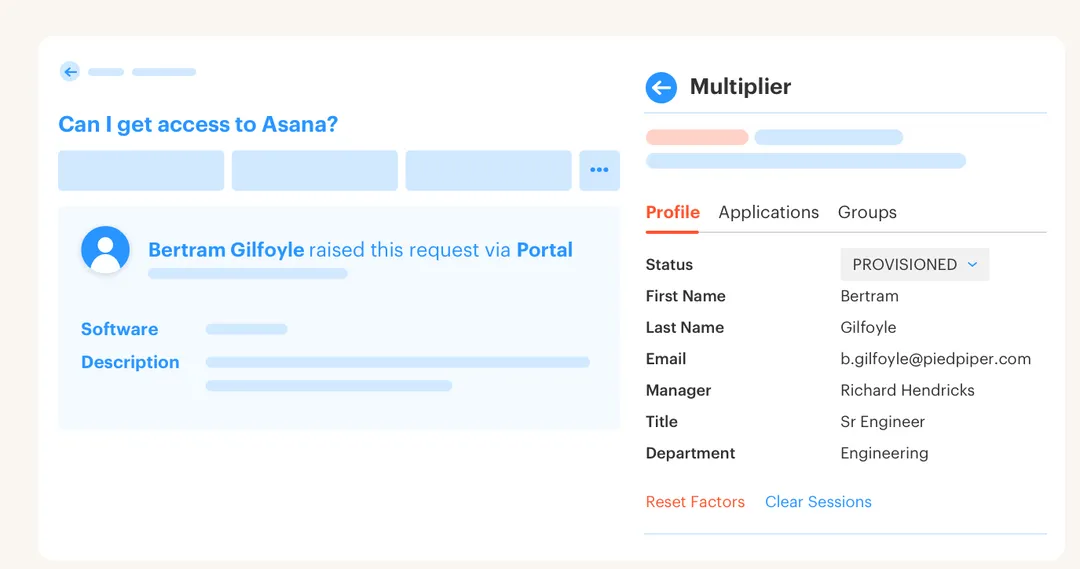
Some teams try to solve access requests with bots first. Fair enough. Employees live in Slack, so pulling requests into Slack feels obvious. But a bot that pings an approver and creates a loose record doesn't solve least privilege. It just speeds up the front door while leaving the back door open.
The test I like is simple. Pick 10 recent privileged access requests and ask five questions:
- Can you see who requested access and why?
- Can you see who approved it and when?
- Can you see which IDP group changed?
- Can you prove when access expired or was revoked?
- Can you export the evidence without rebuilding it manually?
If you miss two or more, the integration isn't really governed. It's coordinated. Big difference.
Audit evidence fails when it has to be rebuilt
Audit evidence fails when it depends on humans remembering to collect it later. The painful part is that most teams don't notice the gap during normal operations. They notice it during audit week, when someone asks for proof across 6 months of access changes and the team starts searching tickets, screenshots, Slack threads, and spreadsheets.
At Synthesia, rapid growth created exactly the kind of pressure that breaks manual access management. They grew from 100 to more than 400 employees in two years, and access requests were living across Slack channels and Notion boards. A 4-person IT Ops team eventually processed 3,800+ access requests in a year, with 75% fully automated after moving the workflow into Jira Service Management with IDP-backed provisioning.
Now, I don't think every company needs that exact setup on day one. A 40-person company can survive with some manual steps for a while. But once you're crossing hundreds of requests per quarter, the math changes. Manual evidence becomes a backlog. Manual revocation becomes a risk. Manual group assignment becomes a tax on every IT person who could be working on something better.
The old way feels manageable until the audit asks for a straight line from request to approval to access change to revocation.
How to Secure IDP Integrations Around the Ticket
The safest way to secure IDP integrations is to make Jira the business record and the identity provider the execution layer. Jira should capture who asked, why they asked, who approved, and what policy applied. The IDP should perform the authoritative group change and write the result back to the ticket.
Start with the identity provider as the execution layer
The IDP should not be treated like another place for IT to do manual work. It should be the place where approved decisions become access changes. That sounds obvious, but a lot of teams still use the IDP like an admin console someone logs into after the approval happens elsewhere. Wrong motion.
A better pattern is role-to-group mapping. For each sanctioned app, define the roles employees can request, then map each role to one or more identity provider groups. Viewer maps to one group. Editor maps to another. Admin maps to a higher-risk group with stricter approval and maybe a shorter duration. Clean.
The decision rule is pretty straightforward. If the app is SSO-backed and the entitlement can be controlled through group membership, automate it through the IDP. If the app isn't connected or doesn't support reliable group-based provisioning, keep the request in Jira and mark provisioning as manual, but still capture the approval and evidence in the ticket. Don't pretend manual apps are automated. That's how audits get messy.
A simple maturity path works well:
- Catalog first: Centralize sanctioned apps and roles so employees stop guessing where to ask.
- Group mappings next: Map approved roles to IDP groups for SSO-backed apps.
- Automated provisioning after that: Trigger group changes only after the right approval status.
- Expiry and review last: Add time limits and access reviews once the core flow is stable.
Weirdly, this is where less ambition wins. Don't start by trying to automate every app in the company. Start with the 20 apps that create the highest request volume or highest access risk. If those 20 cover 70% of requests, you've already changed the operating model.
Use the ticket to capture the business decision
A ticket is more than a request wrapper. Used properly, it's the decision record. It should explain the business reason, app role, requester, approver, policy path, provisioning result, and revocation result. Without that, the IDP can tell you who has access, but not why they got it.
Videoamp is a good example of why this matters. As the company grew from 100 to 500 employees, Tuesdays became a flood of access requests after new hires started on Monday. The painful part wasn't just volume. Requests often lacked the details IT needed to act, and ownership was unclear for certain apps. They moved to a self-service app catalog in Jira Service Management, connected to Okta and Google Workspace, and processed 500+ app requests in 6 months while saving 70+ hours of IT productivity.
The fix wasn't "add more IT people." It was better intake. The right app, the right role, the right approver, and the right identity group. Once those fields are captured up front, the integration between Jira and the IDP can do its job without the back-and-forth.
The ticket should force clarity before provisioning starts:
- What app is being requested? Use sanctioned apps wherever possible.
- What role is needed? Avoid broad defaults like “full access.”
- Who owns approval? Manager, app owner, or named approver.
- Is the access temporary? If yes, capture the duration at request time.
- Which IDP group executes the change? Map it before the ticket reaches approval.
If the requester can't answer those questions, don't provision yet. That's not bureaucracy. That's preventing the wrong access from becoming someone else's cleanup problem 90 days later.
Make temporary access the default for risky roles
Privileged access should expire by default. If someone needs admin access for an incident, migration, finance close, or production support, they probably don't need it forever. They need it for 1 hour, 6 hours, 24 hours, or maybe a few days. After that, standing access becomes risk with no upside.
At Stavvy, long-lived privileged access became a real concern after funding and acquisitions. They needed time-bound access that fit their Atlassian workflow and worked for engineers without creating a heavy process. After adopting a just-in-time access model, they reduced privileged access by 85% and had 1,300+ access requests automatically revoked after approved windows.
That's a meaningful pattern. Not because 85% is a magic benchmark for everyone, but because it proves the mechanism. If elevated access is easy to request, fast to approve, provisioned through the IDP, and removed when the timer ends, people don't need standing privilege as a workaround.
The rule I like: any role that can change money, customer data, production systems, security settings, or employee records should be time-bound unless there's a documented reason not to. Some roles really do need persistent access. Your controller probably doesn't need to request finance access every morning. Fair. But exceptions should be explicit, not accidental.
A practical policy might look like this:
- Low-risk apps: Auto-approve or manager-approve with no expiry.
- Moderate-risk roles: Manager or app owner approval with 30-day expiry.
- High-risk admin roles: App owner approval with 1, 6, or 24-hour expiry.
- Break-glass roles: Fast approval, short duration, mandatory review after use.
The important part is that the IDP enforces the removal. If expiry depends on a person remembering to go back and clean up group membership, it will fail eventually. Maybe not this week. But eventually.
The teams that want to keep privileged access moving without creating standing risk usually need to see the workflow end to end, from request to automatic group removal. See how Multiplier works to evaluate the design choices.
Treat access reviews as enforcement, not paperwork
Access reviews are often treated like a compliance ritual. Export users, send spreadsheet, ask reviewer to mark keep or remove, then hope someone executes the removals. Everyone hates it. And honestly, they should. A review that doesn't enforce decisions is just expensive documentation.
Securing integrations between IDPs requires reviews that can close the loop. The reviewer should see the user, app, group, department, title, last login, and recommendation in one place. Then, when they choose “Revoke,” the system should remove the user from the relevant IDP group and record the action. Otherwise the review and the actual access state drift apart.
A useful diagnostic is to look at your last access review and count the lag between decision and revocation. Under 24 hours is strong. 2-5 business days means you're depending on manual follow-up. More than a week means the review is mostly theater. Harsh, but fair.
One caveat. Not every app will support perfect enforcement through the IDP. Some non-SSO tools still require manual removal. That's okay as long as you label them honestly and keep the ticket record clean. The mistake is mixing automated and manual apps without telling reviewers which is which. Then people assume clicking “Revoke” did something when it only created more work.
A review process worth keeping should do four things:
- Show context: Last login, group membership, department, and role.
- Force a decision: Keep or revoke, not “maybe.”
- Execute revocation when possible: Remove group membership through the IDP.
- Record evidence automatically: Keep decisions and changes tied to Jira issues.
The goal isn't a prettier spreadsheet. The goal is fewer people keeping access they no longer need.
Measure integration health by reversibility
A secure integration is not just fast at granting access. It's reliable at removing access. Reversibility is the overlooked metric. Can you undo the change cleanly, prove it happened, and trace it back to the original decision? If not, the integration is only half-built.
I like to score IDP integration health with a simple 5-point check. Give yourself 1 point for each yes. Can the request be made through a sanctioned catalog? Can the approver act without leaving the workflow? Can the IDP group change happen automatically? Can expiry or revocation remove the group membership without manual cleanup? Can the evidence be exported without rebuilding it?
A score of 4 or 5 means you're in pretty good shape. A score of 2 or 3 means the process works, but still has manual risk. A score of 0 or 1 means you're mostly coordinating access, not governing it. That's not a moral judgment. It's a useful place to start.
The bigger point is that securing integrations between IDPs is not a connector problem. It's a lifecycle problem. Requests, approvals, grants, expiries, reviews, and removals all need to share the same record. Otherwise, the workflow is like a train where every station uses a different timetable. People might still reach the destination, but no one can prove how they got there.
Once you measure reversibility, the priorities get obvious fast.
How Multiplier Anchors Provisioning in Jira
Multiplier anchors access governance in Jira Service Management while using the identity provider to execute access changes. Employees request access in JSM or Slack, approvers act in the same workflow, and provisioning runs through mapped IDP groups. The Jira issue becomes the audit trail for request, approval, grant, and removal.
Jira-native catalog and IDP group provisioning
Multiplier starts with a Jira-native Application Catalog, which gives employees a single place to request sanctioned apps and roles. The catalog syncs apps and groups from Okta, Entra ID, and Google Workspace, and only apps marked approved appear for request. Each role can map to one or more identity provider groups, so the request doesn't rely on an IT admin guessing which group to add.

Once the Jira issue reaches the configured approved status, Multiplier calls the IDP APIs to add the user to the mapped groups. It doesn't directly provision inside every SaaS app, and that's an important distinction. For SSO apps, the IDP group is the authoritative control point, and the Jira issue records the success or failure. That's the cleaner model.
Multiplier also supports approval workflows where managers, app owners, or specific users can approve from Jira or Slack. The Slack App mirrors the request and approval motion for teams that live in chat, but Jira remains the system of record. That matters because chat alone doesn't give you the audit trail, expiry, and provisioning evidence you need when someone asks what happened 4 months later.
Time limits, reviews, and audit-ready evidence
Multiplier's Time-Based Access makes elevated roles temporary by design. A requester can choose a duration like 1, 6, or 24 hours, and after approval, Multiplier adds the user to the mapped IDP group. When the timer expires, it calls the IDP to remove the group membership and records the change in Jira. No reminder spreadsheet. No “can someone clean this up?” message.
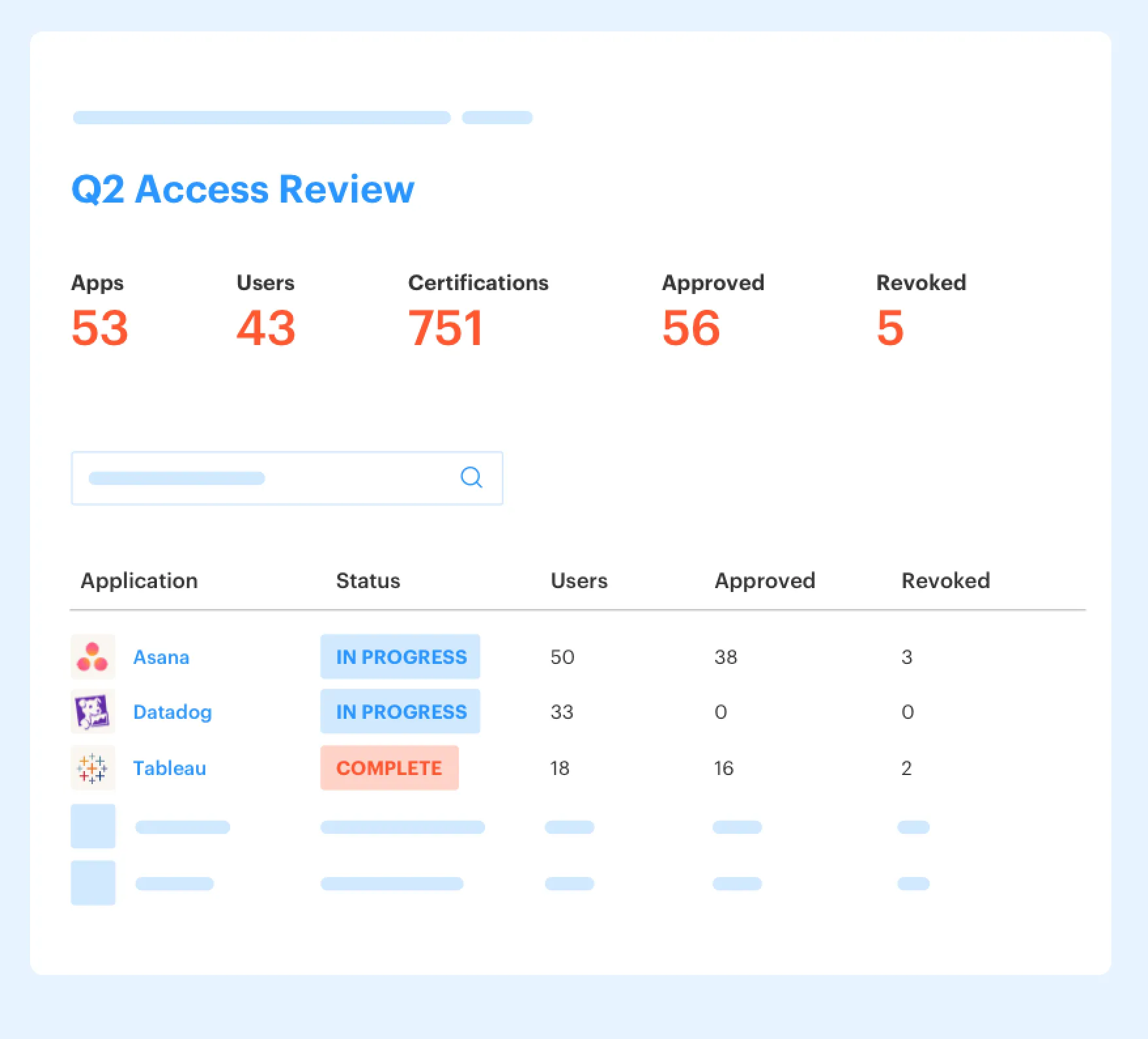
Access Reviews work the same way. Admins create campaigns in Jira, select approved apps, assign reviewers, and give them context like user attributes, groups, last login, and recommendations. When a reviewer chooses revoke, Multiplier removes the relevant IDP group membership where that access is controlled through the IDP, creates Jira evidence, and lets admins export results as CSV or push evidence to Vanta.
For the teams dealing with Tuesday request floods, long-lived admin roles, or audit evidence spread across tools, the change is pretty specific. The request stays in Jira, the approval can happen in Slack or JSM, the access change happens through the identity provider, and the proof stays attached to the issue. If that operating model matches where your team is trying to go, Get started with Multiplier and look at the catalog, provisioning, and review flow against your current process.
Build the Governance Record Before Audit Week
Securing integrations between IDPs is really about making access decisions enforceable. If Jira holds the business context and the IDP executes the change, you get a cleaner access model without forcing employees into another portal. Faster access is nice. Less standing privilege is better.
The bigger win is audit readiness by default. Not because someone rebuilt the story in a spreadsheet, but because the story was captured while the work happened. Request, approval, grant, expiry, review, revocation. All connected.
That's the shift. Stop treating IDP integrations like plumbing. Treat them like the backbone of your access governance workflow.
Frequently Asked Questions
How do I set up time-based access in Multiplier?
To set up time-based access in Multiplier, follow these steps: 1) When submitting an access request through the Jira Service Management (JSM) portal or Slack, select the desired application and role. 2) Choose a duration for the access (e.g., 1, 6, or 24 hours) if the app supports time-based access. 3) After approval, Multiplier will automatically provision the access and set a timer to revoke it once the duration expires. This helps ensure that elevated access is temporary and reduces the risk of long-lived privileges.
What if I need to revoke access quickly after an approval?
If you need to revoke access quickly after an approval, you can do so through the Jira ticket associated with the request. Simply locate the ticket, and if the access was provisioned via an identity provider group, you can click 'Revoke.' Multiplier will automatically remove the user from the relevant group, ensuring that the revocation is logged and tied back to the original request. This streamlined process helps maintain security and compliance.
Can I use Multiplier for non-SSO applications?
Yes, you can use Multiplier for non-SSO applications, but provisioning will remain manual. When employees request access to these apps through the JSM portal, Multiplier captures the approval and retains an audit trail, even if the actual provisioning requires IT intervention. This ensures that all requests are documented and compliant, even for applications that don't support automated provisioning.
When should I conduct access reviews with Multiplier?
You should conduct access reviews with Multiplier regularly, ideally every quarter, to ensure that users have the appropriate access levels. Use the Access Review feature to create campaigns within Jira, selecting approved applications and assigning reviewers. This way, you can monitor user access effectively, and when reviewers decide to revoke access, Multiplier will automatically remove users from the relevant IDP groups, keeping your access governance streamlined and efficient.
Why does my access request process feel slow?
Your access request process may feel slow due to fragmented workflows across different tools. To streamline it, consider using Multiplier with Jira Service Management, where all access requests, approvals, and provisioning happen in one place. By centralizing these processes, you can reduce delays caused by context switching and manual interventions, leading to faster access for employees and a more efficient IT operation.


