


Your annual user access audit leaves 11 months for stale permissions to pile up. Run formal access reviews quarterly, then check privileged access every month. Add event-driven reviews after role changes, and you'll catch access problems before the next audit forces you to rebuild the story.
A low-risk design tool doesn't need the same review cycle as production admin access. Employee growth matters. So do transfers, acquisitions, contractor turnover, and how much access expires automatically. One calendar for every app looks organized, but it usually hides the risk you're trying to manage.
Key Takeaways:
- Review privileged access monthly, or replace standing access with automatic expiry.
- Review core business applications quarterly when access changes regularly.
- Review stable, low-risk applications twice a year.
- Trigger reviews after role changes, terminations, acquisitions, and security events.
- Use login activity to guide decisions, not replace human certification.
- Keep approvals, revocations, and evidence in Jira so audits don't require reconstruction.
Why Quarterly Access Reviews Are Often Too Slow
Quarterly access reviews fail when access changes faster than the review calendar. A certification completed every 90 days can still leave former employees, transferred staff, and temporary admins with access for weeks. The frequency should follow risk and change, not a blanket policy copied across every application.

A quarterly calendar can hide a daily access problem
An IT manager kicks off a certification at 9 AM Monday. They export users from six applications into a spreadsheet and email each app owner. By Thursday, two employees have changed roles and a contractor has wrapped their project. The review isn't finished, yet part of the source data is already wrong. That's the gap nobody sees until an auditor does.
That's the core problem with asking how often should IT run access reviews as one broad question. A quarterly campaign can make sense for stable access. It makes far less sense for privileged roles that get assigned during incidents, customer escalations, or engineering work. The calendar is only useful when it matches how quickly the underlying access changes.

The status quo has some merit. Quarterly reviews are easy to explain, easy to schedule, and common enough that every app owner understands the assignment. For lower-risk tools with little employee movement, that may be enough. Once a company is hiring, reorganizing, or adding applications every month, the same cadence starts producing false confidence.
Audit evidence ages before the review ends
Spreadsheet-based reviews separate the decision from the action. An app owner marks "Revoke," IT removes the user later, and somebody takes a screenshot to prove it happened. If any step gets missed, the spreadsheet shows intent rather than enforcement. That's a big difference when an auditor asks what actually changed.
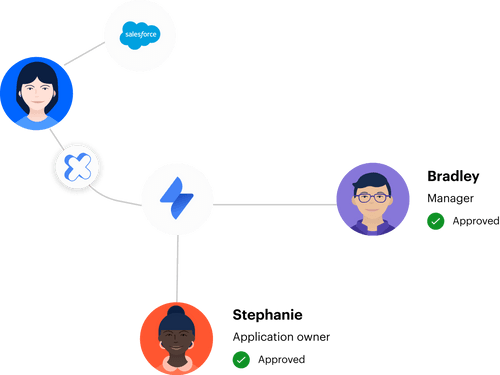
A 500-person advertising company ran into a version of this during rapid growth. New hires created a wave of access requests, often without enough information for IT to act. After centralizing sanctioned applications and request records in Jira Service Management, the company processed 500+ requests in six months and saved more than 70 hours of IT work. The bigger win was having a record that didn't need to be rebuilt later.
Think of every Jira issue as the receipt for an access change. The request is the item, the approval is the authorization, and the identity provider change proves delivery. If those pieces live in different systems, you're asking the audit team to reconstruct the purchase from memory, with no receipt in the drawer.
The practical version of that request-to-evidence record is covered in a short Jira-native walkthrough, where the Jira issue stays attached to the approval and access change.
How Often IT Should Review User Access
IT should review access monthly for privileged roles, quarterly for changing business applications, and twice yearly for stable low-risk tools. Event-based reviews should run between those cycles whenever somebody leaves, changes roles, or gains temporary access. One fixed schedule won't cover each risk well.
Start with risk and change frequency
A calendar can't tell you whether an application needs monthly or twice-yearly review. Risk can. Before assigning a cadence, look at what the access permits, how often membership changes, and whether removal happens automatically. Any schedule chosen before those questions is mostly administrative theater.
Change frequency matters almost as much as sensitivity. A low-risk application with constant contractor churn may need more attention than a sensitive tool where every entitlement expires after six hours. Automatic expiry changes the equation because temporary access doesn't sit around waiting for the next campaign. Not entirely, since permanent roles still need certification, but it lowers the amount of stale access reviewers must sort through.
Use these questions for each application:
- Can the role change production systems, financial data, or customer information?
- How many joins, transfers, and departures affect the user list each month?
- Does access expire automatically, or can it remain indefinitely?
- Can the reviewer see recent login activity and group membership?
- Does a "Revoke" decision actually remove access, or create another task?
If the first three point toward high risk or frequent change, review more often. If access is low risk, stable, and automatically removed when no longer needed, a longer cycle is reasonable. The main thing is documenting why the cadence fits the access.
Use different cadences for different access tiers
A production administrator and a design-tool viewer shouldn't share the same access review frequency. The admin role can rewrite infrastructure, while the viewer may only read internal mockups. Treating them equally adds review work where it has little value and leaves higher-risk access waiting too long.
Four operating buckets keep things simple enough for app owners to understand without turning the policy into a 40-page document. The bucket can change as the application, user population, or control model changes.
- Monthly: Privileged roles, production access, finance administration, and sensitive data access.
- Quarterly: Core business systems with regular employee movement or role changes.
- Twice yearly: Stable, low-risk applications with limited permissions.
- Continuous signals: Login inactivity, expired contracts, and temporary access windows that can trigger action between campaigns.
Monthly doesn't mean somebody must inspect every account by hand. High-risk access should already be limited through approval rules, time-bound membership, and clear ownership. The monthly review catches permanent roles, exceptions, and anything that didn't follow the normal path.
Twice-yearly reviews also have a place. Running a monthly certification against a low-risk application with 15 stable users creates work without adding much control. Longer cycles are valid when you can show low risk, low change, and dependable offboarding.
Trigger a review when the business changes
Any event that changes a person's role, employment status, or need for access should trigger a narrower check. Waiting for the next quarter makes the calendar more important than the actual risk.
Event-based reviews are smaller than full campaigns. You're reviewing the person, team, or acquired business affected by the change rather than reopening every application. Done properly, the event becomes part of the normal Jira workflow instead of a special audit project.
Common triggers include:
- Termination: Remove current access as part of offboarding, not during the next review.
- Role or department change: Recheck inherited group memberships against the new job.
- Contract end: Confirm temporary users lost access on the agreed date.
- Acquisition: Review inherited entitlements before connecting systems broadly.
- Security event: Revalidate sensitive access after compromised credentials or policy violations.
- App owner change: Confirm the new owner understands existing roles and exceptions.
A role change is where many programs break. Companies tend to add access for the new job without removing access from the old one. Six months later, the employee carries both, and nobody remembers why. Scheduled access reviews catch that eventually, while event-based reviews prevent it from building up.
Separate login monitoring from access certification
Login data can tell you an account hasn't been used for 30, 60, or 90 days. It can't always tell you whether the person still needs the access. A finance leader may open a reporting tool once per quarter, while an inactive contractor account may need removal today. Usage is context, not the whole decision.
Continuous monitoring still matters. It narrows the list and gives reviewers something better than a username and job title. Without last-login data, app owners tend to keep access because they don't have enough evidence to make a confident revocation.
A useful review screen should show:
- Current application role and identity provider groups
- Department, manager, and employment context
- Last login date when the identity provider has reliable telemetry
- Whether the access is permanent or time-bound
- The reason given for access, where available
There's a valid case for automatic license reclamation when accurate login telemetry exists. It reduces spend and removes obviously inactive access between formal reviews. The limitation is real: applications without reliable identity provider data can't support the same automation, so they still need direct owner review.
Reduce review volume with automatic expiry
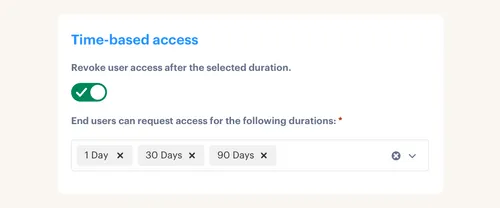
A fintech company cut privileged access by 85% after shifting long-lived permissions into time-bound access. More than 1,300 approved access requests were automatically revoked when their windows ended. Those expirations didn't need to wait for somebody to spot them during a quarterly review.
Automatic expiry changes what the reviewer sees. Instead of sorting through every engineer who needed database access during the last three months, the reviewer focuses on permanent memberships and exceptions. Less noise. Better decisions.
Temporary access isn't right for every role. A full-time administrator may need persistent access to do their job, and forcing a new request every hour creates friction without much gain. Time limits work well for elevated roles used during incidents, deployments, support cases, or short projects.
If a person needs elevated access for a task with a clear end, the access should have a clear end too. Scheduled reviews then become a backstop, rather than the only thing preventing standing privilege.
Measure revocation, not campaign completion
A completed campaign doesn't prove access was removed. It proves somebody clicked through the review. The control only works when every revocation reaches the identity provider and the evidence shows what changed.
Completion rate is still useful. You need to know which app owners responded and which campaigns are stuck. But the stronger measures follow the decision through execution.
Track these four outcomes:
- Percentage of in-scope access reviewed by the deadline
- Number of revocations requested
- Number of revocations successfully enforced
- Exceptions that remain open after the campaign closes
An AI company handling 3,800+ access requests in one year automated 75% of them while a four-person IT team supported more than 420 employees. Automation mattered because approvals and identity changes followed a repeatable path. The same idea applies to access reviews: the decision should drive the change without creating another queue.
The question isn't whether the spreadsheet says "done." It's whether the user still has access.
How Multiplier Runs Access Reviews Inside Jira
Multiplier keeps access review campaigns, reviewer context, enforced revocations, and audit evidence inside Jira Service Management. Reviewers see user details, group membership, last-login data, and recommendations before choosing Keep or Revoke. Revocations can then execute through connected identity provider groups and write evidence back to Jira.
Reviewers get context before making a decision
Multiplier's access review campaigns cover applications marked as approved in the catalog. Admins select the applications, assign reviewers, and launch the campaign from JSM. Reviewers see user attributes, groups, departments, job titles, and last-login information in the same workflow—not an exported username list.
A Keep decision records the reviewer's choice. A Revoke decision can remove the user from the relevant identity provider group, create the Jira record, and update campaign progress. That closes the gap between "we asked for removal" and "access was removed." For non-SSO applications, imported data may still require a manual path, which should remain visible as an exception.
Jira issues become the audit evidence
Every access decision is more useful when it points back to the work that caused it. Multiplier records access requests, approvals, identity provider changes, time-based expiry, and access review actions in Jira. Campaign results can be exported as CSV or pushed to Vanta. Auditors get a connected history instead of screenshots gathered at the end of the quarter.
Automatic enforcement depends on identity provider group membership. A grant made manually inside a SaaS application can't be auto-removed through the group workflow. That's why the campaign should show exceptions rather than pretending every revocation followed the same path.
Start with one high-risk application. Set the reviewer, inspect the identity provider groups, and confirm that a Revoke decision reaches the actual entitlement. Once that path works, get started with Multiplier by expanding the same model to the next access tier.
Build an Access Review Cadence That Holds Up
The right review frequency follows risk, change, and enforcement. Monthly reviews fit privileged access. Quarterly campaigns fit core applications with regular movement. Stable, low-risk tools can often run twice yearly, while terminations and role changes should trigger action immediately.
Audit readiness gets much easier once the evidence is created during normal work. Keep the request, approval, identity change, review decision, and revocation connected in Jira. Then the audit is a report on what already happened, not a spreadsheet project that starts three weeks before somebody asks for proof.
Frequently asked questions
- How do I set up access reviews in Multiplier?
Navigate to the Access Reviews section in Jira Service Management, click 'New Review', and fill in the campaign name and applications you want to include (only those marked as 'Approved' appear). Assign reviewers, set a start and end date, then click 'Start Campaign' to notify everyone. The process keeps your reviews documented in Jira, so audits are much less painful later.
- What if I need to review access after a role change?
A role change should trigger an immediate access review. Create a campaign in Multiplier focused on the affected user or team, check their new permissions against their current role, and document everything in Jira. That paper trail is your audit evidence if anyone asks what changed and why.
- Can I automate access requests using Multiplier?
Yes. Employees submit requests through the Jira Service Management portal or the Slack app. Selecting an application from the catalog routes the request to the right approvers automatically. Once approved, Multiplier provisions access through your identity provider, cutting out most of the manual back-and-forth.
- When should I conduct access reviews for low-risk applications?
Twice a year is a reasonable starting point for low-risk applications. If user roles or access needs change frequently, shorten the cycle. Either way, keep the changes documented in Jira so you have a clear record over time.
- Why does my access review process seem slow?
A quarterly schedule without event-based triggers is usually the culprit. Significant changes like role transfers, manager changes, or terminations don't wait for your next scheduled review, and stale permissions pile up in the meantime. Adding event-driven reviews in Multiplier lets you catch access problems as they happen, not 89 days later.
Frequently Asked Questions
How do I set up access reviews in Multiplier?
Navigate to the Access Reviews section in Jira Service Management, click 'New Review', and fill in the campaign name and applications you want to include (only those marked as 'Approved' appear). Assign reviewers, set a start and end date, then click 'Start Campaign' to notify everyone. The process keeps your reviews documented in Jira, so audits are much less painful later.
What if I need to review access after a role change?
A role change should trigger an immediate access review. Create a campaign in Multiplier focused on the affected user or team, check their new permissions against their current role, and document everything in Jira. That paper trail is your audit evidence if anyone asks what changed and why.
Can I automate access requests using Multiplier?
Yes. Employees submit requests through the Jira Service Management portal or the Slack app. Selecting an application from the catalog routes the request to the right approvers automatically. Once approved, Multiplier provisions access through your identity provider, cutting out most of the manual back-and-forth.
When should I conduct access reviews for low-risk applications?
Twice a year is a reasonable starting point for low-risk applications. If user roles or access needs change frequently, shorten the cycle. Either way, keep the changes documented in Jira so you have a clear record over time.
Why does my access review process seem slow?
A quarterly schedule without event-based triggers is usually the culprit. Significant changes like role transfers, manager changes, or terminations don't wait for your next scheduled review, and stale permissions pile up in the meantime. Adding event-driven reviews in Multiplier lets you catch access problems as they happen, not 89 days later.


