


3 approvals can still create 6 places for access evidence to go missing. And if you're implementing approval workflows for access, the approval itself is rarely the hard part. The hard part is making sure the right person approved, the right access was granted, the expiry was enforced, and the proof didn't end up living in some random Slack thread.
I've seen this pattern a lot in high-growth teams. Jira has the ticket, Slack has the nudge, Okta or Entra has the actual access change, and a spreadsheet has the audit tracker. Everyone feels like the process exists, because technically it does. But when you zoom out, it's not really a workflow. It's a relay race where every handoff can drop the baton.
Key Takeaways:
- Approval workflows break when approvals, provisioning, expiry, and evidence live in different systems.
- The real goal isn't faster approvals, it's enforceable least privilege with proof attached.
- Low-risk requests should move fast, but elevated access needs time limits and explicit ownership.
- Access reviews work better when reviewers see usage context, not just a list of names.
- Audit evidence should be created during the workflow, not rebuilt later in spreadsheets.
Why Access Approval Workflows Break Inside Growing IT Teams
Access approval workflows break because teams treat approval as the finish line, when it's really just one step in the control chain. A good workflow has to capture intent, route the decision, execute the access change, enforce expiry where needed, and preserve evidence. If any one of those steps happens outside the record, you create risk.

The portal split creates a hidden tax
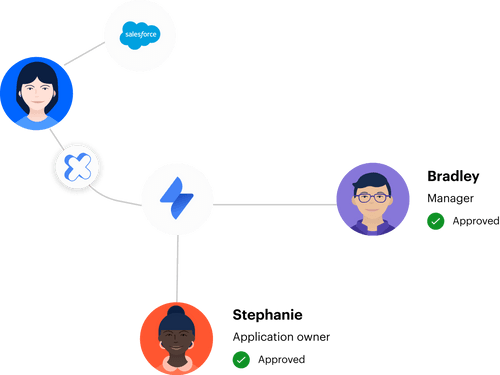
Most teams start with a pretty reasonable setup. Employees submit requests in Jira. Managers approve in Slack or email. IT makes the change in Okta, Entra, or Google Workspace. Someone updates the ticket, if they remember. On paper, not terrible.
Then volume shows up.
At 50 requests a month, this feels manageable. At 500, the gaps start showing. A manager misses the Slack message. IT grants the wrong role because the ticket didn't include enough context. Someone forgets to remove admin access after the incident. The ticket says "approved," but the identity provider shows a different story. You're not running an approval workflow anymore. You're reconciling four versions of the truth.
The mistake is assuming the separate portal is the control system. It isn't. The control system is the full path from request to evidence, and every tool boundary adds another place for the process to fail. If you're trying to bring that path back into one operating model, Learn more about Multiplier after you've mapped where your approvals, access changes, and evidence split today.
Evidence gets rebuilt after the work is done
The painful part of access governance is not always the request backlog. Honestly, the backlog is visible, so at least people complain about it. The audit mess is worse because it builds up in the background until someone asks for proof. Then everyone scrambles.
Picture a Workplace Technology manager on a Thursday afternoon before a SOC 2 evidence deadline. They open Jira and find the access request. Good start. Then they search Slack for the approver's message, check Okta for the group assignment, export a list from Google Workspace, and paste screenshots into a folder. The access was probably approved correctly. But proving it takes longer than the original request.
That is backwards. Evidence should be a byproduct of normal work. If the request, approval, provisioning action, and revocation all live against the same Jira issue, the audit trail becomes much easier to trust. If they don't, you're asking the team to become archaeologists every quarter. And nobody joined IT to dig through screenshots.
Approval speed can hide privilege risk
Fast approvals feel good. Employees stop waiting, IT looks responsive, and Managers feel like blockers are gone. I get the appeal, because nobody wants to be the team slowing down onboarding, incidents, finance close, or engineering work.
The catch is that speed without expiry creates standing privilege. A developer asks for production access for 2 hours and still has it 2 months later. A contractor gets a SaaS license for a project and stays in the group long after the project ends. A finance user gets elevated reporting access during month-end and nobody circles back. Approval happened, but least privilege didn't.
Approval workflows for access need to answer one more question: when should access end? If the answer is "when someone remembers," the workflow is broken. Not because people are careless. Because memory is not a control.
How to Build Approval Workflows for Least Privilege
Implementing approval workflows for least privilege means designing the workflow around risk, not convenience. The goal is to make low-risk access easy, high-risk access deliberate, and temporary access expire without human cleanup. Done well, the workflow gives employees what they need without creating standing access that lingers.
Diagnose which requests actually need friction
Before you touch a routing rule, answer these five questions about your current queue: Can this role expose customer data, PII, or financial records? Does the app cost more than $500 per seat per year? Is the access elevated, admin-tier, or production-tier? Is the app already standard for the requester's department? Does the request include a role name and business reason, or just an app name? Your answers sort every request into low, medium, or high risk. That sort is the workflow.
Start with 30 days of tickets. Pull app name, role requested, requester department, approver, time to approval, and whether provisioning was manual. Then mark each request against those five questions. Low-risk might be viewer access to a standard tool. Medium-risk might be paid SaaS access with business owner approval. High-risk might be admin access, production systems, finance tools, customer data, or anything auditors usually ask about.
The conditional rules that fall out are simple:
- If the role can expose sensitive data, require explicit approval.
- If the role costs money but carries low security risk, route to the app owner or budget owner.
- If the role is elevated or temporary by nature, make duration mandatory.
- If the app is standard for a department, pre-approve it through policy.
- If the request lacks role context, don't let it enter the queue yet.
This prevents fake maturity. A team can have a fancy approval workflow and still treat every request the same. That usually means the workflow is either too strict for routine work or too loose for risky work. Both create problems. Segmentation fixes that before automation makes the wrong process faster.
Put intake where employees already work
Employees don't care about your governance architecture. They care about getting access and getting back to work. If the request path feels weird, they'll ask in Slack, DM the app owner, tag IT in a channel, or submit a vague ticket that says "need access." And then IT becomes the translator.
The intake layer should collect enough context up front. App, role, business reason, duration, manager or app owner, and anything else needed to approve without a back-and-forth. Missing context is one of the biggest hidden costs in access workflows. The ticket sits there, not because anyone disagrees, but because nobody knows whether "Salesforce access" means viewer, editor, admin, sandbox, production, temporary, or permanent.
A self-service catalog solves part of this because it gives people sanctioned choices. Not a blank form. Not a free-text field. A clear list of approved applications and roles. That matters because the workflow can route based on structured data instead of whatever the employee typed at 11:07 PM.
There is a valid counterpoint. Some teams like open-ended requests because they feel flexible. Fair. Under 200 employees, that flexibility often works fine because IT knows most of the requesters by name. Past 500 employees, flexibility becomes ambiguity, and ambiguity becomes delay. The goal isn't to remove human judgment. The goal is to stop wasting judgment on incomplete requests.
Route approvals by ownership, not org chart alone
Manager approval is useful, but it's not always enough. A manager may know whether the employee needs the tool, but they may not know whether the requested role is risky. App owners often understand the access model better. Security may need to weigh in on privileged access. Finance may care about licenses. One approver rarely has the full picture.
A good workflow routes by ownership. For standard access, the manager might be enough. For application-specific roles, the app owner should decide. For elevated privileges, route to the system owner or security owner. For expensive licenses, include whoever owns the budget. And if the request is low-risk and policy-approved, skip the manual approval entirely.
Before you build routing rules, write down the decision rights:
- Managers approve business need because they understand the employee's role.
- App owners approve role fit because they understand the application.
- Security approves elevated access because they understand exposure.
- IT executes or automates the change because they own the identity path.
- Auditors review evidence because they need proof, not vibes.
This works because it separates "should this person have access?" from "what exact access should they have?" Those are different decisions. When you collapse them into one approval, you either slow everything down or approve things without enough context. Neither is great.
Make temporary access the default for elevated roles
Elevated access should have an expiry date. Not sometimes. Not only when someone remembers. Always, unless there's a clear reason for standing access. Admin roles, production access, sensitive datasets, finance controls, and privileged repositories should be treated like a timed lease, not a permanent key.
The conditional rule is simple. If the access is needed for a task, incident, migration, audit, or project, set a duration. If it's needed as part of the person's core job, make it standing access and review it regularly. If nobody can explain which bucket it belongs in, don't approve it yet. That one rule prevents a lot of privilege creep.
This is where implementing approval workflows for least privilege becomes real. Policy documents are fine, but they don't remove access. Timers do. A 1-hour, 6-hour, or 24-hour window changes the behavior. The person gets what they need, does the work, and the access drops off without someone opening a cleanup ticket next week.
The tradeoff is that time-bound access can annoy people if the duration is too short. That's fair. During incidents, you don't want engineers re-requesting access every 15 minutes. Set default windows by use case. One hour for quick checks, 6 hours for project work, 24 hours for on-call or incident response. The point is not to create friction. The point is to stop temporary access from becoming permanent by accident.
Treat provisioning as part of the approval workflow
Approval without provisioning is only half a workflow. The approver says yes, and then IT still has to add the person to the right group. That manual step is where delays, mistakes, and evidence gaps happen. It also turns IT into a human API between Jira and the identity provider.
The cleaner model is to map approved roles to identity provider groups. Once the request reaches the approved state, the workflow adds the user to the right group. If access needs to expire, the workflow removes the user from the group when the timer ends. For SSO apps, that group membership becomes the authoritative path into the application. Much cleaner.
In my view, this is the part teams underestimate. They spend weeks debating approval policy, then leave provisioning as a manual step. The actual control is not the click on "approve." The control is whether the approved state leads to the correct identity change, and whether the record proves it happened. If your approvals already happen around Jira tickets and Slack messages, See how Multiplier works against that handoff before you build another routing table or spreadsheet tracker.
Run access reviews with usage context
Quarterly access reviews fail when reviewers see a spreadsheet full of names and groups with no context. They rubber-stamp because they don't know what changed. They don't know when the user last logged in. They don't know whether the role maps to an actual business need. And they definitely don't want to chase 40 people for explanations.
Reviews should show the reviewer enough context to make a real decision. User attributes, department, job title, group membership, last login, and a recommendation based on inactivity all help. Without that, the reviewer is guessing. With that, they can mark keep or revoke and explain why. Big difference.
A useful threshold is 90 days of inactivity for review attention. Not automatic removal in every case, because some tools are seasonal or role-specific. If someone hasn't logged in for 90+ days, the reviewer should have to actively justify keeping access. That flips the burden in the right direction.
Access reviews also need enforced revocation. If a reviewer marks revoke and IT has to manually clean it up later, you're back to the same problem. The decision and the change need to live together. Otherwise, your review campaign becomes another to-do list with audit language sprinkled on top.
How Multiplier Makes Jira Governance Enforceable
Multiplier makes Jira governance enforceable by keeping access requests, approvals, provisioning actions, revocations, access reviews, and audit evidence tied to Jira issues. It uses Jira Service Management and Slack for the workflow people already use, then executes changes through identity provider groups in Okta, Entra ID, or Google Workspace.
Jira-native requests and Slack approvals reduce the handoffs
Multiplier gives employees a Jira-native application catalog where they can request sanctioned apps and roles instead of sending vague messages to IT. The catalog syncs apps and groups from the identity provider, and each role can map to the right group. Requests create Jira issues, approvals route to managers, app owners, or specific users, and approvers can act in JSM or Slack.

That sounds simple, but it's a big shift. The ticket is no longer just a request container. It becomes the control record. Multiplier writes the approval, provisioning status, and follow-up changes back to Jira, which means the audit trail isn't rebuilt later from Slack messages and screenshots. The same pattern applies to access reviews, where reviewers see user attributes, groups, last login, and recommendations inside JSM before choosing keep or revoke.
For teams implementing approval workflows for access at scale, the win is fewer dropped handoffs. A request doesn't need to move from Jira to Slack to Okta to a spreadsheet and back again. Multiplier keeps the workflow anchored to the Jira issue while still letting people approve in the place they already check all day.
Time-bound access and reviews make least privilege stick
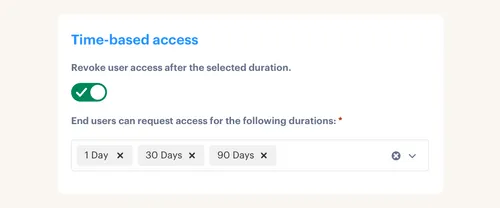
Multiplier's Time-Based Access makes elevated access temporary by default when the access is provisioned through identity provider group membership. A requester can choose a duration like 1, 6, or 24 hours, the approved request adds them to the mapped group, and expiry removes them from that group automatically. The grant and revocation are logged back to Jira.
Access Reviews handle the broader certification side. Admins create campaigns for approved apps, assign reviewers, and give them context like groups, user attributes, last login, and recommendations. When a reviewer marks revoke, Multiplier removes the user from the relevant identity provider groups and creates Jira tickets documenting the change. Admins can export campaign results as CSV or push evidence to Vanta.
That closes the loop from request to review. The earlier problem was evidence getting rebuilt after the work was done. Multiplier changes the shape of that work by generating the record as the workflow runs. If those are the gaps you're trying to close before the next audit, Get started with Multiplier while the process is still fresh.
Approval Workflows Should Prove Control Automatically
Implementing approval workflows for access shouldn't create more places for IT to check. The workflow should capture the request, route the decision, execute the identity change, expire temporary access, and preserve evidence without forcing someone to stitch the story together later.
That's the real bar. Not prettier tickets. Not another portal. A working approval process proves who asked, who approved, what changed, when it expired, and why it was kept or revoked during review. Once you have that, least privilege becomes much easier to run.
And audits get a lot less dramatic.
Frequently Asked Questions
How do I set up time-based access for temporary roles?
To set up time-based access using Multiplier, follow these steps: 1) When an employee submits a request through the Jira Service Management (JSM) portal or Slack, ensure they select a duration for access (like 1, 6, or 24 hours). 2) After approval, Multiplier will automatically provision access and set a timer to revoke it once the duration expires. 3) This process ensures that elevated access is temporary by default, minimizing the risk of standing privileges. You can also configure default durations based on use cases to streamline access further.
What if I need to revoke access during an access review?
If you need to revoke access during an access review, here's what to do: 1) Use Multiplier's Access Review feature to create a campaign where reviewers can see user attributes, last login dates, and group memberships. 2) Reviewers can mark users as 'Keep' or 'Revoke' directly within the JSM dashboard. 3) When a reviewer selects 'Revoke', Multiplier will automatically remove the user from the relevant identity provider groups and create a Jira ticket documenting the change. This keeps your access management streamlined and auditable.
Can I automate access requests for non-SSO applications?
Yes, you can automate access requests for non-SSO applications using Multiplier. Here’s how: 1) Admins can manually add custom applications to the Multiplier Application Catalog, even if they are not integrated with SSO. 2) When employees request access to these apps, the approval process will still be captured in Jira, making sure you maintain an audit trail. 3) However, provisioning for these non-SSO apps will remain manual, so IT will need to handle the actual access grant after approval.
When should I implement automated provisioning?
You should implement automated provisioning when you notice delays or errors in adding users to the correct groups. To do this: 1) Ensure your identity provider (like Okta or Azure AD) is integrated with Multiplier. 2) Set up your access requests in JSM so that once an approval is granted, Multiplier can automatically provision users to the right groups. 3) This will reduce manual steps, minimize errors, and speed up the access process, especially for high-volume requests.
Why does my team need a self-service access catalog?
A self-service access catalog is essential for several reasons: 1) It simplifies the access request process by allowing employees to browse and select from approved applications, reducing confusion and incomplete requests. 2) Multiplier's catalog syncs with your identity provider, making sure that requests include the right context upfront. 3) This not only speeds up approvals but also enhances governance by maintaining a clear audit trail of requests and changes, all within Jira.


