


One 420-person AI company processed more than 3,800 access requests in a year with a four-person IT team. Seventy-five percent of those requests were fully automated. That kind of output doesn't come from writing a longer access policy. It comes from making the approval decision executable.
An ITIL-compliant approval matrix for access requests should define who decides, what evidence they need, and what happens after approval. Most matrices only cover the first part. The Jira ticket gets approved, then an IT admin manually updates a group in Okta, Entra ID, or Google Workspace. Control exists on paper. Execution is still based on memory.
Key Takeaways:
- Build approval rules around access risk, not application names alone.
- Assign named decision owners and backup approvers for every route.
- Make duration part of the request for elevated access.
- Provision through your identity provider so changes stay authoritative.
- Test the full chain from request through revocation and evidence.
- Keep the approval, identity change, and audit record connected in Jira.
Why Approval Matrices Fail Outside the Workflow
Approval matrices fail when they describe decisions without controlling execution. The document may look complete, but the real process crosses Jira, Slack, an identity provider, and sometimes a spreadsheet. Every handoff creates room for delay, wrong group assignments, missed revocations, or incomplete audit evidence.

A Signed Ticket Doesn't Prove Access Was Correct
On a Friday afternoon, an engineer requests temporary admin access through Jira. Their manager approves it, followed by the application owner. An IT admin then opens the identity provider, searches for the right group, adds the engineer, and comments "done" on the ticket. Nobody sets an expiry because the request form didn't require one.
The approval matrix technically worked. Two authorized people made the decision. Yet the actual entitlement was selected by an admin working from memory, and temporary access became standing access. I get why teams accept this process when volume is low. It feels controlled because Jira has an approval record, but the record doesn't prove the right identity change happened.
Tool Handoffs Break the Control Chain
An approval matrix works like a routing table. It tells a request where to go based on risk, role, and application. If the route ends at "approved" instead of continuing through provisioning and revocation, the most important part of the journey sits outside the control.

Jira may hold the request while Slack holds the discussion. The identity provider holds the actual group membership, and a spreadsheet explains which group maps to which role. During an audit, somebody has to reconstruct the chain across all four systems. That's not an evidence problem. It's a workflow design problem, and another policy document won't fix it.
Manual Enforcement Turns Exceptions Into Permanent Access
A fintech company with nearly 1,200 employees had hundreds of routine requests arriving through Slack, email, and Jira. IT staff chased managers, manually assigned Okta groups, and recreated audit logs after the work was done. Each request took 5 to 30 minutes, depending on who needed to approve it. After connecting approvals to automated group changes, the company reduced IT workload on access requests by 80%.
The lesson isn't that every approval should disappear. High-risk access still needs judgment, and some non-SSO applications will remain manual. The stronger point is that approved decisions should trigger a defined action whenever the identity stack supports it. A practical view of that Jira-to-identity-provider handoff appears in Multiplier's Jira-native approval model, where the ticket stays connected to the access change.
Policy-heavy least privilege sounds responsible. Without operational enforcement, it usually creates more standing privilege.
How to Build an ITIL-Aligned Approval Matrix That Executes
A working ITIL-aligned approval matrix connects request type, risk, approver, provisioning action, duration, and evidence. You can build it without buying another portal. Start by mapping the real workflow, then make each approved decision produce a predictable identity change.
Diagnose Where Your Current Matrix Stops
Where does your approval matrix actually end? If the last controlled step is a manager clicking Approve, you have an approval routing document, not an enforced access process. The distinction matters because most errors happen after the decision, during group selection, provisioning, extension, or revocation.
Run one recent request from beginning to end. Don't ask what the policy says. Look at what happened in Jira, Slack, and the identity provider, including any side conversation the ticket didn't capture. Frankly, this exercise can get uncomfortable. That's useful because it exposes the exact point where formal control becomes manual effort.
Check four things in order:
- Decision: Who approved the exact role and access duration?
- Execution: Which identity provider group changed after approval?
- Removal: What event removes the entitlement?
- Evidence: Can one record show the request, approval, grant, and removal?
If you can't answer one question from the ticket history, mark that point for redesign.
Separate Access Risk From the Application Name
Viewer access and administrator access to the same application shouldn't follow the same route. A matrix organized only by application misses the entitlement that creates the real risk. Before approving any design, ask whether the requested role can change settings, view sensitive data, manage users, or affect production.
A three-tier structure is usually enough to start. Low-risk, pre-mapped roles can follow a simple route. Sensitive roles need an accountable owner, while privileged roles should require a reason, a short duration, and stronger review. Not every company needs three tiers, and a ten-person startup may reasonably use two. The rule still holds: route based on what access lets someone do.
An ITIL-compliant approval matrix for access requests becomes much easier to manage once role risk drives the route.
Give Every Decision a Named Owner
One missing owner can stall an otherwise solid workflow. A requester selects an application, Jira looks for an approver, and the ticket sits because "Finance systems" isn't a person. Group aliases feel flexible, but they often hide the fact that nobody is accountable for the decision.
Assign a primary approver and backup route for each role. Use the requester's manager when business need is the main question. Use the application owner when the decision requires knowledge of licenses or data exposure. For privileged access, add the review required by your internal policy, then make Jira enforce the sequence rather than asking IT to remember it.
Before publishing the matrix, verify:
- Every application role has a primary decision owner.
- Departed or unavailable owners have a defined fallback.
- Auto-approved roles have explicit eligibility rules.
- Denials require enough context for the requester to correct the request.
- Approval changes remain attached to the originating ticket.
Named ownership slows some high-risk requests. That's a fair trade when the decision requires real judgment. Routine access shouldn't inherit the same delay, which is why risk-based routing matters.
Put Duration Inside the Approval Decision
Temporary access shouldn't rely on a calendar reminder. Once duration sits outside the approval request, the approver is deciding only whether access can begin. Nobody is clearly deciding when it must end, which is how a one-hour task becomes a six-month entitlement.
Make the requester choose a duration before submission. For elevated roles, offer narrow options such as 1, 6, or 24 hours based on the work being performed. The approver then evaluates the role, reason, and duration together. If access expires while the work continues, handle the extension through a defined request path instead of granting permanent membership "just in case."
A duration-aware flow should run like this:
- The requester selects an application, role, reason, and duration.
- Jira routes the request according to role risk.
- Approval triggers the mapped identity provider group change.
- Expiry removes the user from that group.
- Both changes are recorded against the same request.
A concrete implementation of that flow appears in the Multiplier workflow, which keeps the request, decision, group change, and expiry connected.
Provision Through the Identity Provider
Jira should control the workflow, but your identity provider should execute supported entitlement changes. Okta, Entra ID, or Google Workspace already holds the authoritative user and group data. Sending approved changes through that layer reduces copy-and-paste work and keeps downstream SSO provisioning tied to managed group membership.
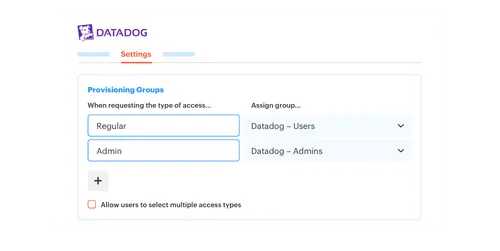
Map each approved catalog role to a specific identity provider group. When Jira reaches the approved status, the workflow should call the identity provider to add the requester to that group. Revocation should reverse the same mapping. Because the request and action share an identifier, IT can tell which approval produced which entitlement.
Before automating, test the route:
- Submit a request with a known test user.
- Confirm the correct approver receives it.
- Approve the request and verify the expected group membership.
- Reject a second request and confirm no change occurs.
- Let a time-bound request expire and verify removal.
- Review the Jira issue for success or error details.
Some applications can't be provisioned through identity provider groups. Keep those applications in the catalog for standardized intake and approvals, then mark fulfillment as manual. Don't pretend a manual grant can auto-revoke.
Make Audit Evidence a Workflow Output
More than 3,800 requests in one year sounds like an audit nightmare when evidence is rebuilt later. At one fast-growing AI company, 75% of those requests were fully automated, allowing four IT staff to support more than 420 employees. The efficiency came from removing routine handoffs, not removing control.
For every request, the ticket should answer six questions: who asked, what role they requested, who approved, what changed, when it changed, and when access ended. Evidence gathered during the workflow is more reliable than screenshots collected months later. It also makes failed actions visible while somebody can still correct them.
Test your ITIL approval matrix with three awkward cases:
- An approver leaves the company during an open request.
- A user changes departments while holding sensitive access.
- A time-bound group removal fails at expiry.
A mature process doesn't hide those exceptions. It routes them into visible work with an owner and recorded outcome. That's the difference between an approval matrix that documents intent and one that survives real operations.
How Multiplier Turns Approval Rules Into Enforced Access
Multiplier puts the approval matrix inside Jira Service Management and connects approved requests to identity provider group changes. Employees request access in JSM or Slack, approvers act through the configured workflow, and supported provisioning runs through Okta, Entra ID, or Google Workspace. The Jira issue remains the record connecting each decision to the resulting action.
Jira-Native Catalog and Approval Routing
The Application Catalog shows approved applications and roles inside the JSM portal. Each role can map to one or more identity provider groups, while custom non-SSO applications can still use the catalog for structured intake and audit history. Employees get one request path instead of choosing between Slack, email, and a ticket.
Approval Workflows route each request to a manager, application owner, or specified user. Notifications can go through JSM and Slack, with approvers acting from either place. The Slack experience doesn't support every portal option, which matters for some configurations. Jira still remains the system of record for the request and decision.
Group Provisioning With Enforced Expiry
After a Jira issue reaches the configured approved status, automated provisioning calls the connected identity provider and adds the user to mapped groups. The platform provisions through identity provider groups rather than clicking around inside individual SaaS applications. For SSO applications, those group changes can flow downstream through the organization's existing setup.

Time-Based Access adds a duration timer to that group membership. At expiry, the identity provider group membership is removed, and the change is recorded in Jira. Automatic removal requires group-based provisioning, so purely manual grants can't use the same expiry enforcement. That boundary matters because it keeps the approval matrix honest.
Access Reviews Connected to Revocation
Access Reviews run as Jira-native campaigns for approved applications. Reviewers see user details, group membership, job information, last login data, and recommendations before choosing Keep or Revoke. A revocation removes the relevant identity provider group membership and creates the related Jira record.
The same model fixes the gap that caused 5-to-30-minute manual requests and missing expiry evidence earlier. If your main problem is the handoff between an approved Jira issue and the identity provider change, get started with Multiplier by mapping one sanctioned application role and testing the full route.
What a Working Approval Matrix Changes
A working approval matrix turns access policy into repeatable action. Requests follow routes based on role risk, approvals come from accountable owners, and supported changes execute through the identity provider. Time-bound access expires without somebody remembering to remove it, while Jira retains the linked evidence.
Start with one high-volume application and one privileged role. Map the current request from submission through revocation, then fix the first uncontrolled handoff. Once that route works, add the next role. You don't need a larger policy. You need the approved decision to become the actual identity change.
Frequently asked questions
- How do I set up automated access requests with Multiplier?
To set up automated access requests using Multiplier, start by integrating it with your identity provider like Okta or Google Workspace. Then, create an Application Catalog in your Jira Service Management (JSM) portal. This catalog will display approved applications and roles for employees to request access. Once a request is made, Multiplier will automatically route it to the designated approvers and provision access based on the approved roles, reducing manual effort and speeding up the process.
- What if I need to revoke access for a user?
If you need to revoke access for a user, you can initiate an Access Review campaign within Multiplier. This campaign allows you to review user access and decide whether to keep or revoke permissions. Once a decision is made, Multiplier will automatically remove the user from the relevant identity provider group, ensuring that access is revoked efficiently and logged in Jira for audit purposes.
- Can I customize access durations for requests?
Yes, you can customize access durations for requests in Multiplier. When setting up your Application Catalog, specify the available time-based access options for each role (e.g., 1 hour, 6 hours, or 24 hours). This allows requesters to choose a duration when submitting their access requests, ensuring that elevated access is temporary and reduces the risk of overprovisioning.
- When should I use manual provisioning instead of automated?
Use manual provisioning when dealing with applications not integrated with your identity provider or non-SSO apps. In these cases, approvals can still be captured through Multiplier, but provisioning will need to be handled manually by an IT agent. This keeps an audit trail for all requests, even when the provisioning process isn't automated.
- Why does my approval matrix need named decision owners?
Named decision owners ensure accountability in the approval process. Without clear ownership, requests stall and access provisioning gets delayed. By assigning primary approvers and backup routes for each role, you streamline decision-making and ensure all requests are handled in line with your organization's policies.


