


These two platforms dominate the IT service management space for good reason. They both handle the core ITSM functions: incident management when systems go down, problem management to prevent repeats, change management for controlled rollouts, and asset management to track your hardware and software. But they approach these tasks with different philosophies.
Let's break down what actually matters when choosing between them.
What Jira Service Management and Freshservice actually do
Freshservice is a cloud-native ITSM platform built by Freshworks. It launched with simplicity as a core principle. The interface is clean, setup is guided, and you can have a functional service desk running within hours rather than days.
Jira Service Management comes from Atlassian, built on the same platform that powers Jira Software. It inherits Jira's legendary flexibility. If you can dream up a workflow, JSM can probably handle it. But that power comes with complexity.
Both tools cover the ITSM basics:
- Incident management for when things break
- Problem management to find root causes
- Change management for controlled deployments
- Asset management to track IT inventory
- Knowledge bases for self-service
- Service catalogs for standardized requests
The difference is in how they deliver these features. Freshservice prioritizes getting you up and running quickly. JSM prioritizes giving you control over every detail.
Pricing comparison: what you'll actually pay
Let's talk numbers. Pricing structures differ between these platforms, and the "cheaper" option depends on your team size and which features you need.
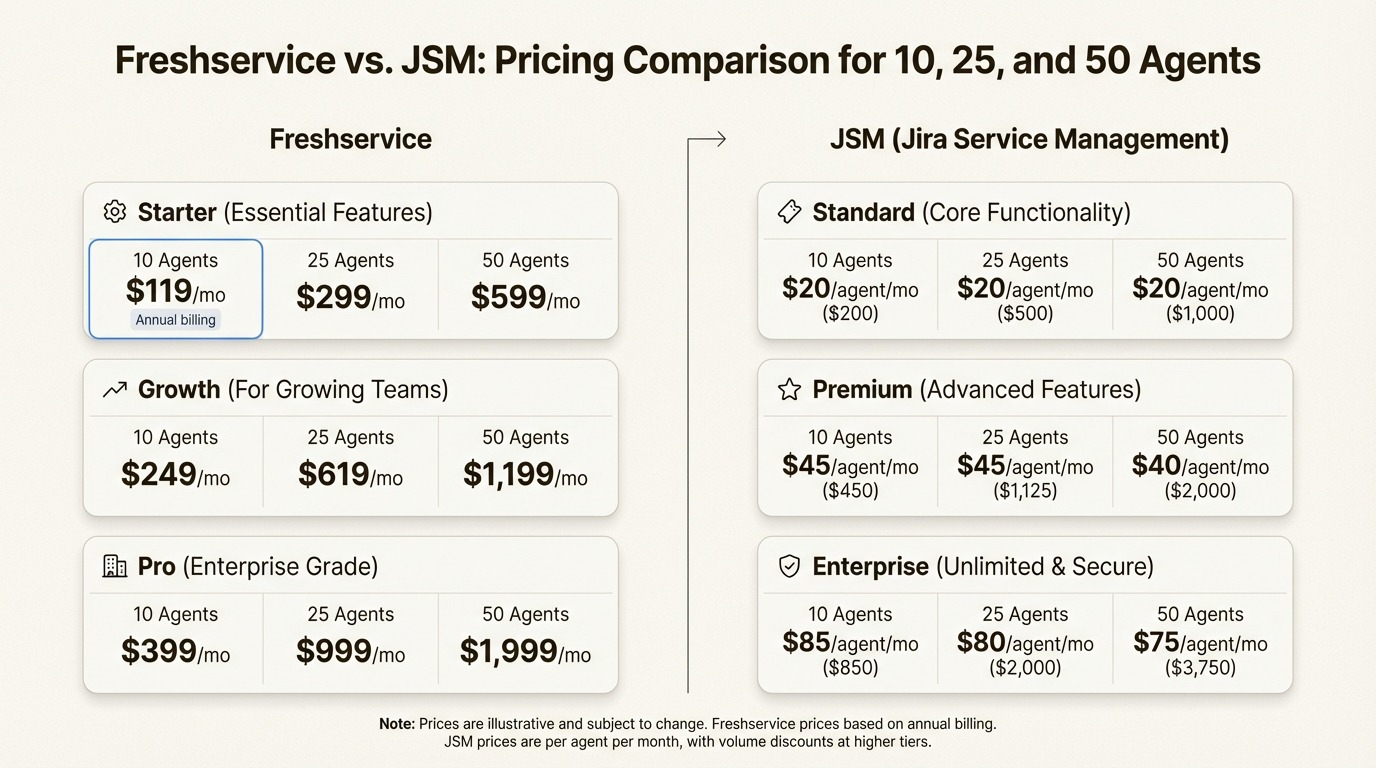
At smaller team sizes, JSM's free tier gives it an edge. But as you scale, the math shifts. A 50-agent team on Freshservice Growth pays $2,000 monthly. The same team on JSM Premium pays around $2,391. That's roughly $4,700 more per year for JSM.
But the sticker price doesn't tell the whole story. Freshservice includes asset management and CMDB capabilities in its mid-tier plans. JSM requires Premium or add-ons for equivalent functionality. Factor in implementation costs, and Freshservice often wins on total cost of ownership for teams without dedicated Atlassian administrators.
Core features compared
Both platforms check the ITSM feature boxes. The differences emerge in how those features work in practice.
Incident management
Freshservice approaches incidents with speed in mind. AI-powered categorization routes tickets automatically. Escalation matrices ensure nothing sits unresolved. The interface prioritizes getting agents the information they need quickly.
JSM offers more control. On-call scheduling is built in. Dependency tracking between issues helps you understand blast radius. Integration with Opsgenie (included in Premium) adds sophisticated alerting. But configuring these capabilities takes more effort.
Asset management
This is where Freshservice pulls ahead. Asset discovery, CMDB, and software license management come built-in. You can scan your network, track hardware lifecycles, and manage contracts without additional purchases.
JSM's asset management requires the Premium plan or third-party plugins. The functionality exists, but you'll pay extra and spend time on configuration.
Change management
JSM shines here. The change management module includes risk assessment tools, change calendars for scheduling, and built-in approval workflows. Change Advisory Board functionality supports enterprise processes.
Freshservice handles changes adequately but with less sophistication. The basics are there. Complex enterprise change processes may feel constrained.
AI capabilities
Freshservice's Freddy AI integrates throughout the platform. It drafts ticket responses, classifies incoming requests, powers a self-service chatbot, and surfaces performance insights. The AI feels like a natural part of the experience rather than a bolt-on feature.
JSM's Atlassian Intelligence offers virtual agents, knowledge base suggestions, and issue summarization. The capabilities are growing but currently less comprehensive than Freddy's integration.
Ease of use and implementation
Gartner Peer Insights tells the story. Freshservice scores 4.3 out of 5 from 840 ratings. JSM scores 4.4 out of 5 from 1,009 ratings. Both are well-regarded, but the review comments reveal different user experiences.
Freshservice users consistently praise the intuitive interface:
JSM users appreciate the power but acknowledge the learning curve:
Freshservice's guided setup process gets teams productive faster. JSM rewards teams willing to invest in configuration with workflows tailored to their exact needs.

Integrations and ecosystem
Your existing tool stack should influence this decision significantly.
JSM connects deeply with the Atlassian ecosystem. If your developers live in Jira Software, your documentation lives in Confluence, and your code lives in Bitbucket, JSM feels like a natural extension. The 3,000+ apps in the Atlassian Marketplace extend functionality in virtually every direction.
Freshservice offers 500+ integrations covering the major tools: Slack, Microsoft Teams, GitHub, GitLab, Okta, Azure AD. The Freshworks suite provides additional value if you use Freshdesk for customer support or other Freshworks products.
For development-heavy organizations, JSM's integration advantage is substantial. Tickets can link directly to code commits, pull requests, and deployments. For general IT operations, both platforms connect to the tools that matter.
Which teams should choose which platform
The right choice depends on your context more than feature checklists.
Choose Freshservice if
- You need quick implementation without dedicated IT resources
- Asset management is a priority (the built-in CMDB is genuinely good)
- Your team values intuitive UI over deep customization
- You're in education, healthcare, or running an SMB
- You want AI features that work out of the box
- You prefer predictable all-in-one pricing
Freshservice customers include the University of Aberdeen, Radisson Hotel Group, and Aramex. These organizations value reliability and ease of use over infinite configurability.
Choose Jira Service Management if
- You're already invested in the Atlassian ecosystem
- You need complex, customized workflows that map to specific processes
- You have technical resources for administration and configuration
- DevOps integration is critical to your operations
- You plan to scale to enterprise size with sophisticated requirements
- Your teams span IT, development, and business units on one platform
JSM customers include Canva, Domino's, and ISS Group. These organizations leverage JSM's flexibility to support complex, multi-team service operations.
Managing access in your ITSM platform
Both JSM and Freshservice handle service requests, but access management often extends beyond what ITSM platforms handle natively. Provisioning users across dozens of SaaS applications, running quarterly access reviews for compliance, and automating onboarding workflows typically requires additional tooling.
For teams using Jira Service Management, access request automation can streamline the provisioning process. Instead of manually adding users to groups in Okta or Azure AD after ticket approval, automation handles the last mile.
If you're running access reviews for SOC2 or ISO 27001 compliance, consider how those workflows integrate with your ITSM choice. The same applies to employee onboarding automation. Your ITSM platform handles the tickets, but the actual provisioning and lifecycle management may need complementary tools.
Multiplier integrates directly with JSM to automate these identity governance workflows. If you're already on JSM or considering it, factor in how access management, reviews, and provisioning will work alongside your service desk.
Making the right choice for your organization
Let's break it down simply.
Freshservice wins on simplicity and speed to value. You can be operational this week with minimal configuration. The built-in asset management and intuitive interface reduce the administrative burden. The tradeoff is less flexibility for complex, custom workflows.
JSM wins on flexibility and ecosystem integration. If you need workflows that map to unique processes, or if your organization already runs on Atlassian tools, JSM provides unmatched integration. The tradeoff is implementation complexity and a steeper learning curve.
Both platforms have satisfied customers. Both handle ITSM fundamentals well. Your decision should hinge on:
- Timeline: How quickly do you need to be operational?
- Resources: Do you have dedicated administrators?
- Existing tools: Are you already in the Atlassian ecosystem?
- Complexity: Do you need custom workflows or will standard ITSM processes suffice?
- Budget: Factor in total cost including implementation, not just per-agent pricing
The "best" tool is the one your team will actually use. A powerful platform that sits underutilized because of complexity delivers less value than a simpler tool that fits your team's capabilities.
Trial both with real use cases. Freshservice offers a 14-day trial. JSM offers 7 days on paid plans or unlimited use of the free tier. Put them through your actual workflows before committing.
Frequently Asked Questions
Is JSM or Freshservice better for small IT teams?
Freshservice generally fits smaller teams better. The guided setup, intuitive interface, and faster time-to-value mean you can be operational without dedicated administrators. JSM's complexity pays off more at scale or when you need custom workflows.
How does JSM vs Freshservice pricing compare at 100 agents?
At 100 agents, Freshservice Growth runs $4,000 monthly while JSM Premium runs approximately $4,782. However, Freshservice includes asset management and CMDB that JSM requires Premium or add-ons to match. Total cost of ownership often favors Freshservice for teams without existing Atlassian expertise.
Can Freshservice integrate with Jira Software like JSM can?
Freshservice integrates with Jira Software through available connectors, but the integration isn't as seamless as JSM's native connection. If your developers live in Jira Software and tight integration is critical, JSM provides a smoother experience.
Which platform has better AI features: JSM or Freshservice?
Freshservice's Freddy AI is more deeply integrated throughout the platform, offering chatbot capabilities, ticket classification, and predictive insights out of the box. JSM's Atlassian Intelligence is growing but currently less comprehensive.
Does either JSM or Freshservice include asset management?
Freshservice includes asset management and CMDB capabilities in its base and mid-tier plans. JSM requires the Premium plan or third-party add-ons for equivalent asset management functionality.
How long does implementation take for JSM vs Freshservice?
Freshservice implementations typically run days to weeks for standard configurations. JSM implementations often span weeks to months depending on customization needs. The complexity of your workflows and the availability of dedicated administrators are the main variables.


