


Quarterly access reviews for SOC 2, SOX, and internal security usually don't fail because reviewers are lazy. They fail because the evidence is scattered before the review even starts. Jira has one piece, Slack has another, Okta or Entra has the actual entitlement, and someone eventually rebuilds the whole story in a spreadsheet.
That's the part most teams underestimate. The review meeting isn't the painful part. The painful part is proving what happened, who approved it, when access changed, and whether the revocation actually happened after someone clicked "revoke."
And once headcount starts growing, the mess compounds pretty quickly. A few extra apps, a few new managers, and a few privileged roles nobody wants to touch. Suddenly quarterly access reviews become a cleanup exercise for decisions that should've been captured correctly months ago.
Key Takeaways:
- Quarterly access reviews break when approvals, identity changes, and audit evidence live in different systems.
- The goal isn't just getting reviewers to click Keep or Revoke. The goal is making the decision enforceable.
- Access reviews should focus on exceptions, not asking managers to rubber-stamp every entitlement.
- Time-bound access reduces the number of risky permissions that ever reach the quarterly review.
- Jira-native governance works because the request, approval, provisioning, review, and evidence all stay tied to the same record.
- Chat bots and SaaS tools can move requests faster, but they don't solve governance unless they enforce revocation and keep audit proof.
Why Quarterly Access Reviews Break Inside Jira Teams
Quarterly access reviews break when the review process becomes separate from daily access work. If access starts in Jira, gets approved in Slack, gets changed in the identity provider, and gets reviewed in a spreadsheet, you're not running governance. You're reconstructing history every quarter.

The Review Isn't the Work, the Evidence Is
Most IT teams think the hard part is getting managers to respond. Fair point, because chasing reviewers is annoying. But the real problem is that the reviewer is being asked to make a decision with half the context missing. They see a name, an app, maybe a role, and then they're supposed to know whether that person still needs access.
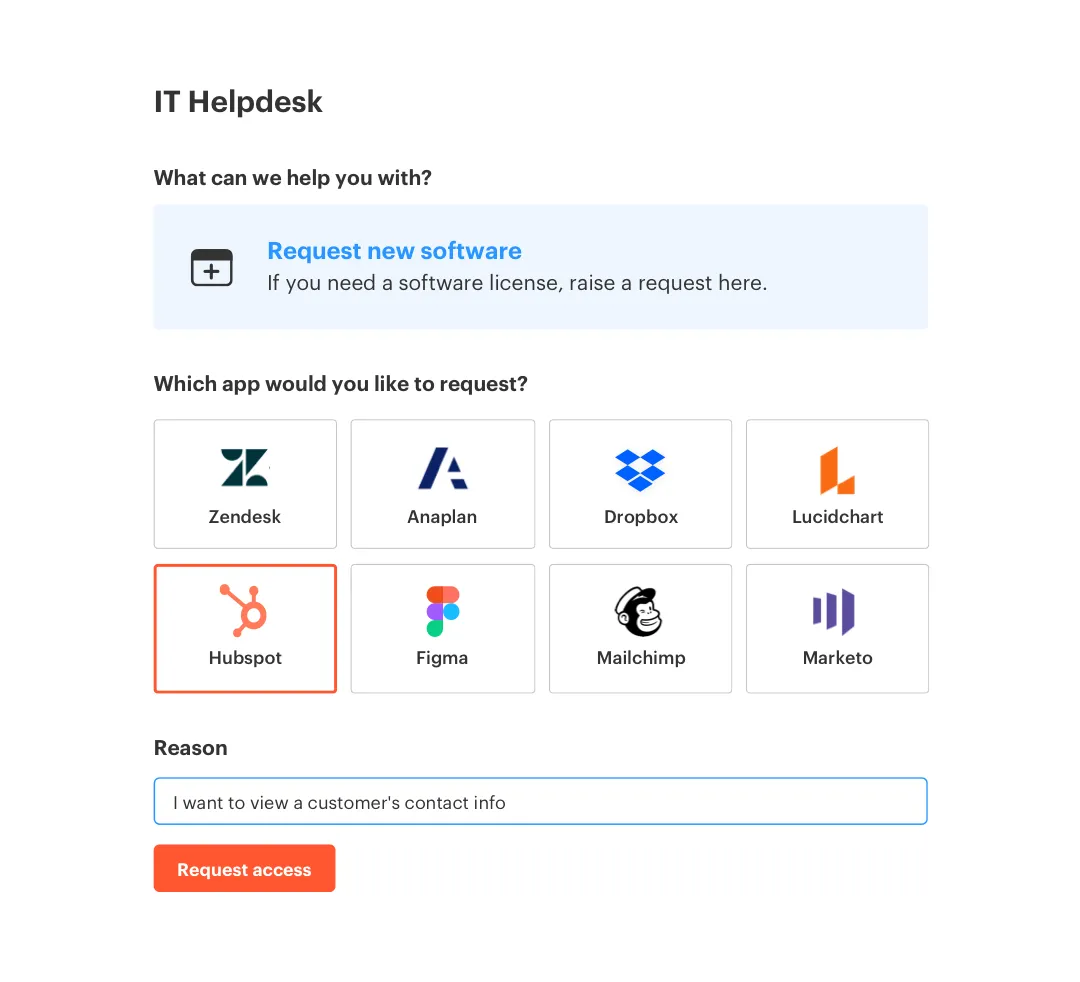
I've seen this pattern a lot in fast-growing teams. Access was originally pretty simple, because everyone knew everyone. Then the company hit 200 employees, then 500, then 1,000, and suddenly nobody knows why a finance analyst has admin access to a reporting tool. The access review becomes archaeology. You dig through Jira comments, Slack threads, screenshots, and IDP group names until you find enough proof to feel okay.
The better test is simple: if an auditor asked why a user had access on a specific date, could you answer from one record in under 2 minutes? If not, your quarterly access reviews for compliance are probably depending on memory, screenshots, and goodwill. That's fragile. It also wastes a ton of time.
Chat Approvals Move Fast, But They Don't Govern
Slack approvals feel like progress because they remove friction. Someone asks for access, the manager clicks approve, and the employee gets unstuck. Honestly, that part is great. Nobody wants to send people into another portal just to request a basic tool.
The issue is what happens after the click. If the approval isn't tied to a Jira issue, and the provisioning isn't tied to the identity provider change, you get speed without control. The access grant happened, but the proof lives somewhere else. The revocation might happen later. Or not. And when review season comes around, the team has to stitch the story back together.
A chat bot is like a front desk at a hotel that hands out room keys without updating the guest system. Fast line. Bad control. The guest gets the key, but housekeeping, billing, and security now have no idea what actually happened. Access works the same way. If chat isn't anchored to the system of record, you're just making the mess move faster.
If your team already handles request intake in Jira, the governance record should start there too. That's the operational gap worth fixing, and it's why Jira-native access workflows are worth a closer look: Learn more about Multiplier.
Standing Access Becomes Normal by Accident
Standing access rarely starts as a strategy. It usually starts as a shortcut. Someone needs admin access for an incident, the team grants it, the incident ends, and nobody removes it because everyone is busy. Then 90 days later, the access shows up in a quarterly review and the reviewer has no idea whether it's still needed.
This is where quarterly reviews get unfairly blamed. The review didn't create the risk. The risk was created weeks or months earlier when access was granted without an expiry. By the time it reaches the certification process, you're asking a manager to clean up a decision that should've had a timer on it from day one.
There's a case to be made for some standing access. Core admins, break-glass accounts, service owners, certain IT roles. Totally valid. But if every elevated role becomes standing access because revocation is manual, the review process will always be overloaded. You can't audit your way out of a provisioning model that creates too many permanent grants.
How to Run Access Reviews Without Rebuilding the Past
The better way to run access reviews is to design the daily access workflow so the quarterly review has less work to do. That means every request has context, every approval is captured, every grant runs through the identity provider, and every revocation is enforced instead of assigned as a follow-up task.
Start With a Red Flag Check Before You Build the Campaign
A useful access review starts before the campaign launches. I like looking for red flags first, because it tells you whether the quarterly review is actually reviewing risk or just collecting approvals. If the review contains hundreds of low-risk entitlements and a few scary privileged roles buried in the middle, reviewers will miss the things that matter.
Ask a few blunt questions before you scope the campaign. Do more than 20% of users have access they haven't used in 90 days? Do privileged roles lack expiry dates? Are app owners different from the people who actually approve access? Can you trace the original approval for each user without leaving Jira? If the answer is no on any of these, the review needs cleanup before it needs a bigger spreadsheet.
The first pass should separate noise from risk:
- Low-risk access: standard apps tied to role or department
- Stale access: users with no recent login activity
- Privileged access: admin, production, finance, customer data, or security roles
- Orphaned access: access with no clear owner or approver
- Manual exceptions: access granted outside the normal workflow
That last bucket matters more than people think. Manual exceptions are where audits get weird. Not always because someone did something wrong, but because nobody can prove what happened later.
Scope Reviews Around Apps, Not Org Charts
Quarterly access reviews for fast-growing teams should start with applications, not departments. Org charts change constantly, managers move, teams split, and new leaders inherit access decisions they didn't make. Apps, especially sanctioned apps, are much more stable as the review object.
Start with the apps that carry the most risk. finance tools, customer data, production systems, code repositories, and admin roles in your IT stack. Once those are in scope, map each app to an owner who can actually make an access decision. Not a generic group. A real person who understands the app and the risk.
A simple rule works well: if the reviewer can't explain what the role allows, they're the wrong reviewer. This sounds obvious, but it gets missed constantly. Managers can confirm whether someone is on their team. App owners can confirm whether the permission level makes sense. Those are different decisions, and mixing them together creates weak reviews.
For lower-risk tools, manager review is usually enough. For higher-risk tools, app owner review should win, and if both are needed, make the workflow explicit. Don't rely on a comment thread where everyone assumes someone else made the real decision.
Put Usage Context in Front of Reviewers
Reviewers make better decisions when they can see usage context. Last login date, group membership, department, job title, manager, and role name all change the answer. Without that context, most reviewers default to Keep because revoking access feels risky. Nobody wants to be the person who breaks someone's work.
Usage data changes the conversation. If a user hasn't logged into an app in 90 days, the reviewer doesn't need to guess. If someone moved departments 45 days ago and still has access to the old team's tool, the pattern is obvious. If a contractor still has access after the engagement ended, the review becomes less political and more operational.
The threshold doesn't need to be perfect. A 30-day inactivity mark may be right for expensive SaaS tools. A 90-day mark may be better for quarterly-use systems. The key is setting a threshold before the review starts, so reviewers aren't inventing rules app by app.
A pattern that works well:
- Use 30 days for high-cost SaaS licenses
- Use 60 days for tools used monthly
- Use 90 days for systems with lower usage frequency
- Flag privileged roles regardless of login activity
- Require a reason when keeping stale access
That final point is underrated. If someone keeps stale access, make them write why. Not an essay. Just enough context so the next review doesn't start from zero.
Make Revoke a Real Action, Not a Ticket Someone Might Do Later
The biggest mistake in access reviews is treating "Revoke" as a recommendation. Reviewer clicks Revoke, the spreadsheet gets updated, and then IT has to manually remove access later. Maybe they do it the same day. Maybe they batch it at the end of the week. Maybe one row gets missed because the group name wasn't clear.

That's not governance. That's a suggestion box.
Revoke should trigger the actual access change through the identity provider. If access is based on Okta, Entra, or Google Workspace groups, the review decision should remove the user from the mapped group and log the action. No copy/paste. No "please confirm when done." No screenshot hunt.
There is a limitation here, and it's worth saying. If an app isn't connected to SSO or doesn't have reliable group-based provisioning, you may still need a manual step. That's fine. But make that exception visible in the review. Don't let manual apps pretend to have the same enforcement quality as automated ones.
The operational rule is pretty clean: if the system can grant access automatically, it should be able to revoke it automatically. Anything else creates a review gap.
Use Time-Bound Access to Shrink the Review Before It Starts
The cleanest quarterly access review is the one with fewer risky permissions in it. Time-bound access does that. Instead of granting someone elevated access forever and hoping a future review catches it, you grant it for 1 hour, 6 hours, 24 hours, or whatever window makes sense.
This matters most for privileged access. Engineers need production access during incidents, finance might need temporary admin access during quarter close, and security may need elevated access during an investigation. All valid use cases. The mistake is turning a temporary need into a permanent entitlement.
At Stavvy, the team cut privileged access by 85% after moving to a time-bound model. They also had 1,300+ access requests automatically revoked after approved windows. That's the direction you want. Not because quarterly reviews go away, but because the review isn't carrying the full weight of least privilege anymore.
If your quarterly access reviews are full of privileged roles, don't start by making the review bigger. Start by asking why so many privileged roles are permanent. That's usually where the real problem lives.
Keep the Audit Trail Inside the Work Record
Audit evidence should be a byproduct of the workflow. The request, approval, provisioning action, review decision, revocation, and export should all trace back to the same system of record. For Jira-heavy teams, that record is usually the Jira issue.
When evidence lives inside the ticket, audits get calmer. You don't need to rebuild the story from Slack screenshots and spreadsheet tabs. You can show who requested access, who approved it, when the IDP group changed, what the reviewer decided later, and whether revocation happened. One chain. Much easier.
A mid-market fintech like Luno ran into the classic version of this problem. Hundreds of routine access requests came in through Slack, email, and Jira, and IT had to chase approvals and manually assign Okta groups. After moving request intake, approvals, provisioning, and audit logging into the same Jira-centered workflow, they reduced IT workload on access requests by 80%. Different company, same lesson: the system of record matters.
If your current process still forces IT to prove access decisions after the fact, the workflow itself is creating the audit burden. The Jira record should be doing more of that work as the request moves: See how Multiplier works.
How the Platform Makes Reviews Enforceable
A Jira-native access governance platform makes reviews enforceable by connecting requests, approvals, provisioning, access reviews, and revocations to the same Jira workflow. The point isn't another place to click buttons. The point is making least privilege operational through the identity provider and leaving audit evidence behind.
Access Review Campaigns Stay Inside Jira
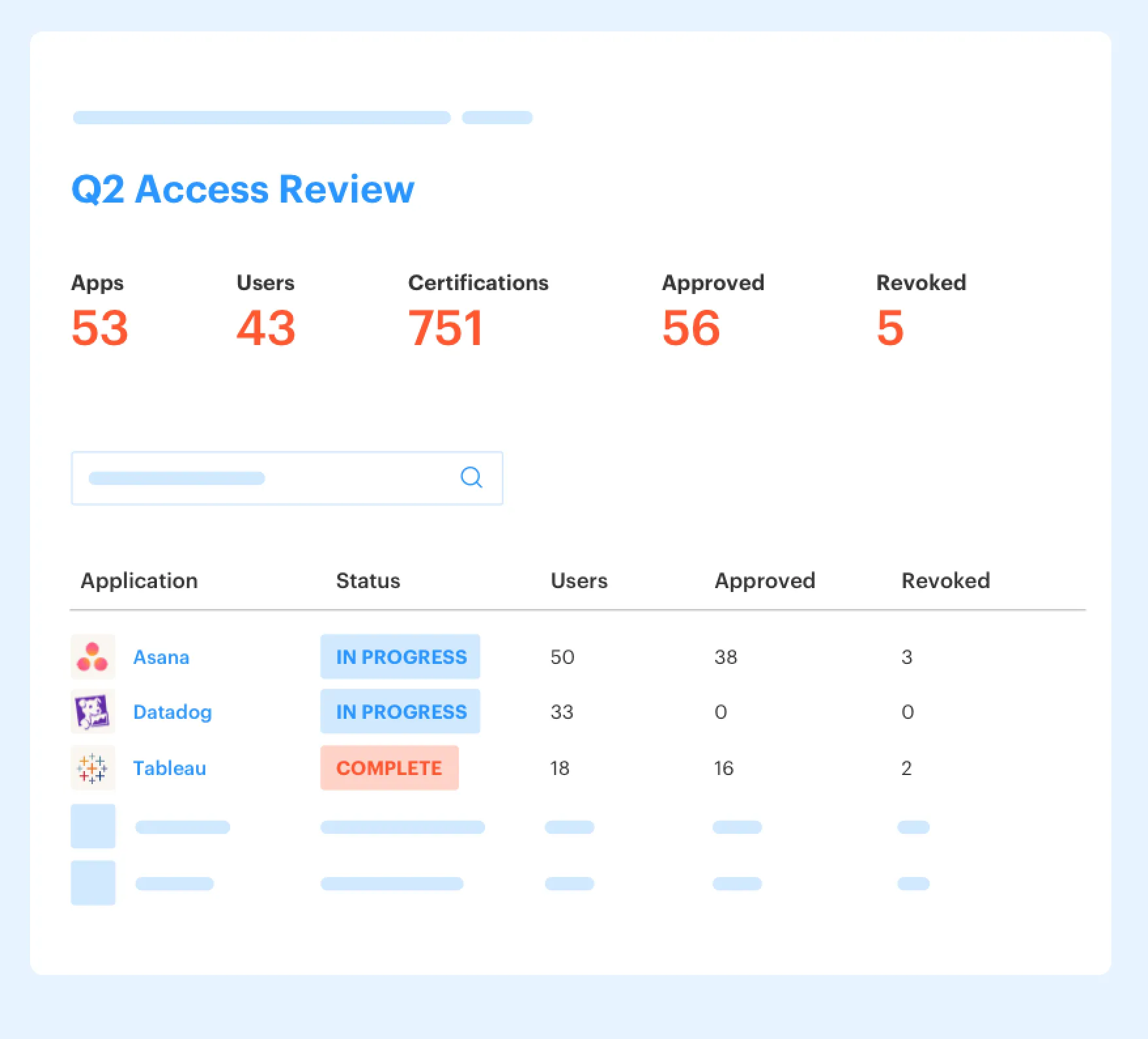
Multiplier's Access Reviews turn quarterly certifications into Jira-native campaigns. Admins select the approved applications in scope, assign reviewers by app, and launch the campaign from the same environment where service work already happens. Reviewers see user attributes, group memberships, job titles, departments, last login dates, and recommendations like revoking inactive users.
That matters because the reviewer isn't staring at a flat spreadsheet anymore. They have context. They can mark Keep or Revoke, add a reason when needed, and the decision becomes part of the governance record. When revocation is selected, Multiplier removes users from the relevant identity provider groups and creates Jira tickets documenting the change.
The callback to the earlier problem is pretty direct. Instead of rebuilding evidence every quarter, the campaign produces the evidence as the work happens. CSV exports and Vanta-ready evidence can come from the Jira-based workflow, not from someone collecting screenshots at the end.
Identity Provider Groups Make Changes Real
Multiplier provisions and revokes access through identity provider groups in Okta, Entra ID, and Google Workspace. Each catalog role maps to one or more groups. When a request is approved, the user gets added to the mapped group. When access expires or gets revoked, the user gets removed from that group.
This is the difference between a workflow that records intent and a workflow that enforces the decision. A reviewer can say Revoke, and the system can actually remove the entitlement. An approver can approve a request, and the grant can happen without an admin logging into the IDP and making the change manually.
Worth noting, this only works automatically where access is provisioned through identity provider group membership. If a grant was made manually outside SSO, the platform can't magically remove something it doesn't control. That's not a weakness as much as a boundary. The real move is getting the important apps and roles mapped to IDP groups so approval and revocation can be enforced.
Time-Based Access Reduces Standing Privilege
Multiplier's Time-Based Access lets requesters choose a duration, like 1, 6, or 24 hours, during submission. After approval, access is provisioned through the mapped identity provider group, a timer starts, and access is removed when the window expires. The grant and the removal both get recorded back to the Jira issue.
This is where quarterly access reviews become lighter. If elevated access expires automatically, reviewers aren't stuck cleaning up as many old admin grants. The review can focus on real exceptions, stale access, and roles that should stay permanent for a clear reason.
The Slack App also keeps the experience close to where people already work. Employees can request access from Slack, approvers can approve from Slack, and the Jira issue remains the system of record. After seeing how much of the review burden comes from missing expiry and missing evidence, the natural next step is testing the workflow against your own access patterns: Get started with Multiplier.
Make Quarterly Reviews Boring Again
Quarterly access reviews shouldn't feel like a fire drill. They should feel like a control check on a system that's already doing the right things every day. Requests start with context, approvals go to the right people, provisioning runs through the identity provider, time-bound access expires, and review decisions actually revoke access.
The old way made quarterly reviews carry too much weight. The better way is to reduce the mess before the quarter ends. Once access governance lives where the work already happens, the review stops being a rebuild of the past and becomes what it should've been all along: proof that least privilege is actually being enforced.
Frequently asked questions
- How do I set up time-based access for my team?
To set up time-based access with Multiplier, follow these steps: 1) When submitting an access request through the JSM portal or Slack, select the duration for access (like 1, 6, or 24 hours). 2) After approval, Multiplier will automatically provision access and start a timer to revoke it once the duration expires. 3) Ensure that the apps you’re using support time-based access to maximize efficiency. This approach helps minimize standing privileges and ensures that access is only granted when necessary.
- What if I need to revoke access but the app isn't connected to SSO?
If the app isn’t connected to SSO, you’ll need to handle revocation manually. However, you can still use Multiplier to document the revocation process. Make sure to create a Jira ticket to log the action and provide evidence of the change. This way, you maintain an audit trail even for manual processes. Additionally, consider mapping important apps to identity provider groups in the future to streamline this process.
- Can I automate access requests for non-SSO applications?
Yes, you can automate access requests for non-SSO applications using Multiplier. You can add custom, non-SSO apps to the application catalog, allowing employees to request access through the JSM portal. Even though provisioning for these apps will remain manual, the approval process will still be captured in Jira, helping you maintain an audit trail. This ensures that all requests are logged and tracked, reducing the chance of missing evidence during audits.
- When should I conduct access reviews?
You should conduct access reviews quarterly or whenever there are significant changes in your organization, such as rapid growth or new applications being introduced. With Multiplier's Access Reviews feature, you can create campaigns that include only approved applications, making it easier to focus on high-risk access. Additionally, consider running red flag checks before launching reviews to identify any potential issues, such as stale access or users with excessive privileges.
- Why does my team struggle with access review approvals?
Teams often struggle with access review approvals because they lack context about user access. To improve this, ensure that your access review campaigns in Multiplier include detailed information such as last login dates and group memberships. This context helps reviewers make informed decisions. Additionally, using automated notifications through Slack can streamline the approval process, making it easier for approvers to respond quickly and efficiently.
Frequently Asked Questions
How do I set up time-based access for my team?
To set up time-based access with Multiplier, follow these steps: 1) When submitting an access request through the JSM portal or Slack, select the duration for access (like 1, 6, or 24 hours). 2) After approval, Multiplier will automatically provision access and start a timer to revoke it once the duration expires. 3) Ensure that the apps you’re using support time-based access to maximize efficiency. This approach helps minimize standing privileges and ensures that access is only granted when necessary.
What if I need to revoke access but the app isn't connected to SSO?
If the app isn’t connected to SSO, you’ll need to handle revocation manually. However, you can still use Multiplier to document the revocation process. Make sure to create a Jira ticket to log the action and provide evidence of the change. This way, you maintain an audit trail even for manual processes. Additionally, consider mapping important apps to identity provider groups in the future to streamline this process.
Can I automate access requests for non-SSO applications?
Yes, you can automate access requests for non-SSO applications using Multiplier. You can add custom, non-SSO apps to the application catalog, allowing employees to request access through the JSM portal. Even though provisioning for these apps will remain manual, the approval process will still be captured in Jira, helping you maintain an audit trail. This ensures that all requests are logged and tracked, reducing the chance of missing evidence during audits.
When should I conduct access reviews?
You should conduct access reviews quarterly or whenever there are significant changes in your organization, such as rapid growth or new applications being introduced. With Multiplier's Access Reviews feature, you can create campaigns that include only approved applications, making it easier to focus on high-risk access. Additionally, consider running red flag checks before launching reviews to identify any potential issues, such as stale access or users with excessive privileges.
Why does my team struggle with access review approvals?
Teams often struggle with access review approvals because they lack context about user access. To improve this, ensure that your access review campaigns in Multiplier include detailed information such as last login dates and group memberships. This context helps reviewers make informed decisions. Additionally, using automated notifications through Slack can streamline the approval process, making it easier for approvers to respond quickly and efficiently.


