


The Jira ticket says the contractor left 72 hours ago. Their identity provider groups are still active, and finance is still paying for the apps. For IT, streamlining offboarding for contractors isn't mainly a checklist problem. It's a systems problem.
Most companies already know when a contract ends. Where they get stuck is turning that date into a verified identity change across every connected app. If Jira says "Done" before the identity provider confirms revocation, the workflow isn't done. It just stopped producing visible work.
Key Takeaways:
- Make the identity provider the authority for contractor access removal.
- Separate contract end dates from the contractor's actual last working day.
- Trigger revocation from Jira instead of handing IT another task.
- Keep success and error details on the original offboarding ticket.
- Use login activity to reclaim licenses that aren't being used.
- Send exceptions into a visible queue instead of letting them hide in spreadsheets.
Why Contractor Offboarding Breaks Across Jira and Identity Systems
Contractor offboarding breaks when Jira tracks the request but doesn't execute the identity change. HR closes the contract, IT resolves the ticket, and access stays live somewhere else. The failure sits in the gap between the workflow status and the identity provider group assignment, which is exactly where manual processes tend to lose ownership.

A Finished Jira Ticket Can Hide Active Access
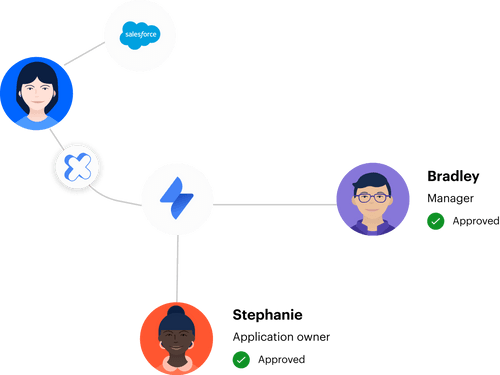
At 4:47 p.m. on a Friday, an IT manager picks up a contractor termination ticket. They pull the contractor from the main Okta group, update Jira, and close the issue. Then Monday arrives. Someone notices the contractor still has access through a second group they inherited months earlier, and now there's a weekend of live access nobody signed off on. That's not really an IT mistake. The workflow let a ticket status stand in for a verified access change. Jira recorded what someone intended to do, while the identity provider showed what actually happened. Those are two different records, and auditors care about the second one.
Contract End Dates Aren't Revocation Events
A contract end date is useful input, but it doesn't revoke anything on its own. Procurement may have one date, the hiring manager may expect another, and the contractor may stop working earlier because the project wrapped. IT usually finds out through whichever message lands first. Contractor offboarding should behave like a Jira workflow with a real terminal state. If the identity changes aren't tied to that transition, "Done" is decorative. In my view, that one distinction causes more stale contractor access than any missing checklist item. The status should only close after the required changes return a clear outcome. Success gets recorded, errors stay visible and assigned, and nobody has to guess.
Audit Evidence Gets Lost During Normal Work
The audit problem starts months before an auditor ever asks for evidence. Approval happens in Slack, removal happens in the identity provider, and the contract date lives in a procurement system. Someone later tries to line up timestamps with a spreadsheet and a pile of screenshots. That process feels normal because every individual action did happen somewhere. The catch is that nobody created one connected record showing the request, the decision, the change, and the result. Think of it like trying to prove a package arrived when you kept the order email, the shipping label, and the delivery photo in three different drawers, none of them dated the same way. Rebuilding that chain later burns time and usually exposes gaps nobody noticed during the original offboarding. A Jira workflow linked to identity provider confirmation fixes the missing handoff. If your current ticket closes before that confirmation arrives, Learn more about Multiplier to see what a ticket-linked model looks like. The fix is to make the offboarding event drive the identity change, not merely request it.
How to Build Contractor Offboarding Around Verified Revocation
Reliable contractor offboarding connects the exit event, the identity change, and the evidence in one controlled flow. Jira can coordinate the work, but the identity provider has to execute and confirm access removal. Streamlining offboarding for contractors starts by designing around that confirmation, not around another checklist for IT to remember.
Can You Prove Access Was Actually Removed?
Ask one basic question: can you prove every contractor's access was removed without opening five different tools? If the answer needs Slack searches or screenshots, you don't have a completed process. You have a collection of actions that probably happened. A useful diagnostic starts with observable evidence. Take the last five contractor exits and follow each record from the original request through the identity provider change. Don't ask whether the ticket closed. Ask whether the group removal actually succeeded and whether Jira captured the result.
Check five things:
- Did the workflow use the contractor's actual last working time?
- Did every identity provider group get evaluated?
- Did failed removals stay assigned to someone?
- Did licensed applications lose the entitlement?
- Could you show the full sequence from one Jira issue?
If two or more answers are "no," contractor access removal is still running on memory.
Use Three Dates Instead of One
Three dates matter in contractor offboarding: the planned contract end, the last working time, and the required revocation time. Treat them as one field and you get bad outcomes both ways. You either kill access too early and block delivery, or leave it live long after the work ended. The planned end date still earns its keep. Procurement needs it for renewals, and managers need it for project planning. It just shouldn't become the automatic revocation trigger unless someone confirms the contractor is actually done. Fair enough, some companies run fixed contracts where all three dates match, and in that case a single timestamp can drive the whole workflow.
For everyone else, capture the dates separately:
- Planned contract end: The commercial date used for renewal and budget decisions.
- Last working time: The point after which the contractor shouldn't perform work.
- Revocation deadline: The time by which identity provider access must be removed.
If the last working time changes, update the workflow before the revocation event runs. Don't bury the change in a comment where it dies.
Make the Identity Provider the Authority
Group membership drives access across every connected app, which is exactly why the identity provider should execute contractor deprovisioning. Jira supplies the approved event and context. The identity provider adds or removes the mapped groups, then sends the outcome back to the issue. A fast-growing fintech ran into the opposite setup while approaching 1,200 employees. Access requests came in through Slack, email, and Jira, and individual requests took 5 to 30 minutes each because IT had to chase approvals and hand-assign Okta groups. After connecting the workflow to automated group actions, the company reported an 80% reduction in IT workload for access requests. Different lifecycle moment, same mechanism.
For contractor offboarding, the flow should be explicit:
- Jira receives the confirmed offboarding event.
- The workflow identifies the contractor and their mapped identity provider groups.
- Group removals execute through the identity provider.
- Success or error details return to the Jira issue.
- The ticket closes only when the required changes succeed.
The critical handoff is step three, where intent becomes an authoritative identity change. See how Multiplier works when that handoff ties directly to Jira instead of sitting in a separate admin queue.
Put Exceptions in a Queue Humans Can Own
Standard contractor exits should run automatically. Exceptions need a person, an owner, and enough context to act. Mix both paths and you build a queue where routine work buries the few cases that genuinely need judgment. Manual review isn't the enemy here. For non-SSO apps, disputed end dates, or accounts with missing identity data, a human call may be exactly right. The mistake is making every contractor offboarding case manual because a handful are unusual. Automation should handle the predictable group changes and route everything else into an exception path.
A useful exception record includes:
- The contractor's identity and manager
- The failed or unsupported application
- The group or entitlement that couldn't be removed
- The error returned by the identity system
- The person responsible for follow-up
- A deadline that keeps the issue from aging unnoticed
If an exception has no owner, it isn't really an exception process. It's a backlog wearing a nicer name.
Write Audit Evidence While the Work Happens
Audit-ready contractor offboarding records the evidence during execution. The original Jira issue should show who initiated the exit, who approved it, which identity changes ran, and whether each action succeeded. By the time the ticket closes, the evidence chain already exists. Rebuilding evidence later sounds manageable when contractor volume is low. It might even be faster for a company offboarding one contractor every few months. Once contractors rotate across multiple projects and apps, that spreadsheet becomes a second system nobody updates consistently, and that's where the audit starts to hurt.
A complete evidence record should contain:
- Trigger: The confirmed offboarding event and effective time
- Decision: The manager or system approval
- Execution: The group removals or account changes attempted
- Outcome: Success and error details for each action
- Ownership: The person assigned to unresolved exceptions
Audits should test the process, not force IT to recreate it from scratch.
Use Login Activity to Find Hidden License Waste
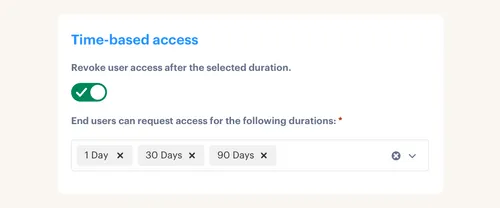
Can login activity replace contractor offboarding? No. Someone can stop logging in before a contract ends, while another contractor keeps logging in well after their work should have stopped. Login telemetry is a cost signal, not proof of employment status. Used properly, though, it catches a different problem. A contractor wraps a project informally, the manager forgets to submit the exit, and paid licenses sit assigned for months. An inactivity threshold can flag the account, give the user a grace period, then reclaim access if they stay inactive.
The conditional rule is simple. If you have a confirmed exit, revoke from the exit workflow. If you only have inactivity, notify first and reclaim after the grace period. If the account is excluded because the work is genuinely intermittent, document that exception rather than switching off the policy for everyone. Finance gets a cleaner view of avoidable SaaS spend. IT gets fewer manual usage reports. Security gets another signal for stale access, without pretending login data can stand in for the authoritative offboarding event.
How Multiplier Automates Jira-Based Offboarding
Multiplier connects Jira directly to your identity provider, so a workflow transition actually executes the group removal rather than creating another task for IT to handle separately. The outcome — success or error — comes back to the same ticket that triggered the change.
Jira Transitions Trigger Identity Provider Changes
One Jira transition can kick off the contractor deprovisioning work instead of assigning another manual task to a queue. Multiplier Post Functions attach supported identity lifecycle actions to workflow transitions, with field values from the Jira form supplying the user details. Each action targets a supported identity provider such as Okta, Entra ID, or Google Workspace. For access managed through identity provider groups, automated provisioning and revocation can remove the contractor from mapped groups when the workflow reaches the configured state. Success or error comments write back to the ticket, giving IT a visible result. The platform doesn't automate inside individual non-SCIM SaaS apps, so those cases still need an exception path.

The core pieces are straightforward:
- Trigger from Jira: A configured workflow transition starts the identity action.
- Change identity groups: Supported group assignments or removals execute through the connected identity provider.
- Record the result: Success and error details return to the originating Jira issue.
The Jira issue becomes the control record because it carries both the approved event and the execution result.
License Reclamation Catches Access That Outlives the Work
Auto Reclaim tackles the cost side of stale contractor access. It uses last-login data from connected identity providers, then applies an inactivity threshold, a grace period, and group exclusions. If the user stays inactive past the warning period, access is revoked and a Jira ticket records the removal. The limitation matters. Auto Reclaim is available on the Advanced edition, and it depends on accurate identity provider login data. Apps without that telemetry can't be evaluated through the same policy. Access Reviews can cover a broader review cycle by showing reviewers group membership and last-login context inside JSM, with revocation decisions tied back to Jira.
Together, those controls address two different failures. The offboarding workflow removes access because the contract ended. Usage-based reclamation catches licenses that stay active because nobody submitted an exit on time. To test that model against your current Jira process, Get started with Multiplier and map one contractor exit from trigger through verified removal.
What Reliable Contractor Offboarding Looks Like
Reliable contractor offboarding ends with verified identity changes, not a resolved service ticket. Jira should carry the request and the evidence, while the identity provider executes the group removal. Login activity then gives you a second control for reclaiming unused licenses that slipped past the original process. Start with one contractor type and one connected application. Map the three dates, tie the Jira transition to the identity change, and keep failed actions open. Once that path works, expand it. Streamlining offboarding for contractors gets a lot easier when "Done" means the access is actually gone.
Frequently asked questions
- How do I streamline contractor offboarding with Multiplier?
To streamline contractor offboarding using Multiplier, start by ensuring that your Jira workflow is set up to trigger identity provider actions. 1) Create a Jira ticket for the contractor's offboarding and link it to the identity provider. 2) Use Multiplier's automated provisioning feature to remove the contractor from the appropriate identity provider groups. 3) Ensure that success or error details are recorded in the Jira ticket to maintain a clear audit trail. This way, you can confirm that access has been revoked effectively and keep everything documented in one place.
- What if a contractor's last working day changes?
If a contractor's last working day changes, it's crucial to update your offboarding workflow promptly. 1) Modify the Jira ticket to reflect the new last working time. 2) Ensure that the revocation deadline is adjusted accordingly to prevent any access from remaining active after the contractor's actual last day. 3) Use Multiplier to trigger the identity provider to remove access based on the updated information, ensuring that all changes are documented in the Jira ticket for audit purposes.
- Can I automate access requests for contractors?
Yes, you can automate access requests for contractors using Multiplier. 1) Set up the Application Catalog within your Jira Service Management portal, allowing contractors to request access to approved applications easily. 2) Ensure that the catalog is synced with your identity provider to streamline the approval process. 3) Use Multiplier's automated provisioning to handle group assignments after approvals, reducing manual effort and speeding up the onboarding process for contractors.
- When should I conduct access reviews for contractors?
Access reviews for contractors should typically be conducted quarterly or whenever there are significant changes in your team. 1) Use Multiplier's Access Review feature to set up campaigns that include all relevant applications. 2) Assign reviewers who can evaluate access based on last login data and usage patterns. 3) Ensure that decisions made during the reviews are documented in Jira, allowing for easy tracking and compliance with audit requirements.
- Why does contractor offboarding sometimes fail?
Contractor offboarding can fail due to several reasons, often related to communication gaps. 1) Ensure that the offboarding process in Jira is tightly linked to the identity provider's actions, so that access changes are verified. 2) Check that all relevant dates (planned end, last working time, revocation deadline) are correctly documented and updated. 3) Use Multiplier to automate the removal of access based on these verified changes, minimizing the risk of stale access.


