

Four systems can touch one access change: Jira, Slack, your identity provider, and a spreadsheet. The hidden costs of fragmented access governance start when each system holds a different piece of the truth.
The request might look finished in Jira, the approval sits in Slack, and the group change happened in Okta. Then, three months later, someone rebuilds the full story for an auditor. None of these steps looks expensive by itself. Together, they create slow access, standing privilege, and hours of evidence work nobody planned for.
Key Takeaways:
- Treat audit evidence as an output of daily access work, not a quarterly project.
- Keep requests, approvals, identity changes, and revocations tied to one Jira record.
- Make elevated access temporary whenever the job has a clear end.
- Give reviewers usage context before asking them to certify access.
- Test every workflow against revocation, not just approval speed.
- Use spreadsheets for analysis if needed, but never as the control system.
Why Fragmented Access Governance Costs More Than It Looks
Fragmented access governance costs more because every handoff creates rework, delay, or lost context. Jira may track the request, but it can't prove what changed if the identity action happened elsewhere without a linked record. The visible cost is ticket handling. The bigger cost comes later, when IT and Security have to reconstruct intent, approval, execution, and expiry.
A Completed Ticket Can Still Hide an Incomplete Change
A Jira issue can reach Done while the real access change stays unclear. Maybe an admin added the user to the right identity provider group. Maybe they granted access directly inside the SaaS app. Maybe the manager approved in Slack, but the decision never made it back into Jira. The ticket status tells you the process moved. It doesn't always prove the control worked.
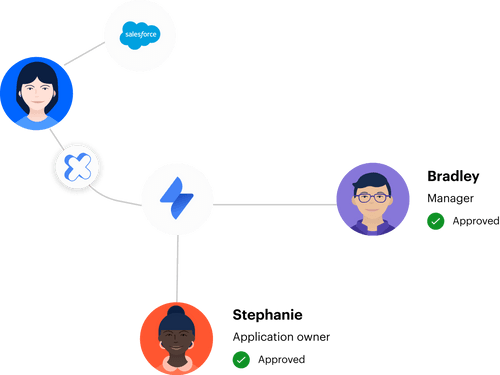
That gap matters most during revocation. When the original grant lacks a clear group mapping, owner, or expiry, removing access becomes another investigation. Someone checks the ticket, asks the app owner, searches Slack, and compares the current group membership. The fragmented process has now charged you twice, once during the grant and again during cleanup. For teams already using Jira as the request record, Learn more about Multiplier shows how approvals and identity changes can stay attached to that same work.
Rapid Growth Makes Small Handoffs Expensive
One fintech grew by 32% in roughly eight months, reaching nearly 1,200 employees. Hundreds of routine access requests arrived through Slack, email, and Jira. Each one could take 5 to 30 minutes because IT had to chase approval, open Okta, assign a group, then preserve enough evidence for later. Pretty normal on a small scale. Painful at volume. Run the math on the ugly end of that range: 400 requests a month at 20 minutes each is over 130 hours, most of it a person clicking between four tabs.
Manual work has real merits when request volume is low. An experienced admin can judge an odd request faster than a committee can design automation for it. That's fair. The model breaks when routine requests keep following the same path, because every repeated handoff becomes a permanent tax on growth.
Audit Preparation Exposes the Missing Links
Audit prep isn't mainly a reporting problem. It's a workflow problem that's been piling up for months. If evidence isn't captured when the access event happens, someone has to rebuild the event later from ticket comments, chat messages, identity logs, and screenshots. Accuracy drops because each source answers a different question.
Think of the Jira issue as a bank ledger. Every request, approval, grant, and removal should post against the same record as the work happens. If the finance team had to reconstruct transactions from emails every quarter, nobody would call that accounting. Yet plenty of access audits still work exactly that way.
The cost of fragmented access workflows won't disappear through a better spreadsheet. You have to change what the daily workflow produces. That's a design problem, not a documentation problem, which is where the next section starts.
How to Build Audit Readiness Into Daily Access Work
Audit-ready access work starts by defining the evidence each change must create, then making the workflow capture it automatically. Approval is only one event. A complete record also shows what was granted, where it was granted, how long it remained active, and whether the eventual revocation succeeded. Once those facts live together, audit prep becomes verification instead of reconstruction.
Diagnose Where Your Access Record Actually Breaks
Can one Jira issue answer the full story without sending you into another system? That's the first test. Pick ten recently completed access requests and follow them from submission through the current identity state. Don't choose the cleanest examples. Pick admin access, a transferred employee, a contractor request, and one ordinary SaaS role.
You're looking for missing links, not bad people. Most fragmented workflows survive because experienced IT staff carry the process in their heads. They know which Slack message matters and which Okta group maps to the requested role. Auditors and new hires don't have that context, and neither will you six months from now when memory fades.
Check each request against five questions:
- Does the issue show who requested the access and why?
- Can you see who approved or denied it?
- Does the record identify the exact role or identity provider group?
- If access was temporary, does it show the approved duration and removal?
- Can you prove the current state without asking an admin to investigate?
If two or more answers require another tool, your audit trail is fragmented. That's your starting score, and it tells you exactly which workflow to fix first.
Define the Evidence Before Designing the Workflow
Five fields usually separate an actionable access record from a vague ticket. You need the requester, the approver, the entitlement, the execution status, and the end condition. Without them, a reviewer sees that someone got "Figma access" but can't tell whether they received Viewer, Editor, or Admin. Big difference.
The execution status deserves extra attention. "Approved" means a person agreed with the request. It doesn't prove the user was added to the correct group, nor does it prove a later removal worked. I'd argue that many access reviews overvalue the decision and undervalue the change that followed it.
For every request type, document the record in this order:
- Intent: Why the person needs access.
- Decision: Who approved it and when.
- Entitlement: The exact role or mapped group.
- Execution: Whether the identity change succeeded.
- End condition: Expiry, review date, or employment event that removes access.
Those five facts should stay linked. If one lives only in chat or a spreadsheet, the hidden cost of fragmentation is still there, just waiting for the next audit to surface it.
Match the Control to the Risk of the Entitlement
A low-risk viewer role shouldn't follow the same path as production admin access. Treating every request identically creates one of two bad outcomes. Either ordinary access moves too slowly, or sensitive access gets a weak review because the approval queue is overloaded. Both happen more often than people admit.
Use the consequence of misuse to choose the control. Here's a working rule: if a role can change production, expose customer data, or affect billing, require a named approver and a fixed duration. If the role is basic and easily reversible, policy-based approval is usually enough. The access method should reflect the risk, not whoever complains loudest.
There's a tradeoff here. More control adds friction, and some security teams genuinely need controls that extend beyond Jira-native workflows. A separate IGA suite can make sense where complex regulatory policy or large enterprise coverage requires it. Even then, the request and execution records still need a dependable connection, or the ITSM and IGA split keeps creating manual reconciliation.
Make Temporary Access the Default for Temporary Work
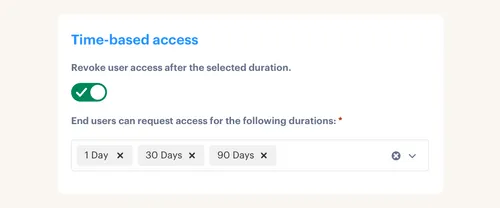
Temporary work should create temporary access. An engineer handling an incident may need production access for 1, 6, or 24 hours. Granting the role permanently because manual cleanup is unreliable solves today's delay by creating tomorrow's risk. The approval was fast. The privilege stays.
One fintech changed that operating model and reduced privileged access by 85%. More than 1,300 access requests were automatically revoked after their approved windows. The interesting part isn't the percentage. It's that automatic expiry removed the follow-up task that usually fails when the incident ends and everyone moves on.
A reliable time-bound flow follows four events:
- The requester selects a duration with the role.
- The approver sees the role, reason, and requested window.
- The identity provider group membership starts after approval.
- The membership ends at expiry, with the removal written back to the record.
Automatic removal depends on authoritative group-based access. Purely manual or non-SSO grants can't magically revoke themselves. That limitation sharpens the decision: if automatic expiry matters, provision through a group the workflow can remove.
Once the duration and removal event are part of the request design, See how Multiplier works to compare that model with your current Jira and identity provider flow.
Put Usage Context Inside the Access Review
Access reviews fail when the reviewer sees a name and an application, then has to guess. A manager might remember that Priya changed departments. The app owner might know the role is sensitive. IT may have the last-login data. Splitting those facts across people turns certification into rubber-stamping.
A useful review puts identity details, group membership, job context, and recent login activity in front of the decision maker. Reviewers can then answer a much better question: does this person still need this exact entitlement? "Keep" or "Revoke" becomes an informed choice instead of an annual memory test.
Run a simple reviewer test before launching a campaign. Give one reviewer a sample record and ask them to decide without opening another tab. If they need to message IT, search the identity provider, or inspect a spreadsheet, the campaign isn't ready. Fix the context first.
Test Revocation Before Calling the Workflow Auditable
What happens after a reviewer selects Revoke? Too many processes stop at the decision. A ticket gets assigned to IT, the spreadsheet cell turns red, and everyone assumes removal will happen eventually. That isn't enforced least privilege. It's a new backlog wearing a green checkmark.
Test one real revocation from end to end before each review cycle. Confirm the decision triggers the intended identity provider group removal. Then check that the change created evidence in the same record and surfaced any exception. Honestly, the exception path matters more than the clean path, because failed removals are where false confidence starts.
Your pre-launch check should cover four outcomes:
- A Keep decision preserves the correct access.
- A Revoke decision removes the mapped group membership.
- A failed removal stays visible for follow-up.
- Exported evidence shows the reviewer decision and resulting change.
Audit readiness comes from closing the loop. A completed review with unexecuted revocations is still an unfinished control, and that gap is exactly what the next section closes.
How Multiplier Connects Reviews, Revocation, and Evidence
Multiplier connects the review decision to the identity change and keeps the evidence in Jira. Access review campaigns show reviewers user attributes, group memberships, job context, last-login data, and recommendations. When a reviewer selects Revoke, the mapped identity provider group can be removed, with a Jira ticket documenting the action.
Jira-Native Reviews Keep Decisions and Changes Together
Admins can create campaigns for approved applications and assign reviewers by app. Reviewers work from a JSM dashboard rather than passing spreadsheets around. They choose Keep or Revoke and can provide reasons for revocation. Campaign progress and exceptions stay visible as the work moves.
The important bit is execution. A Revoke decision can remove the user from the relevant Okta, Entra ID, or Google Workspace group. Evidence can then be exported as CSV or pushed to Vanta. Start and end dates for campaigns are informational, and automated reminders or escalations are planned rather than current functionality. Better to be clear about that.
The access review flow connects:
- Reviewer context: User details, groups, job information, last login, and recommendations.
- Enforced revocation: Removal from relevant mapped identity provider groups.
- Linked evidence: Jira tickets showing the decision and resulting change.
- Audit output: CSV exports or evidence sent to Vanta.
Time-Based Access Reduces the Next Review's Cleanup
Time-based access tackles the problem before the next certification campaign. A requester selects a duration, approval grants the mapped identity provider group, and expiry removes that membership automatically. The request, grant, and removal stay tied to the Jira issue. Less standing privilege enters the review in the first place.

Not every entitlement fits that model. Automatic expiry requires group-based provisioning through the connected identity provider, so manual grants still need a different removal path. For sensitive SSO roles, though, the rule is clean: if the work has an end, the entitlement should have one too.
If your team already handles requests in Jira, Get started with Multiplier to connect those requests with time-bound provisioning and in-Jira access reviews.
With the grant, review, and revocation tied together, the audit trail stops being a separate deliverable and starts being a byproduct of the work you already do.
Make Every Access Change Produce Its Own Evidence
The hidden costs of fragmented access governance come from reconstructing work that already happened. Fixing that means designing each request to capture intent, approval, execution, and removal in one connected record. Start with ten completed tickets, find the missing links, then fix the highest-risk workflow first.
Spreadsheets can still be useful for analysis, Slack can still be useful for fast decisions, and your identity provider still needs to stay authoritative. The mistake is letting those tools hold disconnected pieces that nobody can reconcile without manual work.
Audits should be ready by design, not rebuilt on demand.
Frequently asked questions
- How do I ensure access requests are documented correctly?
To ensure access requests are documented properly, you can use Multiplier's Application Catalog within Jira. When employees submit requests through the JSM portal or Slack, each request automatically creates a Jira ticket that captures all necessary details, including the requester, approver, and the specific role requested. This helps maintain a clear record of who requested access, why, and what was granted, reducing the chances of fragmented documentation.
- What if I need to revoke access after a project ends?
If you need to revoke access after a project, you can implement Multiplier's Time-Based Access feature. When submitting a request, users can select a specific duration for access, ensuring it automatically expires after the project ends. This way, you won't have to worry about manually revoking access later, as it will be handled automatically, keeping your access governance easier to manage.
- Can I automate approvals for access requests?
Yes, you can automate approvals using Multiplier's Approval Workflows. By mapping the approval process to specific users, such as app owners or managers, you can ensure that requests are routed correctly without manual intervention. Approvers receive notifications via JSM or Slack, allowing them to approve or deny requests quickly, which keeps requests moving and reduces delays in access provisioning.
- When should I conduct access reviews?
You should conduct access reviews regularly, ideally aligned with your organization's audit schedule. Using Multiplier's Access Reviews feature, you can set up campaigns in Jira that allow you to review user access systematically. This helps ensure that access remains appropriate over time and that any unnecessary privileges are revoked, reducing security risk.
- Why does access governance matter in my organization?
Access governance matters because it helps prevent unauthorized access and reduces security risks. By using Multiplier, you can centralize access requests, approvals, and changes within Jira, ensuring that all actions are documented and linked. This not only simplifies the process and also prepares your organization for audits by maintaining a clear and comprehensive audit trail.
Frequently Asked Questions
How do I ensure access requests are documented correctly?
To ensure access requests are documented properly, you can use Multiplier's Application Catalog within Jira. When employees submit requests through the JSM portal or Slack, each request automatically creates a Jira ticket that captures all necessary details, including the requester, approver, and the specific role requested. This helps maintain a clear record of who requested access, why, and what was granted, reducing the chances of fragmented documentation.
What if I need to revoke access after a project ends?
If you need to revoke access after a project, you can implement Multiplier's Time-Based Access feature. When submitting a request, users can select a specific duration for access, ensuring it automatically expires after the project ends. This way, you won't have to worry about manually revoking access later, as it will be handled automatically, keeping your access governance easier to manage.
Can I automate approvals for access requests?
Yes, you can automate approvals using Multiplier's Approval Workflows. By mapping the approval process to specific users, such as app owners or managers, you can ensure that requests are routed correctly without manual intervention. Approvers receive notifications via JSM or Slack, allowing them to approve or deny requests quickly, which keeps requests moving and reduces delays in access provisioning.
When should I conduct access reviews?
You should conduct access reviews regularly, ideally aligned with your organization's audit schedule. Using Multiplier's Access Reviews feature, you can set up campaigns in Jira that allow you to review user access systematically. This helps ensure that access remains appropriate over time and that any unnecessary privileges are revoked, reducing security risk.
Why does access governance matter in my organization?
Access governance matters because it helps prevent unauthorized access and reduces security risks. By using Multiplier, you can centralize access requests, approvals, and changes within Jira, ensuring that all actions are documented and linked. This not only simplifies the process and also prepares your organization for audits by maintaining a clear and comprehensive audit trail.


