


Quarterly access reviews look responsible until 40% of the decisions turn into "keep" with no real evidence behind them. The importance of regular access reviews isn't the meeting cadence, or the spreadsheet, or the checkbox for audit. It's whether access actually changes when the review says it should.
I've seen this pattern a lot. IT runs the review, app owners skim a list, someone asks "does Sarah still need this?", nobody knows, and the safest answer becomes yes. Access piles up. Licenses keep renewing. Privileged roles hang around long after the project ended.
Key Takeaways:
- Regular access reviews only matter if they trigger real changes, not just approvals in a spreadsheet.
- The strongest review process ties every decision to usage data, group membership, role context, and a Jira record.
- If a reviewer can't explain why someone needs access in 30 seconds, the default should shift from "keep" to "verify."
- Identity providers should execute the access change, because they're the source that actually controls the entitlement.
- Chat bots can speed up approvals, but they can't replace governance, expiry, revocation, and audit evidence.
- The best review process separates permanent access, time-bound access, and unused access before the campaign starts.
Why Regular Access Reviews Break When They Leave Jira
Regular access reviews break when the decision, evidence, and revocation all live in different systems. Jira has the request history, the identity provider has the group membership, Slack has the approval chatter, and spreadsheets become the fake source of truth. That split creates slow reviews and weak follow-through.

The Review Meeting Becomes Theater
A real access review should answer one simple question: should this person still have this access? Not "did someone click approve?" Not "can we produce a spreadsheet?" The actual question is whether the access still matches the job, the risk, and the recent usage pattern. When that answer isn't obvious, reviewers default to keeping access because revoking the wrong thing creates noise.
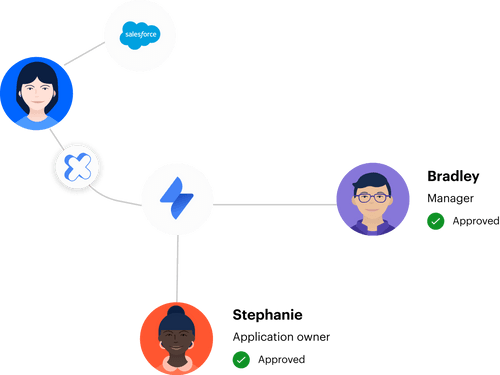
Picture a Workplace Technology manager at 8:47 AM Tuesday. They export 312 user rows from Okta into Google Sheets, ping six app owners in Slack, then spend the afternoon chasing the three who haven't responded. One app owner asks for last login data. Another asks what group controls the role. Nobody has the full picture in one place, so the review drags into Friday and 184 rows become "keep" because the team ran out of patience.
That's the part people don't talk about. The review didn't fail because the team was lazy. It failed because the system made the right decision harder than the safe decision. I get why teams do it this way — spreadsheets are flexible and everyone knows how to use them — but flexibility becomes a problem when every decision needs proof and every proof point lives somewhere else.
If you're already running access work in Jira, the next logical move is to bring the review process closer to the tickets, approvals, and identity changes that created the access in the first place. If that's the system you're trying to build, Learn more about Multiplier.
Chat Approvals Don't Equal Governance
Fast approvals feel like progress, especially when employees are waiting on access. Slack is great for nudges, quick decisions, and reducing the "did you see my ticket?" dance. Chat-based workflows work well when they're tied to a real system of record. Without that anchor, chat becomes another place where decisions happen and evidence gets lost.
The trap is thinking speed and control are the same thing. A Slack approval can tell you who said yes. It rarely tells you whether the request had the right role, whether the access should expire, whether the user actually used the app, or whether revocation happened after the review. For security and audit teams, that gap matters. NIST's access control guidance, including AC-6 on least privilege, is pretty clear on the core idea: users should have only the access they need.
Regular access reviews are where that idea either becomes real or stays as policy language. Policy language without operational teeth is where a lot of teams get stuck. They can say they review access every quarter, but if revoked users stay in the same identity provider group for another 30 days, the control didn't really work.
The Hidden Cost Is Standing Privilege
Standing privilege is what happens when old access never gets cleaned up. The engineer who still has admin rights from an incident two months ago. The finance contractor who kept access after the project ended. The manager who moved departments but still sits in the old group because nobody wanted to break their workflow. One-off decisions stack up until the access model stops reflecting the company.
The pattern works a lot like inventory drift in a warehouse. Boxes come in every day, nobody runs cycle counts, and after six months the shelf labels stop meaning anything. The system says you have 12 units, the floor has 7, finance shows 15, and the customer gets the wrong answer. Access works the same way. The label says least privilege, but the actual group membership tells the real story.
Regular access checks are the cleanup mechanism. They force teams to compare what people have against what they need right now. Without that comparison, every growth phase, reorg, acquisition, and project creates more access drift.
The cost isn't just audit stress. It's the slow build-up of trust debt inside your identity stack.
How to Make Regular Access Reviews Actually Enforce Least Privilege
Regular access reviews enforce least privilege when they combine context, usage data, reviewer accountability, and automatic revocation. The goal isn't to run a prettier certification campaign. The goal is to reduce access that no longer has a clear business reason and prove the change happened.
Diagnose Whether Your Review Process Is Real or Cosmetic
Is your last campaign producing removals, or just completed rows? A real review produces removals, exceptions, and clean evidence. A cosmetic review produces completed rows. That difference sounds harsh, but it's useful because it forces you to look at outcomes instead of ceremony. If 98% of your review decisions are "keep" every quarter, either your access model is incredibly clean or your reviewers don't have enough context to say no.
Run a quick diagnostic before your next campaign. Five questions, no soft answers:
- Can reviewers see last login or usage context before deciding?
- Can they see the user's department, title, manager, and group membership?
- Can a revoke decision trigger an actual identity provider change?
- Can audit evidence be pulled from the original system, not rebuilt later?
- Can you tell which access was time-bound, unused, or privileged?
If you answer no to two or more, don't start by adding more reviewers. That usually makes the process slower, not better. Start by fixing the decision packet. Every reviewer should be able to decide low-risk access in under 30 seconds, and anything that needs longer should be flagged as an exception. Not because speed is everything. Because slow reviews create rubber-stamping.
Anchor Decisions to Identity Provider Groups
Access reviews get much easier when entitlements map cleanly to identity provider groups. The identity provider is where the actual access change happens for SSO apps, so the review should connect directly to that structure. If the reviewer says revoke, the system should know which group membership to remove. No guessing. No "can someone from IT handle this later?"
A useful rule: if an app role can't be mapped to a group, treat that app as manual and label it that way before the campaign starts. Don't mix deterministic revocations with manual cleanup in the same mental bucket. That's how work gets missed. For SSO apps, group-based access gives you a clean path from decision to action. For non-SSO tools, you can still review access, but you need a separate task owner and proof trail.
Some teams resist this because their group structure is messy. That's fair. Most identity providers get messy as companies grow. The answer isn't to pause access reviews until the model is perfect. Pick your top 10 riskiest or most expensive apps, map those roles first, and run the review there. Trying to fix every app and every group at once turns the project into a six-month identity cleanup, and nobody has time for that.
Use Usage Data to Change the Default Answer
Usage data changes the psychology of the review. Without it, reviewers think, "I'm not sure, so keep." With it, reviewers think, "No login in 90 days, wrong department, no open project, revoke." Totally different decision. It gives the reviewer permission to remove access without feeling reckless.
Three thresholds work well. At 30 days inactive, flag the user for a light check on expensive apps. At 60 days, ask the reviewer to justify keeping access. At 90 days, default the recommendation to revoke unless there's a documented exception. CIS treats access control management as a core control, and CIS Control 6 pushes teams toward defined, maintained access rights instead of informal permissions that drift over time.
Usage data isn't perfect, and pretending otherwise is the fastest way to lose reviewer trust. Some apps have poor login telemetry. Some users need rare access for quarterly tasks. Some executive accounts look inactive but are politically sensitive. That's a real limitation. The point still holds because bad telemetry should create an exception path, not kill the whole review process. If the data is incomplete, mark it incomplete, assign an owner, and make the reviewer explain the keep decision.
A good review packet should include:
- Last login: the fastest signal for unused access
- Department and title: the simplest way to catch role mismatch
- Group membership: the control point for provisioning and revocation
- Reviewer recommendation: a default based on inactivity or risk
- Reason for keep or revoke: the sentence auditors actually care about later
Separate Permanent Access From Time-Bound Access
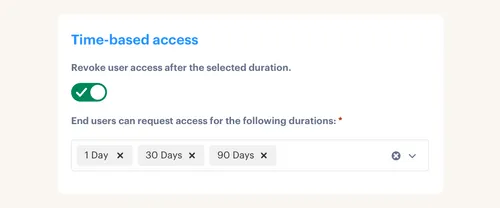
Permanent access and temporary access shouldn't go through the same review logic. Permanent access needs recurring justification. Time-bound access needs enforced expiry. If an engineer needs production database access for an incident, the right answer probably isn't "approve forever and remember to clean it up next quarter." The right answer is one hour, six hours, or 24 hours, then automatic removal.
A practical rule works well here. If access is privileged, sensitive, or tied to an incident, make it time-bound by default. If access is needed for daily work, make it permanent but review it every quarter or every 6 months depending on risk. If access is expensive but low risk, review based on inactivity first. Not all access deserves the same process, and treating it all the same creates needless friction.
A fintech team like Stavvy is a good example of where this matters. They reduced privileged access by 85% and had 1,300+ access requests automatically revoked after approved windows. That's not a spreadsheet improvement. That's a control model change. Long-lived access became temporary access, and temporary access became something the system could remove without waiting for a human to remember.
Not every company needs that level of just-in-time access everywhere. A design tool viewer role doesn't need the same treatment as production admin rights. Still, if the access could expose customer data, financial data, source code, or infrastructure controls, expiry should be part of the request from the start.
Make Revocation the Measure of Review Quality
The easiest metric to fake is campaign completion. The harder metric to fake is executed revocation. A campaign can show 100% complete while old access still exists in the identity provider. That's the kind of gap that looks fine until audit sampling asks for proof that the removed user was actually removed. Then everyone starts digging through comments, screenshots, and admin logs.
Track the review process in five stages:
- Scope selected: which apps and roles are included
- Context attached: which reviewer sees what data
- Decision made: keep, revoke, or exception
- Change executed: identity provider group added or removed
- Evidence stored: ticket or campaign record updated with the decision and action
If stage four and five are manual, you haven't finished the review. You've finished the decision step. That distinction matters because the real risk sits between "revoke approved" and "revocation done." I've watched teams celebrate completed reviews while IT still had a backlog of cleanup tasks. That's not governance. That's deferred work with a nicer label.
The metric to watch is revoke completion time. If a reviewer says revoke on Monday, and the group membership still exists on Friday, the process is broken. For high-risk apps, revocation should be measured in minutes. For low-risk apps, same day is usually fine. Anything longer than 3 business days needs a root cause review because the access review is no longer connected to enforcement.
Run Smaller Campaigns More Often
Big quarterly reviews feel efficient because everyone does the work at once. In practice, they create huge bursts of review fatigue. App owners get too many rows, IT gets too many follow-ups, and the whole thing becomes a compliance sprint. Then everyone avoids thinking about access again for another quarter. Which is how drift comes back.
Smaller campaigns work better for most mid-market teams. Review privileged apps monthly. Review expensive SaaS apps every 60 days using inactivity signals. Review broad business apps quarterly. Review low-risk default apps twice a year. The cadence should follow risk and cost, not a generic calendar invite. That's the difference between regular access reviews and regular access theater.
There's also a people issue here. Reviewers make better decisions when the list is short. Give an app owner 400 rows and they'll skim. Give them 35 rows with last login, role, department, and a recommendation, and they'll actually think. Same reason sales teams work better with a tight account list than a giant territory dump. Focus creates better decisions.
How Multiplier Runs Reviews Inside Jira
Multiplier runs access reviews inside Jira Service Management, then connects review decisions to identity provider actions. Reviewers see user context, group data, last login, and recommendations in JSM. When they choose revoke, the removal can be executed through mapped identity provider groups and documented back in Jira.
Jira-Native Reviews With Real Usage Context
Multiplier's Access Reviews feature replaces the spreadsheet campaign with a Jira-native review flow. Admins select approved applications, assign reviewers, and launch campaigns. Reviewers land in JSM and see the context they need: user attributes, groups, job titles, departments, last login dates, and recommendations like revoke for inactive users. That's the difference. The reviewer isn't just staring at names.
Multiplier also keeps the decision tied to the operating record. If someone marks "Revoke," the reason is captured, the change is tracked, and the review progress stays visible. For teams already living in Jira, that matters because it removes the weird side quest where governance happens in a separate portal and evidence gets rebuilt later. The work and the proof stay together.
This is where the old review process changes shape:
- Before: export users, email app owners, chase Slack replies, update a sheet
- After: launch the campaign in JSM, show usage context, collect decisions, track revocations
- Before: audit evidence gets stitched together after the fact
- After: decisions and changes are attached to the Jira workflow
Provisioning and Revocation Through the Identity Provider
Multiplier provisions and revokes access through identity provider group mappings for Okta, Entra ID, and Google Workspace. Each catalog role maps to one or more groups. When the Jira issue reaches the approved state, the identity provider group change happens through the configured workflow. For review revocations, the same model matters because the system removes group membership instead of leaving IT to copy and paste changes later.

The boundary is important. Multiplier provisions through identity provider groups. It doesn't directly provision inside every individual SaaS app outside that model. For teams with SSO and group-based app access, that's usually the right foundation because the identity provider remains authoritative. For manual apps, you can still track the approval and evidence, but automatic removal depends on the access being controlled through group membership.
Multiplier also supports time-based access for just-in-time use cases, where a requester selects a duration like 1, 6, or 24 hours and access expires automatically after approval. That matters for the privileged access problem we talked about earlier. Instead of waiting for the next regular access review to catch old access, the expiry is built into the original grant.
Regular Access Reviews Should End With Real Changes
Regular access reviews matter because access drift is inevitable. People change roles, teams grow, projects end, vendors leave, and nobody remembers every one-off permission that got approved during a busy week. The review is supposed to catch that drift before it becomes standing privilege, wasted spend, or an audit mess.
The mistake is treating the review as the control. The control is the change that happens after the review: the revoked group, the expired privileged role, the reclaimed license, the Jira record that proves who decided what and when. Keep that distinction clear and the whole process gets sharper.
If the review doesn't remove access, it didn't really govern access.
Frequently Asked Questions
How do I set up regular access reviews with Multiplier?
To set up regular access reviews with Multiplier, follow these steps: 1) In Jira Service Management, navigate to the Access Reviews section. 2) Click on 'New Review' to create a campaign, providing a name, selecting approved applications, and assigning reviewers. 3) Start the campaign to notify reviewers. Multiplier will show user context, group memberships, and last login data, making it easier for reviewers to decide whether to keep or revoke access.
What if I need to revoke access quickly during a review?
If you need to revoke access quickly, ensure your access review process is tied to your identity provider. When a reviewer chooses to revoke access in Multiplier, the system automatically updates the relevant identity provider groups, removing access without manual follow-up. This ensures that revocations happen promptly and are documented in Jira, providing a clear audit trail.
Can I automate access provisioning with Multiplier?
Yes, you can automate access provisioning with Multiplier by connecting it to your identity provider like Okta or Google Workspace. Once an access request is approved in Jira, Multiplier will automatically provision access by adding users to the appropriate groups. This eliminates manual steps, reduces errors, and speeds up the process, ensuring users get the access they need right away.
When should I conduct access reviews?
You should conduct access reviews regularly, ideally every quarter or more frequently for high-risk applications. Smaller, more frequent campaigns can help prevent access drift and ensure that users only retain the access they need. Multiplier allows you to set up these campaigns efficiently within Jira, making it easier to keep track of who has access and why.
Why does my team struggle with access review decisions?
Teams often struggle with access review decisions due to a lack of context. To improve this, ensure that reviewers have access to relevant data like last login dates, job titles, and group memberships. Multiplier provides this context directly in the Jira access review interface, helping reviewers make informed decisions about whether to keep or revoke access.


