


Your SaaS bill keeps growing because access survives long after the work ends. Another dashboard won't reclaim an idle license or remove the user from your identity provider. The question of what tools automate SaaS work isn't answered by anything that just displays the problem. Real automation connects login activity to an inactivity threshold, gives the user a grace period, then revokes access if they still don't return. That's where the savings show up.
A high-growth advertising company ran into this after growing from 100 to 500 employees. Tuesdays became a flood of access tickets with missing details and unclear owners. After centralizing requests, it processed 500+ app requests in six months and saved more than 70 hours of IT work.
Key Takeaways:
- Judge SaaS automation tools by the action they execute, not the ticket they move.
- Keep identity provider groups as the source of truth for access.
- Make temporary access the default for elevated roles.
- Use real login activity to reclaim licenses people aren't using.
- Run access reviews where revocation decisions can be enforced automatically.
Why SaaS Automation Tools Fail at the Last Mile
SaaS automation usually fails between approval and enforcement. A request moves through Jira, but someone still has to update the identity provider, remove old access, or save evidence. That last manual step is where the backlog, standing access, and license waste all pile up, the exact problems the software was bought to remove. Think of it like a relay race where the final runner never gets the baton. Everyone did their leg. The race still isn't won.

A closed ticket doesn't mean access changed
A manager approves Figma Editor in Jira. The ticket moves to Approved, so the workflow looks complete. An IT admin then opens Okta, finds the right group, adds the employee, and returns to Jira to leave a comment. If they're busy, the approved request just sits there.

The same thing happens in reverse. An employee changes roles, a manager requests removal, and the ticket gets assigned. Yet the old group membership stays put until someone performs the actual change. In my view, an access ticket isn't done when the status changes. It's done when the identity provider reflects the decision.
The part worth watching is the handoff between the Jira status and the identity provider group change, which is exactly what you inspect when you Learn more about Multiplier rather than stopping at another approval screen.
Fragmented tools turn SaaS access into cleanup work
Request tools, chat bots, SaaS management platforms, and identity governance products can all automate part of the process. Trouble shows up when each tool owns a different part. Intake lives in Jira, approval happens in Slack, provisioning happens in Okta, and review evidence ends up in a spreadsheet. Four systems. One change.
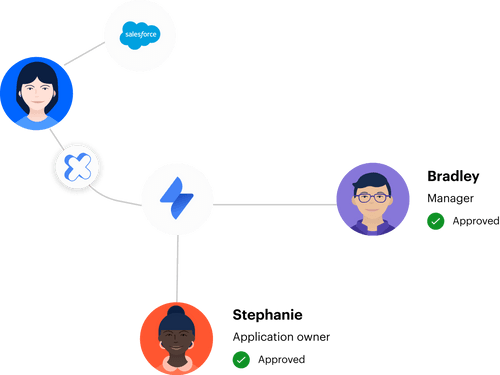
A human API sits in the middle, translating each decision into the next system. Every approved ticket becomes a manual call. Every revocation becomes another call that can be delayed, skipped, or performed without complete evidence. It works fine at low volume, but the person doing the translation turns into the bottleneck as requests grow.
Manual work can be completely rational for a small company processing 20 requests a month. There's no point building a large automation program for a queue one admin can clear before lunch. The model breaks at a specific point: when monthly request volume climbs past what one person can process in an afternoon, when role changes stop being occasional, or when nobody can say for sure whether approved access was actually removed. Hit two of those three and the human API becomes the risk.
Policy-heavy least privilege still leaves access behind
A least privilege policy can define who should get access, how long they should keep it, and who should approve it. None of that removes an entitlement. Without operational enforcement, the policy becomes instructions for a person who already has 40 other tickets.
A 160-person fintech company faced that problem after funding and acquisitions left privileged access active for too long. It moved elevated access into time-bound workflows, reduced privileged access by 85%, and automatically revoked more than 1,300 approved access windows. The policy didn't create that change. Expiry enforcement did.
Access automation has to make the safer action easier than the exception. Otherwise IT grants standing access because repeated manual requests are a headache, and security accepts the risk because revocation is another cleanup project nobody wants. So what does a complete automation path actually look like?
How to Choose Tools That Automate SaaS Work
Tools that automate SaaS work should connect the request, decision, identity change, review, and removal. You don't need one product to replace every system. You need a clear system of record, an authoritative enforcement point, and no manual gap between the two.
Find the first action that still needs a person
Where does the process stop after someone clicks Approve? That single question will tell you more than a 40-row feature comparison. If an admin still opens the identity provider, looks up a group, or records evidence by hand, you've found the automation gap.
Start with one common request and follow it all the way through. Pick something like Figma Editor, Salesforce Viewer, or temporary production access. Watch who touches it, which systems they open, and what proves the access changed. Don't stop at ticket closure. Keep going until the user is added or removed from the authoritative group.
Run the same check against five points:
- Does approval trigger the identity change?
- Can access expire without an IT reminder?
- Does a revocation decision remove the entitlement?
- Can you see real login activity before paying for another renewal?
- Is evidence written back to the original request?
Three or more manual answers mean you're looking at workflow support, not complete SaaS automation.
Separate request tools from enforcement tools
A request tool captures intent. An enforcement tool changes access. Those jobs can live in connected systems, but confusing the two is where most SaaS automation projects go sideways.
Jira Service Management is strong at intake, status, ownership, and approvals. An identity provider such as Okta, Entra ID, or Google Workspace owns users and group memberships. The useful automation sits between them. Once Jira records an approved decision, the identity provider should perform the access change and send the outcome back to the ticket.
A separate IGA portal can make sense for a large enterprise with broad governance programs outside Jira. That's a valid model, and I won't pretend otherwise. For a company already running employee requests through JSM, though, another portal creates a second queue, another place to train users, and another record to reconcile. Tool depth matters less if the daily workflow still depends on copying decisions between systems.
The categories are easier to compare when you ask what each one actually controls:
- ITSM tools manage requests, ownership, SLAs, and ticket status.
- Identity providers manage users, groups, and connected application access.
- SaaS management tools track applications, spend, and usage.
- Identity governance tools handle approvals, reviews, and access policy.
- Automation layers connect the decision to the identity change.
The strongest setup isn't the one with the most categories. It's the one with the fewest manual handoffs.
Map every role to an identity provider group
Role-to-group mapping turns a vague approval into a deterministic action. Figma Editor maps to one group. Figma Viewer maps to another. Production Admin maps to a restricted group with an expiry requirement. Once those mappings exist, the workflow doesn't need an admin to interpret what the approver meant.
I'd start with the 10 most requested application roles, not the whole SaaS estate. You'll learn faster that way. High-volume, low-risk roles expose broken mappings without putting sensitive access at risk, and each automated request pulls recurring work out of the queue.
A basic request path should run in this order:
- The employee selects an approved application and role.
- Jira creates the request with the required context.
- The correct manager or application owner approves it.
- The identity provider adds the user to the mapped group.
- Jira records whether the group change succeeded or failed.
That request-to-group chain is the part worth inspecting when you See how Multiplier works, because a polished catalog means very little if an admin still performs step four by hand.
Group-based provisioning has a real limitation. It works where the application is connected to the identity provider and access follows group membership. A non-SSO application may still need manual provisioning, so keep the request and approval record in Jira even when the final action can't yet be automated.
Make temporary access the default for elevated roles
Permanent access should be the exception for production systems, admin roles, and sensitive data. If an engineer needs access for an incident, let them request one, six, or 24 hours. Approval grants the mapped group membership, and expiry removes it.
Temporary access changes the economics of least privilege. IT no longer has to choose between blocking the employee and creating cleanup work later. The employee gets access when needed, while security knows the entitlement won't outlive its purpose because someone forgot a follow-up task.
The fintech example matters here. More than 1,300 access windows were revoked automatically after their approved duration ran out. Imagine handling those as reminders and manual group removals instead. Even if each removal took only three minutes, that's over 65 hours of interrupt work, and the real cost isn't the minutes, it's the context-switching tax on whoever gets pinged.
Time-based access won't cover every entitlement. Shared accounts, manual grants, and apps outside the identity provider can't be removed through a group change. That's a real gap. Use automatic expiry where enforcement exists, and keep the remaining exceptions visible rather than pretending they're automated.
Reclaim licenses using actual login activity
License automation should begin with usage, not a procurement spreadsheet. A purchased seat tells you someone received access. Last-login activity tells you whether they're still using it. Those are two very different facts, and most renewal decisions confuse them.
Start with applications where login data reflects meaningful use. Set an inactivity threshold, give the user a grace period, and exclude groups that shouldn't be handled automatically. If the user logs in during the warning window, keep the license. If they stay inactive, revoke the mapped access and record the action.
A practical policy needs four decisions:
- Inactivity threshold: How long can the app go unused before review?
- Grace period: How much warning does the user get?
- Exclusions: Which groups or users need different treatment?
- Evidence: Where will the warning and revocation be recorded?
Here's a rule you can apply today: 30 days works for collaboration software people touch every week, but a quarterly finance tool needs a window of at least 100 days or you'll reclaim seats from people mid-cycle. Login data can also be incomplete for shared accounts or apps without identity provider telemetry, so don't auto-reclaim what you can't measure with confidence.
The connection people miss is that license waste and least privilege are usually the same problem wearing two labels. An unused license is almost always unused access too. Reclaiming the seat cuts spend and removes an entitlement that no longer has a business reason to exist.
Put access reviews beside the revocation action
Access reviews fail when the reviewer's decision creates more work for IT. A manager marks Revoke in a spreadsheet, sends it back, and waits for someone else to remove the user. The certification looks complete on paper while the access stays live.
Bring the reviewer enough context to actually decide: user, department, role, group membership, and last login. Then make Keep or Revoke executable on the spot. A revoke decision should remove the relevant identity provider group, create a record of the change, and update review progress without spawning another queue.
If review decisions can't be enforced within one business day, the review process is still partly manual. That's the diagnostic I'd use. Faster campaigns are nice, but completed forms don't reduce risk. Removed access does.
Review context also sharpens license decisions. A user who hasn't logged in for 90 days is a lot easier to challenge than a row containing only their name and app. Usage turns the review from "Do they still need this?" into "They haven't used it since April, so what business reason justifies keeping it?" Much better conversation.
How Multiplier Automates Access Inside Jira
Multiplier connects Jira decisions to identity provider actions, so approved requests and revocations don't stall as ticket updates. It uses mapped groups in Okta, Entra ID, or Google Workspace for enforcement. Access reviews and license reclamation then use the same operational path rather than creating separate cleanup queues.
Approved requests trigger group changes
Each catalog role maps to one or more identity provider groups. When the Jira issue reaches the configured Approved status, Multiplier calls the identity provider to add the user to those groups. Success or failure is written back to Jira, which keeps the decision and the executed change together.

Time-Based Access uses the same group model. A requester selects a duration, access is granted after approval, and the group membership is removed when the window expires. Automatic revocation only works when access is controlled through identity provider groups, so purely manual grants stay outside that enforcement path.
Approvals can go to managers, application owners, or named users through JSM and Slack. Slack actions still create and update the Jira record. The chat layer speeds up the decision, while Jira remains the record behind it.
Reviews and license reclamation execute removal
Access Reviews run in JSM with user attributes, group memberships, last-login dates, and recommendations available to reviewers. A Revoke decision removes the user from the relevant identity provider group, creates Jira evidence, and updates campaign progress. The reviewer isn't handing IT another spreadsheet to process later.
Auto Reclaim handles inactive licenses using login telemetry from connected identity providers. Admins set inactivity thresholds, grace periods, and exclusions. Users receive a warning, and continued inactivity triggers access removal plus a Jira ticket documenting it. Auto Reclaim is available on the Advanced edition.
Once you can trace the inactivity warning, revocation, and Jira evidence in one chain, the sensible rollout is one application with reliable telemetry. You can Get started with Multiplier there, prove the workflow, then expand to more SaaS access.
Turning SaaS Automation Into Enforced Action
SaaS automation is complete when a business decision changes access without manual translation. Requests should trigger group assignments, temporary roles should expire, inactive licenses should be reclaimed, and review decisions should remove access. Anything less leaves the most important work sitting with IT.
If you're still asking what tools automate SaaS work, inspect the final action first. Don't buy another dashboard because it can display the problem. Pick the setup that can enforce the decision and leave behind a usable record.
Frequently asked questions
- How do I set up time-based access for applications?
To set up time-based access in Multiplier, follow these steps: 1) Go to the application settings in your Jira Service Management portal. 2) Enable time-based access for the desired application and specify the duration options (like 1, 6, or 24 hours). 3) When users request access, they can select the duration they need. After approval, Multiplier will automatically provision access and set a timer to revoke it once the time expires. This helps minimize standing access and reduces license waste.
- What if I need to revoke access for multiple users at once?
If you need to revoke access for multiple users, you can create an access review campaign in Multiplier. Here's how: 1) Navigate to the Access Reviews section in Jira. 2) Create a new campaign and select the applications you want to review. 3) Assign reviewers who can make decisions to revoke access. Once the review is complete, Multiplier will automatically remove users from the relevant identity provider groups based on the reviewers' decisions, streamlining the process.
- Can I track license usage for better cost management?
Yes, you can track license usage with Multiplier's Auto Reclaim feature. To do this: 1) Set inactivity thresholds for your applications, such as 30 days without login. 2) Define grace periods to notify users before revoking access. 3) Multiplier will monitor login activity and automatically reclaim licenses from users who exceed the inactivity threshold. This helps you manage costs effectively by ensuring you're only paying for active licenses.
- When should I consider using automated provisioning?
Consider using automated provisioning when your organization experiences a high volume of access requests. If you find that IT is spending too much time manually adding users to groups or handling approvals, implementing Multiplier can streamline these processes. Automated provisioning connects your Jira Service Management with your identity provider, allowing for quick and accurate access changes without manual intervention, which can significantly reduce bottlenecks.


