


387 new employees in 8 months will expose every broken access checklist you thought was fine. The funny part is that most access processes look completely reasonable until growth hits, and then everyone realizes their “process” was really a few Jira fields, a Slack nudge, and someone in IT remembering to clean things up later.
Automated checklists for faster access sound boring. But boring is kind of the point. When the checklist actually drives approvals, provisioning, expiry, review, and evidence, you stop relying on memory. And memory is where access governance usually starts to fail.
Key Takeaways:
- Automated checklists for faster access only work when they trigger real system actions, not just reminders.
- The access problem usually isn't intake. It's the handoff between Jira, Slack, your identity provider, and audit evidence.
- Time-bound access should be the default for elevated permissions, because standing privilege grows when no one owns revocation.
- Faster access doesn't have to mean weaker control if every approval, grant, and removal lands in one record.
- Start with your top 20 access requests, then build automation around the messy ones.
- The best checklist is boring: request, approve, provision, expire, review, prove.
Why Access Checklists Break When Headcount Spikes
Access checklists break because they describe work instead of doing work. A checklist that says “get manager approval” or “remove access after 30 days” still depends on a person catching the task, executing it correctly, and proving it later. At 50 employees, that might work. At 500, it becomes a risk.

The checklist isn't the problem, the gaps are
A lot of IT teams start with a totally reasonable setup. Jira ticket comes in, Manager approves, and someone checks the app owner. Someone else adds the user to the right group in Okta or Entra. Then the ticket gets closed, assuming nobody forgot a step.
The issue is that every handoff adds drag. And every manual step creates a place where evidence can disappear. I don't think people appreciate how fast that compounds. If you have 20 requests a week, and 25% of them need one extra clarification, that's already 5 interruptions. Not huge. Annoying, but survivable.
At 200 requests a week, same process, same 25% clarification rate, and now you have 50 avoidable interruptions. That's where automated checklists for faster access start to matter. Not because checklists are magic. Because the workflow needs to force the next action without someone babysitting the queue.
If your checklist doesn't move the work forward, it's documentation pretending to be operations.
What growth does to access requests
One advertising company scaled from 100 to 500 employees and started seeing the same pattern every Tuesday. New hires started Monday, and by Tuesday the IT queue filled up with access requests that were missing details, missing owners, or asking for apps that lived in someone's head. Groundhog day. Very fun if you hate your calendar.
A fintech team had a different version of the same problem. After funding and acquisitions, privileged access stuck around too long. Not because anyone wanted bad security. Because long-lived access was easier than rebuilding the same approval path every time an engineer needed temporary permissions. Honestly, I get it. During an incident, nobody wants to wait 2 hours for a perfect workflow.
The problem is that shortcuts become policy if they happen often enough. Extra licenses get bought to avoid delays. Admin access stays on because removing it creates more work later. Audit evidence gets rebuilt in spreadsheets because the original decision happened in Slack, the grant happened in the identity provider, and the ticket only tells half the story.
For teams trying to keep Jira as the main work system, access governance should feel like an extension of the request. If the request is already there, the checklist should be able to carry the work all the way through, and Learn more about Multiplier if you want to see what that looks like inside JSM and Slack.
Why separate portals make the audit mess worse
Separate IGA portals can make sense in large enterprise environments with dedicated governance teams. Fair point. If you have a 20-person identity team, a long implementation window, and strict segregation between service delivery and governance, a dedicated system might fit.
For a lot of mid-market IT and security teams, the separate portal creates a new problem. Employees still live in Jira and Slack, Managers still respond faster in chat, and IT still works the ticket queue. So now access governance gets split across the portal that owns policy, the service desk that owns work, the identity provider that owns the actual group change, and a spreadsheet that exists because the auditor needs proof.
That's the access equivalent of running a kitchen where the order ticket is in one room, the chef is in another, the waiter is texting updates, and the receipt gets written after the meal. The food might still arrive. But the process is fragile, and when something goes wrong, nobody has the full story.
Access governance breaks when the checklist can't prove what happened.
How to Build Automated Checklists for Faster Access
Automated checklists for faster access should map every request to a clear decision, a system action, and an evidence trail. The checklist has to know who approves, what group changes, how long access lasts, and where proof is stored. Without those mechanics, you're just creating prettier tickets.
Diagnose the access request before automating it
Before you automate anything, sort requests by risk and repeatability. That's where most teams go wrong. They try to automate every request at once, which sounds ambitious, but usually turns into a six-month project that nobody loves.
Start with 30 days of Jira access tickets, Not a theoretical policy review, and Actual tickets. Look at the top request types, the approvers involved, the apps requested, how often IT had to ask for more context, and how often access needed to be removed later. The pattern will show up pretty quickly.
I like using four questions:
- Is the request common? If it happens 10+ times a month, it deserves structure.
- Is the approval path predictable? Manager, app owner, or named approver should be obvious.
- Can access be granted through an identity provider group? If yes, automation becomes much easier.
- Should access expire? Admin roles, production tools, finance systems, and sensitive data should rarely be open-ended.
The best first candidates are boring, high-volume, and low-drama. Zoom role changes, Figma editor access, Jira project permissions, and Git repository access with a known owner. Once those are working, move to privileged or time-bound use cases. Don't start with the weirdest edge case. That's how projects get stuck.
Make the checklist drive the workflow
A useful access checklist should make the next step obvious and hard to skip. If the requester chooses “Salesforce Admin,” the system should already know who approves it, which group maps to the role, whether a duration is required, and what evidence needs to land on the ticket. No guessing.
A manual checklist might say:
- Confirm requester identity
- Get manager approval
- Add user to group
- Comment on ticket
- Remove access later
An automated checklist for faster access turns those into actions:
- Requester selects the app and role so the ticket has clean context from the start.
- Approver is assigned based on the app or requester so IT doesn't chase the wrong person.
- Approval changes the ticket status so the system knows when to provision.
- Provisioning happens through the identity provider group so the grant is consistent.
- Expiry or review is scheduled up front so cleanup isn't optional.
- Evidence writes back to the ticket so audit prep isn't a separate project.
Notice the shift. The checklist isn't asking a human to remember the process. The checklist is the process. It catches the missing context before the ticket reaches IT, routes the decision to the right person, and turns approval into a real change.
Use time limits as the default for risky access
Standing privilege is usually a cleanup problem disguised as an access problem. People get access because they need it. That part is fine. The failure happens after the job is done, when nobody owns the removal.
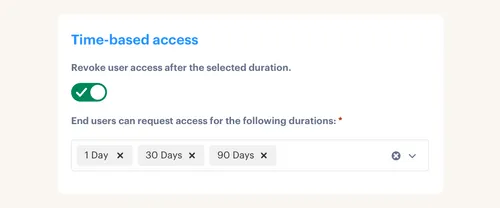
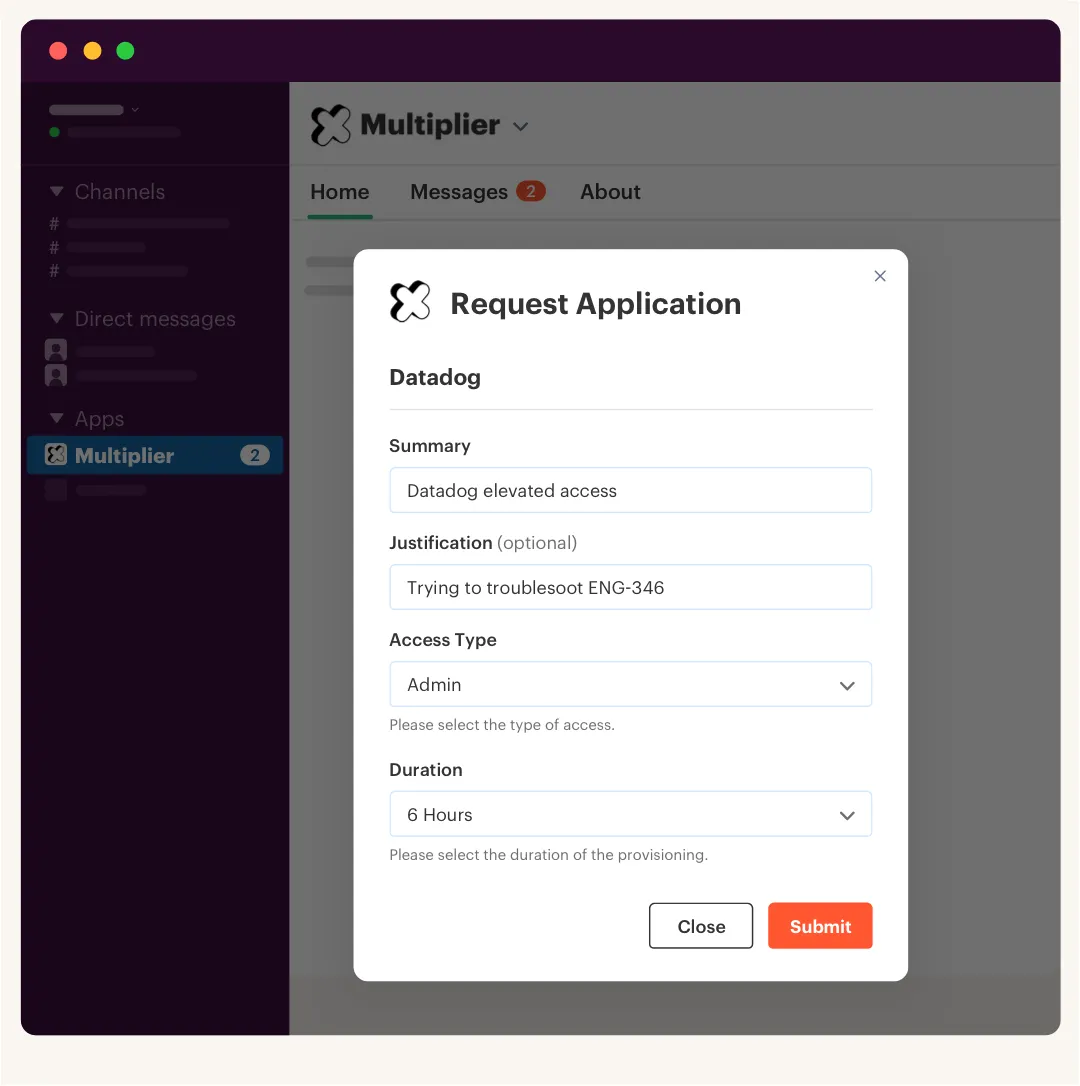
Time-bound access solves a very specific problem: the person needs elevated access now, but they shouldn't keep it forever. A 1-hour, 6-hour, or 24-hour window is often enough for production support, finance exports, admin tasks, or a one-off engineering change. After that, access should disappear without a human remembering to clean it up.
Not every app needs time limits. That's the honest limitation. If someone needs a core work app every day, forcing them to request it every morning is ridiculous. You'll annoy people, and they'll find a workaround. The rule I prefer is simple: if the access increases blast radius, handles sensitive data, or bypasses a normal control, put a duration on it.
A fintech company reduced privileged access by 85% using that model. The big change wasn't just faster approvals. The access window closed automatically after the approved duration. That's the part that matters, Granting access quickly is good, and Removing it without a reminder is better.
Treat Slack as a decision surface, not the system of record
Approvals happen faster when they happen where managers already work. For a lot of companies, that's Slack. No surprise there. The mistake is treating Slack as the governance system.
Slack is great for nudges, DMs, and one-click decisions. It is not where audit evidence should live, Messages get buried, and Context gets split across threads. People approve something in chat, then IT still has to update Jira and make the group change somewhere else. That's how evidence gets weird.
The better pattern is to let Slack speed up the decision while Jira stays the record. Request comes in through Jira or chat, Approver gets a Slack DM, they approve or deny there, the ticket transitions, Provisioning happens through the identity provider, and Evidence lands back in the Jira issue.
It sounds small, but it changes the operating model. You get the speed of chat without turning audit into archaeology. And if your team is already trying to keep access work inside Jira, See how Multiplier works around Slack approvals, identity provider group changes, and ticket-level evidence.
Build access reviews from the same checklist logic
Quarterly access reviews usually fail because they start from scratch. Someone exports users from apps, pulls groups from the identity provider, asks managers to review a spreadsheet, and then hopes revocations actually happen. It works. Kind of. But it creates a lot of room for rubber-stamping.
Access reviews should use the same structure as access requests. App owner, User list, Last login, Group membership, Keep or revoke, Reason, Enforced removal, and Evidence. If your request workflow already maps apps to owners and groups, the review process doesn't need to be rebuilt every quarter.
A good review checklist should answer:
- Who owns the app?
- Which users currently have access?
- When did each person last log in?
- Which users look inactive or overprovisioned?
- What happens when a reviewer clicks revoke?
- Where does the evidence go?
The hidden advantage is that reviews become less political. You're not asking someone to judge a massive spreadsheet with no context. You're showing them the access, the usage signal, and the action. Keep or revoke. Simple enough to complete, structured enough to trust.
Know when not to automate
Some access requests should stay manual. I know that sounds weird in an article about automated checklists for faster access, but it's true. If a request requires judgment, legal review, customer-specific context, or manual work inside a non-SSO app, forcing automation can create more risk than it removes.
The line I use is pretty straightforward. Automate the routing, the evidence, and the reminders first. Automate provisioning only when the entitlement is tied to a reliable identity provider group. If access is granted outside SSO, you can still track the request and approval, but automatic removal may not be possible.
That's not a failure. It's maturity. Mature access workflows don't pretend every system behaves the same way. They separate what can be automated from what still needs a human, then make sure the human step is visible, assigned, and auditable.
Automated checklists for faster access work best when they don't overpromise.
How Multiplier Makes Jira the Access Control Layer
Multiplier turns Jira Service Management into the place where access requests, approvals, provisioning, expiry, and review evidence stay connected. It does that by tying JSM tickets to identity provider group changes, Slack approvals, time-based access, and Jira-native review workflows. The point isn't another portal. The point is less split-brain access work.
Jira-native intake with identity provider execution
Multiplier's Application Catalog gives employees a Jira-native way to request sanctioned apps and roles. The catalog syncs apps and groups from Okta, Entra ID, and Google Workspace, then maps roles to identity provider groups. So instead of a free-form Jira ticket that says “need access,” the requester chooses the app, role, and sometimes a duration before the ticket gets created.

After approval, Multiplier provisions through identity provider groups, that's an important boundary, and it doesn't directly provision inside every SaaS app. It uses the identity provider as the source of truth, which keeps the change more consistent and easier to reverse. For SSO apps where group membership controls access, that makes the checklist executable.
The earlier problem was 50 interruptions from missing context and manual cleanup. Here, the request starts with cleaner data, the approval path is assigned, and the group change writes back to the Jira issue. Fewer screenshots, Fewer “who approved this?” moments, and Less weird audit archaeology.
Time-bound access and reviews in the same Jira flow
Multiplier's Time-Based Access is where least privilege gets real. Requesters can choose durations like 1, 6, or 24 hours for eligible access. Once approved, Multiplier adds the user to the mapped identity provider group, starts the timer, removes the group membership when the window expires, and records the change on the Jira issue.
Access Reviews follow the same idea. Admins create review campaigns in JSM, select approved apps, assign reviewers, and give them user attributes, group membership, last login, and recommendations. Reviewers mark Keep or Revoke. When they revoke, Multiplier removes the user from the relevant identity provider group and documents the action.
Auto Reclaim adds another layer for unused licenses, based on last-login data from the identity provider. If someone crosses an inactivity threshold and doesn't act after the warning period, access can be revoked and a Jira ticket generated. Same pattern again: checklist, action, evidence. For teams trying to reduce standing privilege and wasted licenses, Get started with Multiplier from the Jira workflows you're already using.
Where Access Governance Goes After the Checklist
Access governance gets a lot easier when the checklist becomes the operating system for the request. Not a side document. Not a quarterly spreadsheet. The actual workflow that asks for the right context, routes the right approval, grants the right access, removes it at the right time, and keeps the proof in the ticket.
The old way made sense for a while. Jira for tickets, Slack for approvals, the identity provider for changes, spreadsheets for audits. But at some point, the split becomes the bottleneck. And when access gets busy, busy teams make shortcuts. They grant too much, leave it on too long, and rebuild the story later.
The better path is boring in the best way. Start with your highest-volume requests, Add structure, Tie approvals to action, Make risky access temporary by default, and Run reviews from the same source of truth. Faster access and stronger least privilege don't need to fight each other. You just need the checklist to do more than sit there.
Frequently asked questions
- How do I set up automated checklists for access requests?
To set up automated checklists with Multiplier, start by integrating it with your Jira Service Management (JSM). 1) Use the Application Catalog to list approved applications and roles for your employees to request. 2) Map out the approval workflows so that requests are routed to the right approvers automatically. 3) Make sure the checklist triggers provisioning through your identity provider and writes evidence back to the Jira ticket. That way, access requests have a full audit trail without any extra work.
- What if I need to revoke access after a specific period?
If you need to revoke access after a specific period, you can use Multiplier's Time-Based Access feature. When setting up access requests, allow users to select a duration (like 1, 6, or 24 hours) for their access. Once approved, Multiplier will automatically provision the access and set a timer to revoke it when the duration expires. Elevated access stays temporary, and standing privilege risk drops.
- Can I track who approved access requests?
Multiplier tracks every approval automatically. When a request is submitted through JSM or Slack, the approval workflow captures the approver's details and links them to the Jira ticket. This way, every decision is documented, and you can easily reference who approved what, so every decision is on record.
- When should I conduct access reviews?
You should conduct access reviews regularly, typically every quarter, to ensure that users still need their access. With Multiplier's Access Reviews feature, you can create campaigns that automatically pull user data and group memberships for review. Set a schedule for your reviews and assign reviewers to streamline the process. It keeps access appropriate and compliance easier to prove.
- Why does my access request process feel slow?
Your access request process might feel slow due to fragmented workflows. If requests come in through multiple channels like email, chat, and separate portals, it can create delays. By using Multiplier integrated with Jira Service Management, you can centralize requests in one place. Approvals route automatically and provisioning happens without someone manually working the queue.
Frequently Asked Questions
How do I set up automated checklists for access requests?
To set up automated checklists with Multiplier, start by integrating it with your Jira Service Management (JSM). 1) Use the Application Catalog to list approved applications and roles for your employees to request. 2) Map out the approval workflows so that requests are routed to the right approvers automatically. 3) Make sure the checklist triggers provisioning through your identity provider and writes evidence back to the Jira ticket. That way, access requests have a full audit trail without any extra work.
What if I need to revoke access after a specific period?
If you need to revoke access after a specific period, you can use Multiplier's Time-Based Access feature. When setting up access requests, allow users to select a duration (like 1, 6, or 24 hours) for their access. Once approved, Multiplier will automatically provision the access and set a timer to revoke it when the duration expires. Elevated access stays temporary, and standing privilege risk drops.
Can I track who approved access requests?
Multiplier tracks every approval automatically. When a request is submitted through JSM or Slack, the approval workflow captures the approver's details and links them to the Jira ticket. This way, every decision is documented, and you can easily reference who approved what, so every decision is on record.
When should I conduct access reviews?
You should conduct access reviews regularly, typically every quarter, to ensure that users still need their access. With Multiplier's Access Reviews feature, you can create campaigns that automatically pull user data and group memberships for review. Set a schedule for your reviews and assign reviewers to streamline the process. It keeps access appropriate and compliance easier to prove.
Why does my access request process feel slow?
Your access request process might feel slow due to fragmented workflows. If requests come in through multiple channels like email, chat, and separate portals, it can create delays. By using Multiplier integrated with Jira Service Management, you can centralize requests in one place. Approvals route automatically and provisioning happens without someone manually working the queue.


