


Your IAM stack doesn't break because you picked the wrong tool. It breaks because Jira has the ticket, Slack has the approval, Okta or Entra has the change, and a spreadsheet becomes the audit story three months later. So when someone asks what tools streamline IAM, I'd start with a different question: where does the access decision actually live? If the answer is "kind of everywhere," that's the problem.
Most teams don't have an IAM tooling problem at first. They have a work location problem. Requests are in Jira, approvals are in Slack, provisioning is in Okta or Entra, evidence is in screenshots, and access reviews live in a spreadsheet someone hates opening.
That stack feels normal because everyone owns a piece of it. IT owns the ticket, Security owns the policy, Managers own approvals, and Finance owns the SaaS waste. Then audit shows up and everyone realizes no one owned the full motion.
Key Takeaways:
- The tools that make IAM faster aren't always separate IGA portals. Often, they're Jira-native workflows, Slack approvals, identity provider automation, and access reviews tied to tickets.
- Access requests break when intake, approval, provisioning, and evidence live in different systems.
- A good IAM workflow should reduce handoffs before it adds more policy.
- If 70%+ of your access tickets follow the same pattern, automate those before touching edge cases.
- Access reviews get a lot easier when reviewers see usage context and revocations happen from the same workflow.
Why IAM Tool Sprawl Makes Access Slower
IAM slows down when teams split the access workflow across too many places. Jira captures the request, Slack carries the conversation, the identity provider makes the change, and spreadsheets rebuild the evidence later. Each tool makes sense on its own. The broken part is the handoff between them.

The Separate Portal Looks Clean Until Work Starts
Most IT teams don't buy a separate IGA portal because they love extra software. They buy it because they need control, and honestly, that's a fair reason. Access is risky. Standing privilege is risky. Auditors don't accept "we think it was approved" as proof.

Here's where the plan meets reality. Employees don't wake up thinking, "I should go to the identity governance portal today." They go to Jira because that's where IT requests live. They ask in Slack because that's where work moves. Then IT has to translate that activity into a second governance system. It looks like control from the admin side, but it feels like friction everywhere else.
I've seen this pattern in a lot of ops workflows. The tool that "owns the policy" isn't where the work actually happens. So the team creates a relay race where every runner uses a different track. The request starts in one place, approval runs through another, execution happens somewhere else, and evidence gets stapled together at the end.
That's where access management tools start working against the team. Not because they're bad tools. Because they're disconnected from the day-to-day workflow. If your team has to update 3 systems to prove 1 access change happened, your IAM process is already too heavy. If your Jira queue already shows this pattern, the practical next move is to Learn more about Multiplier before you buy another standalone portal.
The Hidden Cost Is Not the Ticket Volume
Ticket volume gets blamed first. Makes sense. You see 200 access tickets in a month and think the problem is too many requests. The real cost is not the ticket. It's the number of manual decisions inside each ticket.
Picture a workplace technology manager at 4:42 PM on a Thursday. A sales leader needs Salesforce admin access for a cleanup project. The request is in Jira, the approval is buried in a Slack DM from Tuesday, the user's manager changed last week, and the Okta group name doesn't match the app role the requester selected. Now a 5-minute task turns into 25 minutes of checking, asking, waiting, and documenting. And it's 5:07 PM on a Thursday, which is a bad time to be doing forensics.
Multiply that by hundreds of routine access requests and the math gets ugly. Even if each request only takes 10 minutes, 300 requests becomes 50 hours. And that assumes nothing breaks, no one asks the wrong approver, and no one forgets to revoke access later. Which, frankly, is optimistic.
A separate portal can reduce some of that mess if everyone uses it perfectly. That's the honest limitation. Most mid-market teams running Jira Service Management already have a service delivery system employees trust, so forcing a second front door often creates more cleanup than control.
Access Reviews Expose the Real Problem
Access reviews are where bad IAM workflows go to confess. During the quarter, teams can survive with manual tickets and Slack approvals. During the review, they have to prove who had access, who approved it, whether the person still needs it, and whether revoked access was actually removed.
And that's where the spreadsheet shows up.
The spreadsheet is not the problem by itself, it's a symptom. If reviewers have no usage context, they rubber-stamp. If revocations require a second workflow, they get delayed. If evidence lives outside Jira, someone has to rebuild the story for audit. And no one enjoys that job. It's tedious, political, and very easy to get wrong.
The overlooked truth is that access reviews aren't just a compliance motion. They're a stress test for your whole IAM stack. If your review process can't show last login, group membership, reviewer decision, revocation action, and ticket evidence in one place, your access governance is more fragile than it looks. Which brings up the obvious next question: what actually collapses those handoffs?
What Tools Actually Make IAM Faster
The tools that streamline IAM are the ones that collapse intake, approval, provisioning, review, and evidence into fewer handoffs. For Jira-heavy teams, that usually means JSM for requests, Slack for fast approvals, the identity provider for authoritative changes, and access review workflows that execute revocations instead of just recording decisions.
Start With the Request Path Employees Already Use
70% of the IAM fight is usually intake. Not policy. Not architecture. Intake. If employees request access through 4 channels, IT spends the week reconciling different versions of the same ask.
Here's a diagnostic you can run this week. Pull 30 days of access requests and sort them into buckets: app access, elevated access, onboarding access, offboarding changes, and access review cleanup. Then count how many had missing information, unclear approvers, or manual provisioning steps. If more than 30% needed clarification, your intake form is not doing enough work. If it's above 50%, the form is basically a free-text ticket with extra steps.
What works better is a self-service catalog tied to approved apps and roles. Not a generic request form that says "what do you need?" That creates junk data. A good catalog forces structure up front: app, role, duration, business reason, requester, manager, and app owner. Now the ticket has enough context to move without IT playing detective.
There's a case for leaving some requests open-ended. New tools, weird exceptions, contractor access, temporary projects. That's fair, and you shouldn't over-structure the edge cases. If most requests are for the same 25 apps, those should not arrive as free text. They should arrive as clean, routable work.
A strong request path usually has:
- Employees choose from sanctioned tools first.
- Viewer, Editor, Admin, or whatever maps to real access.
- Especially admin or production access.
- Manager, app owner, or a named owner.
- Every request needs a record.
Use Slack for Decisions, Not as the System of Record
A Slack approval is great. A Slack approval as your only proof is not great. Big difference.
Slack is where people respond quickly, so it should be part of the IAM workflow. The mistake is letting Slack become the workflow. Someone says "approved" in a thread, IT makes the change, and later everyone has to reconstruct what happened. That's fine at 50 employees. At 500, it starts to fail pretty fast.
The better pattern is Slack for action, Jira for record. Approvers get a DM with the request context, they approve or deny in Slack, and that decision updates the Jira issue. The ticket remains the source of truth. The Slack message is just the control surface.
What should you check before trusting Slack approvals? Look at whether the approval writes back to the request record, whether the approver is actually the right person, and whether the downstream provisioning is tied to the approval status. If approval still requires IT to copy information into the identity provider, you sped up one step but left the bottleneck intact.
This is why chat-only access bots often disappoint. They make requests feel faster, but they don't always solve governance. Speed without evidence just creates a faster mess.
Provision Through Identity Provider Groups
The identity provider should be the execution layer for IAM changes. Not a side database. Not a note in Jira. The actual access change should happen through Okta, Entra ID, or Google Workspace groups whenever the app supports it.
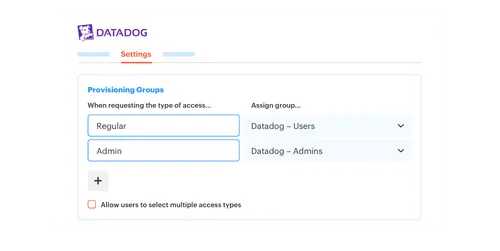
That means the catalog role maps to an identity provider group. When the request is approved, the user gets added to the right group. When access expires or gets revoked, the user gets removed from that group. The Jira ticket should show what happened, when it happened, and whether the action succeeded.
This is where a lot of IAM tools either become useful or become shelfware. If the tool can approve access but can't execute the change, IT still has to do the boring part. If it can execute changes but doesn't write evidence back to the request, audit still has to chase the story. You need both.
The conditional rule is pretty clear. If an app is SSO-backed and group-based, automate provisioning. If an app is non-SSO or has messy manual permissions, keep the ticket workflow and evidence trail, but don't pretend you have full automation. That distinction matters. It keeps the team honest, and it prevents security from assuming revocation happened when it still needs a human.
Luno is a good example of why this matters. As the company grew close to 1,200 people, access requests came through Slack, email, and Jira. IT had to chase approvals and manually assign Okta groups. After moving routine access through Jira Service Management and automated group assignment, they reduced IT workload on access requests by 80%. Not because every edge case disappeared. Because the repeatable requests stopped eating the team alive.
Once you've mapped that handoff from approval to identity provider group, it's easier to See how Multiplier works against your own Jira workflow instead of guessing from a generic IAM checklist.
Make Time-Bound Access the Default for Risky Roles
Permanent access is often a convenience decision pretending to be an access decision. Someone needs admin access for 2 hours, and gets it forever because revocation requires follow-up. Then 6 months later, the access review finds it and everyone acts surprised.
The fix is not more reminders. Reminders fail because everyone is busy. The fix is duration-based access where the requester chooses a window, the approver approves the window, and access ends automatically when the timer expires. One hour, 6 hours, 24 hours. Whatever fits the job.
This works especially well for production access, finance systems, admin roles, customer data, and incident response. The key is matching risk to duration. Low-risk viewer access might be ongoing. High-risk admin access should expire. If the user needs more time, they can extend the request with the right workflow.
Stavvy is the clean example here. They had long-lived privileged access after growth and acquisitions, which is common. After moving to time-bound access with Jira and Slack workflows, they reduced privileged access by 85% and had 1,300+ access requests automatically revoked after the approved windows. That's the part most teams miss. The win wasn't just faster approval. The win was the cleanup happening without someone remembering to do it.
One caution though. Time-bound access only works if revocation can be enforced through the identity provider group. If a SaaS app requires manual removal outside SSO, you can still track expiry in Jira, automatic revocation may not happen. Don't oversell the control. Map the enforcement path first.
Treat Access Reviews Like Action Workflows
Most access reviews are designed like surveys. Reviewer gets a list, clicks keep or revoke, adds a reason, and then someone else has to make the changes. That creates a weird gap between decision and enforcement.
Access reviews should work more like operational campaigns. Select the apps, assign reviewers, show usage context, collect decisions, execute revocations, and record evidence. Same motion. One system. If a reviewer marks "Revoke," that should trigger the removal path, not create a second manual project.
The diagnostic here is brutal but useful. Take your last access review and ask 5 questions:
- Did reviewers see last login or usage context?
- Did they see user attributes like department, title, and group membership?
- Did revocation decisions automatically create or update tickets?
- Did access actually get removed from the identity provider group?
- Could you export evidence without rebuilding it by hand?
If you answer no to 2 or more, your review process is probably too manual. And if reviewers lack usage context, expect rubber-stamping. They don't have enough information to make a real decision, so they choose the safest political option, which is usually "keep."
Access reviews are also a good place to cut SaaS waste. If someone hasn't logged into a tool in 90 days, the reviewer should see that. If a license can be reclaimed after a warning period, even better. Finance cares about the unused seat, Security cares about excess access, IT cares about not running another spreadsheet project. Same workflow, different stakeholder pain. Which raises the practical question: what does that actually look like when it's wired into Jira?
How Multiplier Runs Access Governance Inside Jira
Multiplier runs access governance inside Jira Service Management by turning requests, approvals, provisioning, access reviews, and revocations into Jira-native workflows. Employees request access in JSM or Slack, approvers act in the same flow, identity provider groups execute changes, and the Jira issue becomes the audit record.
Jira-Native Intake and Approval Workflows
Multiplier starts with the Application Catalog inside JSM. Employees browse approved applications, select roles like Viewer or Admin, and submit the request from Jira or Slack. Behind the scenes, apps and groups sync from Okta, Entra ID, or Google Workspace, and each role can map to the right identity provider group.

That matters because it removes the messy front door problem. Instead of Slack messages, email threads, and vague Jira tickets, the request arrives with the app, role, requester, and approval path already structured. Approvers can act in Jira or Slack, and the decision stays tied to the ticket. Not a screenshot. Not a side conversation. The actual record.
Multiplier also supports manager, app owner, or specific-user approvals. That gives IT enough control to route risky apps differently from routine ones. Low-risk access can move fast. Higher-risk roles can require explicit approval. And because the approval is connected to the Jira workflow, provisioning can trigger when the issue reaches the approved status.
The callback to the earlier problem is pretty direct. If each manual request used to cost 10 to 25 minutes of checking and group assignment, the goal is to remove that repeated admin work from the queue. Multiplier does that by keeping intake, approval, and execution in the same Jira-centered motion.
Access Reviews With Context and Enforced Revocation
Multiplier's Access Reviews run as Jira-native campaigns. Admins choose approved apps, assign reviewers, and reviewers see user details like groups, job title, department, last login, and recommendations. They can mark Keep or Revoke, add reasons, and the revocation path can remove users from the relevant identity provider groups.
This is the part I think is most underrated. Access reviews usually fail because decisions and actions are separated. Someone decides revoke in a spreadsheet, then IT has to turn that into tickets, then someone has to prove it happened. Multiplier closes that loop inside Jira. Review decision, revocation action, and audit evidence stay connected.
Multiplier also supports Time-Based Access for just-in-time use cases. Requesters choose a duration, access is provisioned after approval, and the identity provider group membership is removed when the window expires. For teams trying to reduce standing privilege, that's a much better operating model than "approve now and remember to clean it up later."
There are limits, and they matter. Automatic revocation depends on access being provisioned through identity provider group membership. For manual or non-SSO grants, you still need a human path. That's not a weakness as much as a boundary. The system should make enforceable access automatic and keep manual access visible.
Multiplier also has Auto Reclaim on the Advanced edition, which can identify inactive users from identity provider login data, notify them, and revoke access after the grace period if they stay inactive. Once those pieces are visible in one record, you can Get started with Multiplier with the workflows that already create the most cleanup.
Build IAM Around the Work People Already Do
The best answer to what tools streamline IAM is not "buy the biggest governance suite." It's build around the workflow your employees and IT team already use, then automate the repeatable parts. For Atlassian teams, that usually means Jira for the record, Slack for fast action, and the identity provider for enforcement.
Start with the requests that happen every week. App access, role changes, temporary admin access, quarterly reviews. If those can move through structured Jira tickets, Slack approvals, mapped identity provider groups, and review campaigns with usage context, you'll fix a huge chunk of the problem before touching the weird edge cases.
As much as IAM feels like a security category, the day-to-day work is operational. The teams that win don't just write better policies. They make the right access path easier than the workaround.
Frequently asked questions
- How do I streamline access requests in Jira?
To streamline access requests in Jira, you can use Multiplier's Application Catalog. Start by ensuring employees can browse approved applications directly in the JSM portal. This allows them to select roles like Viewer or Admin and submit requests easily. Automate the approval workflow so that approvers receive notifications in Jira or Slack, and ensure that requests are tied to the same ticket for a complete audit trail. This setup reduces manual steps and keeps everything organized.
- What if I need to revoke access quickly?
If you need to revoke access quickly, consider using Multiplier's Access Reviews feature. This allows you to create campaigns where reviewers can easily see user details, last login dates, and make decisions to keep or revoke access. When a revocation decision is made, it automatically triggers the removal of users from the relevant identity provider groups, ensuring that access is revoked without delay and all actions are documented in Jira.
- Can I automate provisioning for non-SSO apps?
Automating provisioning for non-SSO apps isn't possible directly through Multiplier, as it primarily provisions access via identity provider groups. However, you can still capture approvals and maintain an audit trail for these apps. For manual provisioning, ensure that your team is aware of the necessary steps to grant access and document everything in Jira to keep track of requests and approvals.
- When should I use time-based access?
You should use time-based access when granting elevated permissions, especially for sensitive roles or production systems. With Multiplier, requesters can choose a duration for access, and once approved, the system automatically revokes access when the time expires. This approach minimizes the risk of standing privileges and helps ensure that users only have access when they truly need it.
- Why does my team struggle with access reviews?
Your team may struggle with access reviews if the process is too manual or lacks context. To improve this, use Multiplier's Access Reviews feature to set up campaigns that provide reviewers with necessary information like last login and group memberships. This way, decisions to keep or revoke access are informed and can be executed automatically, reducing the need for manual follow-up and ensuring compliance.
Frequently Asked Questions
How do I streamline access requests in Jira?
To streamline access requests in Jira, you can use Multiplier's Application Catalog. Start by ensuring employees can browse approved applications directly in the JSM portal. This allows them to select roles like Viewer or Admin and submit requests easily. Automate the approval workflow so that approvers receive notifications in Jira or Slack, and ensure that requests are tied to the same ticket for a complete audit trail. This setup reduces manual steps and keeps everything organized.
What if I need to revoke access quickly?
If you need to revoke access quickly, consider using Multiplier's Access Reviews feature. This allows you to create campaigns where reviewers can easily see user details, last login dates, and make decisions to keep or revoke access. When a revocation decision is made, it automatically triggers the removal of users from the relevant identity provider groups, ensuring that access is revoked without delay and all actions are documented in Jira.
Can I automate provisioning for non-SSO apps?
Automating provisioning for non-SSO apps isn't possible directly through Multiplier, as it primarily provisions access via identity provider groups. However, you can still capture approvals and maintain an audit trail for these apps. For manual provisioning, ensure that your team is aware of the necessary steps to grant access and document everything in Jira to keep track of requests and approvals.
When should I use time-based access?
You should use time-based access when granting elevated permissions, especially for sensitive roles or production systems. With Multiplier, requesters can choose a duration for access, and once approved, the system automatically revokes access when the time expires. This approach minimizes the risk of standing privileges and helps ensure that users only have access when they truly need it.
Why does my team struggle with access reviews?
Your team may struggle with access reviews if the process is too manual or lacks context. To improve this, use Multiplier's Access Reviews feature to set up campaigns that provide reviewers with necessary information like last login and group memberships. This way, decisions to keep or revoke access are informed and can be executed automatically, reducing the need for manual follow-up and ensuring compliance.


