


At 9:17 AM, a Jira access request for Salesforce Admin hits the queue, and your team has 2 bad options: approve it fast and risk overprovisioning, or chase the app owner in Slack while the employee waits. Conditional routing is where access governance starts to feel real, because the request has to pick the right approver, map to the right Okta or Entra group, and set the right expiry before anyone touches it. Get that wrong and you don't just create a slower ticket. You create standing access and wasted licenses, then someone has to rebuild the audit trail later.
The mistake is assuming policy is the hard part. It usually isn't. The hard part is getting the right route to fire at the right moment, with enough context that IT doesn't have to play detective for every Figma, GitHub, Salesforce, production, finance, contractor, and offboarding request.
Key Takeaways:
- Conditional routing should start with access risk, not org chart politics.
- If a request needs human judgment every time, your routing rules aren't specific enough yet.
- The best routes use app, role, department, manager, access duration, and employment status together.
- Least privilege only works when approval, provisioning, expiry, and evidence live in the same workflow.
- SaaS waste is usually an access routing problem hiding inside a license report.
- Start with 10 to 20 high-volume apps before trying to route everything.
- Audit evidence should be created during the request, not rebuilt later.
Why Access Routing Breaks Inside Jira Queues
Access routing breaks when every request enters Jira with different levels of context, different approvers, and different follow-up work. A basic route can handle simple software requests, but it fails once you add elevated roles, contractors, time-bound access, and compliance evidence. The queue looks organized, but the work underneath is still manual.

The Real Bottleneck Isn't Jira
Most IT teams don't have a Jira problem. They have a decision problem sitting inside Jira. Someone asks for access, the ticket gets created, and then the real work begins: who approves it, which group maps to the right role, whether the user should get permanent or temporary access, and whether anyone needs to document why it was granted.

I've seen this pattern a lot. The team thinks they need a cleaner portal or a better form. Fair point, forms matter. A better form without conditional routing just gives you prettier bad tickets. The same human still has to read the request and decide what happens next.
Picture a workplace technology manager at 4:12 PM on a Thursday. A salesperson requests Salesforce admin access, a contractor asks for Google Drive access, and a new engineer needs GitHub access before onboarding on Monday. Three tickets. Three very different risk profiles. If all three follow the same path, the routing is basically pretending the differences don't matter.
That gets expensive fast. Not always in one big visible moment, either. It shows up as extra licenses, standing privilege, delayed onboarding, and IT agents doing the same 5 to 30 minute task again and again. If your current Jira queue is full of these almost-identical decisions, Try Multiplier for Jira access routing in the context of routing the work to the right owner before IT has to touch it.
Policy Without Enforcement Becomes Theater
Policy-heavy access management feels safe because it looks complete. You have the approval matrix, you have the spreadsheet, and you have the quarterly review process. Everyone nods in the meeting, and then two weeks later someone grants access manually because the requester is blocked and the approver is on vacation.
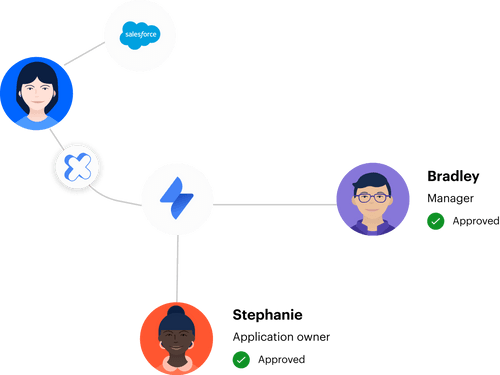
That's why automation-first least privilege beats policy-heavy governance without operational enforcement. Not because policy doesn't matter. It does. The problem sits in this: policy outside the workflow can't make the workflow behave. It becomes advice, not control.
The routing rule is where policy becomes real. If finance apps require the app owner, route them there. If production access expires after 1 or 6 hours, make the duration part of the request. If contractors need different approvals than employees, don't ask IT to remember that every time. Build the condition into the workflow.
And honestly, this is where a lot of access programs fall apart. They try to boil the ocean with a giant governance model before fixing the 20 routes that create 80% of the work. Then the whole thing feels too big, too slow, and too annoying to maintain. Start smaller. Make the obvious routes work first.
The Audit Trail Can't Be an Afterthought
Audit evidence gets messy when the approval happens in one tool, the provisioning happens in another, and the proof gets stitched together later. The actual request may be in Jira, but the manager approved in Slack, the group change happened in Okta or Entra, and someone grabbed screenshots before the audit. That's not a system. That's arts and crafts.
A good routing model treats evidence like exhaust from the workflow. Every approval, denial, group assignment, expiry, and revocation should connect back to the original issue. If the auditor asks why someone had access, the answer shouldn't require three tabs, two exports, and one person who remembers what happened last quarter.
At Luno, rapid growth pushed access requests through Slack, email, and Jira. They were dealing with hundreds of routine requests and manually assigning Okta groups after chasing approvals. After they moved requests into a structured Jira workflow with automated provisioning, they cut IT workload on access requests by 80%. That wasn't because people suddenly became more disciplined. The process stopped relying on memory.
The route did the work.
How to Build Conditional Routing for Access Requests
Building conditional routing for access requests means defining the decision logic before the ticket reaches an IT agent. The goal is to turn repeated human judgment into predictable paths based on app, role, requester, risk, duration, and lifecycle event. Done well, routing becomes the operating system for least privilege.
Start With the Routes That Repeat Every Week
10 to 20 apps will usually tell you more than a 200-app inventory. I know that sounds backwards, because the instinct is to map everything first. If you start with every app, every group, every approver, every exception, you'll spend weeks building a beautiful spreadsheet that no one wants to maintain.
Here's the diagnostic that works. Pull the last 30 to 60 days of access tickets and answer four questions: Which 10 apps show up most? Which requests took over 48 hours to close? Which required more than one back-and-forth with the requester? Which resulted in access that got revoked within 30 days? The apps that appear in three or more of those buckets are your first routes. Everything else can wait.
For each app, write down the route in plain English before touching Jira workflow logic. Something like: "If a full-time employee requests Figma Viewer, auto-approve and provision. If they request Figma Admin, route to the app owner. If a contractor requests any role, route to manager and app owner." Simple. Clear. Boring in a good way.
A useful first pass usually includes:
- Top 10 requested apps: Pick the apps that create the most tickets.
- Roles inside each app: Viewer, editor, admin, owner, finance user, production user.
- Approver source: Manager, app owner, security, finance, or a named user.
- Provisioning method: Identity provider group, manual task, or no access allowed.
- Expiry rule: Permanent, 1 hour, 24 hours, 7 days, or end date tied to contract.
When I've seen this work well, teams don't start with governance theory. They start with queue pain. Videoamp is a good example. As they grew from 100 to 500 employees, Tuesdays became the access request rush. New hires needed tools, specialized apps needed owners, and tickets often lacked enough detail to act on. Once they created a self-service catalog inside Jira, they processed 500+ app requests in 6 months and saved 70+ hours of IT productivity.
Split Routing by Risk, Not Just Department
The org chart is a weak routing model by itself. Department helps, but it doesn't tell you enough about risk. A marketing user requesting Canva Viewer is not the same as a marketing user requesting admin access to the CRM. Same department. Completely different decision.
Risk-based routing is more useful because it asks what can go wrong if the request is approved. Low-risk access can move quickly. Medium-risk access should go to the manager or app owner. High-risk access needs tighter approval, shorter duration, or both. The route should change when the blast radius changes.
The decision test is pretty simple. If the access can expose customer data, change production, approve spend, modify security settings, or export sensitive data, don't route it like a normal app request. Add a condition. Make the role matter. Make the duration matter. Make the approver matter.
You can bucket routes like this:
- Low-risk access: Standard employee apps, viewer roles, low data sensitivity. Route to auto-approval or manager approval.
- Medium-risk access: Editor roles, department-specific systems, tools with customer or financial context. Route to app owner or manager.
- High-risk access: Admin roles, production systems, databases, finance controls, security tools. Route to app owner plus time-bound access.
- Exception access: Contractors, interns, terminated users, unusual departments. Route to manual review with required justification.
The honest limitation is that risk models can get political. App owners may over-classify everything as high risk because nobody wants to be blamed later. I get it. The fix is to review the route by actual consequence, not title. If a role can't change settings, export data, or create financial/security exposure, don't make it crawl through a heavy approval chain just because the app feels important.
Use Duration as a Routing Condition
Time is one of the most underused access controls. Most teams treat access as approved or denied. A lot of requests should be approved for a window, not forever. Production access during an incident. Admin access for a setup task. Database access for a migration. The person needs it, and they just don't need it forever.
This is where building conditional routing for least privilege gets much more practical. Instead of forcing security to say no, the route can say yes with a timer. The condition becomes: if the role is privileged, require duration. If duration exceeds the allowed window, route for extra approval. If the user already had the same approved temporary access and needs a short extension, route differently.
That's a much healthier conversation. Security isn't blocking work, and IT isn't chasing cleanup. The requester isn't waiting around because the process treats every admin request like a permanent entitlement. Everyone wins, or at least everyone complains less. Sometimes that's the real enterprise benchmark.
A good duration model might look like this:
- 1 hour for emergency production access.
- 6 hours for same-day troubleshooting.
- 24 hours for admin setup work.
- 7 days for project-based access.
- Contract end date for temporary worker access.
Stavvy is a good case here. After funding and acquisitions, they had long-lived privileged access hanging around. They moved to a just-in-time model and cut privileged access by 85%, with 1,300+ access requests automatically revoked after the approved window. That's the pattern. Don't just approve access. Approve the access window.
Build Approval Logic Around Ownership
Approval routing falls apart when ownership is fuzzy. If no one owns the app, every request becomes an IT judgment call. And IT usually isn't the right decision-maker for business access. They can execute the change, but they shouldn't always decide whether the salesperson needs admin rights or whether the finance analyst needs access to a payment tool.
The route should answer one question before the ticket lands: who has the context to approve this safely? Sometimes it's the manager, sometimes it's the app owner, and sometimes it's a named security reviewer. For certain requests, it's two people, but be careful here. Multi-approval workflows can become approval theater if every person rubber stamps the same request.
My preferred rule is: one approver for normal risk, app owner for role-sensitive access, security only for genuinely high-risk access. If security reviews everything, they become the bottleneck. If security reviews nothing, least privilege becomes a slogan. The trick is to reserve security attention for the requests where their judgment actually changes the outcome.
The approval route should include:
- Requester manager when business need is the main question.
- App owner when role, license cost, or data access is the main question.
- Security reviewer when elevated access, sensitive systems, or production access is involved.
- Finance or procurement owner when paid seats are expensive or limited.
- No approval when the app and role are low-risk and policy allows it.
Building conditional routes this way also makes your audit trail cleaner. The approver isn't random. The approver is part of the control design. When someone asks why access was granted, you can point to the route, the condition, the approver, and the resulting change. That's a lot better than "Janet approved it in Slack, I think."
Treat License Waste Like a Routing Failure
SaaS waste usually looks like a finance problem. It isn't always. A lot of the time, it's an access routing problem. Someone gets a license during onboarding, never uses it, transfers teams, or finishes a project, and no route exists to reclaim it. Then finance asks why the renewal is bloated and IT has to reverse-engineer six months of usage.
The route needs to continue after approval. That's the part most teams miss. Access routing shouldn't stop when the user gets the app. It should also define what happens when the user goes inactive, changes roles, leaves the company, or fails a periodic review. Without that, the front door is governed and the back door is wide open.
A practical rule: if an app has paid seats and reliable login data, attach an inactivity policy. If a user hasn't logged in for 30, 60, or 90 days, notify them first. If they still don't use it after the grace period, reclaim the license and write the action back to the ticket. Not every app can support this, and that's fine. Start with the expensive ones.
The CFO conversation changes when you can show real usage, not just purchased seats. You're not saying, "We think some licenses are unused." You're saying, "These users crossed the inactivity threshold, received notice, didn't log in, and had access removed with evidence." That's a different level of control.
For high-growth teams, this becomes a meaningful operating habit. Access routing isn't only about faster approvals. It's how you stop SaaS sprawl from compounding every month.
Keep Evidence Attached to the Workflow
Audit readiness is the boring part until it isn't boring. Then it's the only thing anyone wants to talk about. The mistake is waiting until the audit window to gather proof. By then, you're rebuilding the story from old tickets, Slack threads, exports, and screenshots.
Evidence should be attached at the moment the workflow happens. Request submitted. Approver notified. Decision made. Group assignment completed. Expiry triggered. Revocation done. Review completed. Every step should update the same record or link back to it. If your evidence lives somewhere else, the route isn't complete.
A quick diagnostic works well. Pick 10 recent access requests. Try to prove who requested access, who approved it, what was granted, when it was granted, and whether it was removed. Time how long it takes. If one request takes more than 5 minutes to reconstruct, your audit process is too manual. If you need screenshots, your evidence model is already fragile.
That test is a little painful. Good. It shows the truth fast. Most teams don't realize how broken the evidence chain is because day-to-day access still gets done. The work completes, but the proof doesn't travel with it. That's the hidden cost.
When conditional routing includes evidence by design, audits stop feeling like a separate project. They become a report on work that already happened.
How Multiplier Automates Jira Access Governance
Multiplier automates Jira access governance by turning request intake, approvals, provisioning, expiry, reviews, and evidence into one connected Jira-based workflow. It uses identity provider group mappings for provisioning and revocation, while keeping approvals in JSM or Slack. The point isn't another portal. It's operational enforcement where the work already happens.
Jira-Native Routes With Identity Provider Execution
Multiplier fits the routing model because the catalog, approval path, and provisioning action all connect to the same Jira issue. Employees request approved apps through the JSM app catalog or Slack, pick the role they need, and submit the request with the right context up front. Then approval workflows route the decision to the manager, app owner, or specific user based on how the app is configured.

Once approved, Multiplier provisions through identity provider groups in Okta, Entra ID, or Google Workspace. That part matters. IT isn't copying names between systems or manually adding users after the approval. The mapped group assignment becomes the execution layer, and the Jira issue records what happened for troubleshooting and audit.
For temporary access, Multiplier's time-based access makes the expiry part of the workflow. A requester can choose a duration like 1, 6, or 24 hours, and when the window ends, Multiplier removes the user from the mapped identity provider group and records the change on the issue. For teams building conditional routing for privileged access, that's the difference between approving a need and creating a standing risk.
The same idea applies to reviews. Multiplier runs access review campaigns inside JSM, shows reviewers useful context like groups and last login, and can remove users from relevant identity provider groups when a reviewer chooses revoke. If your route depends on evidence staying attached to the workflow, See Multiplier on the Atlassian Marketplace with the actual approval, provisioning, and revocation record in mind.
License Reclamation and Audit Evidence in the Same System
Multiplier also handles the cost side of access through Auto Reclaim, which identifies inactive users using login telemetry from the connected identity provider. Admins define inactivity thresholds, grace periods, and exclusions. If a user crosses the threshold, they get a warning. If they still don't log in after the grace period, Multiplier revokes access and creates a Jira ticket documenting the removal.
That connects directly to the SaaS waste problem. Instead of waiting for a renewal panic or running manual reports, Multiplier turns inactivity into a route. Last login data triggers the policy. The user gets a chance to keep the license by logging in. If they don't, the license is reclaimed and the evidence is already in Jira. Auto Reclaim is available on the Advanced edition, and its value depends on accurate login data from the identity provider, which is worth being clear about.
Access reviews add another layer. Reviewers can decide keep or revoke in JSM, and admins can export results as CSV or push evidence to Vanta. The same workflow that removes risky or unused access also creates the proof auditors and compliance teams need. No spreadsheet archaeology.
Multiplier isn't magic. You still need to define the right routes, name the right approvers, and decide which apps deserve automation first. Once those decisions are clear, Multiplier gives you the machinery to make them repeatable inside Jira and Slack. If your access routes are already clear on paper but still painful in practice, Get Multiplier for Jira from the specific workflow you want to automate first.
Build Access Routes That Remove Manual Judgment
Conditional routing works because it takes the decisions IT keeps making by hand and turns them into routes the system can enforce. Start with the apps that create the most tickets, split routes by risk, use duration for privileged access, and keep evidence attached to the Jira issue. That's the play.
The bigger point is simple. Least privilege doesn't come from writing a stronger policy. It comes from making the right access path easier than the wrong one. When building conditional routing for access requests, the goal isn't to create more process. The goal is to remove guesswork, cut waste, and make audit evidence a byproduct of normal work.
Frequently asked questions
- How do I set up time-based access for applications?
To set up time-based access using Multiplier, follow these steps: 1) In the JSM portal, when submitting a request, choose the application and role you need. 2) Select a duration for access, like 1, 6, or 24 hours. 3) Once approved, Multiplier will automatically provision access and set a timer to revoke it when the duration expires. This helps ensure that elevated access is only granted when necessary, reducing the risk of standing privileges.
- What if I need to reclaim licenses from inactive users?
You can reclaim licenses from inactive users using Multiplier's Auto Reclaim feature. Here's how: 1) Define inactivity thresholds for each application, such as 30 days without login. 2) Set up grace periods to notify users before revoking access. 3) If users remain inactive after the grace period, Multiplier will automatically revoke their access and document the action in a Jira ticket. This approach helps optimize your SaaS spend and maintain control over licenses.
- Can I automate the approval process for access requests?
Yes, you can automate the approval process with Multiplier. To do this: 1) Set up approval workflows in Jira by mapping approvers, such as app owners or managers, to specific applications. 2) When a request is submitted, Multiplier will route it to the designated approver based on your settings. 3) Approvers will receive notifications in JSM or Slack, allowing them to approve or deny requests quickly. This streamlines the process and keeps everything within the same system.
- When should I conduct access reviews?
You should conduct access reviews regularly to ensure compliance and security. Typically, this is done quarterly or bi-annually. With Multiplier's Access Review feature, you can create campaigns for specific applications, assign reviewers, and track progress in Jira. This way, you can efficiently manage user access, identify inactive users, and ensure that only necessary permissions are granted, all while maintaining a clear audit trail.
Frequently Asked Questions
How do I set up time-based access for applications?
To set up time-based access using Multiplier, follow these steps: 1) In the JSM portal, when submitting a request, choose the application and role you need. 2) Select a duration for access, like 1, 6, or 24 hours. 3) Once approved, Multiplier will automatically provision access and set a timer to revoke it when the duration expires. This helps ensure that elevated access is only granted when necessary, reducing the risk of standing privileges.
What if I need to reclaim licenses from inactive users?
You can reclaim licenses from inactive users using Multiplier's Auto Reclaim feature. Here's how: 1) Define inactivity thresholds for each application, such as 30 days without login. 2) Set up grace periods to notify users before revoking access. 3) If users remain inactive after the grace period, Multiplier will automatically revoke their access and document the action in a Jira ticket. This approach helps optimize your SaaS spend and maintain control over licenses.
Can I automate the approval process for access requests?
Yes, you can automate the approval process with Multiplier. To do this: 1) Set up approval workflows in Jira by mapping approvers, such as app owners or managers, to specific applications. 2) When a request is submitted, Multiplier will route it to the designated approver based on your settings. 3) Approvers will receive notifications in JSM or Slack, allowing them to approve or deny requests quickly. This streamlines the process and keeps everything within the same system.
When should I conduct access reviews?
You should conduct access reviews regularly to ensure compliance and security. Typically, this is done quarterly or bi-annually. With Multiplier's Access Review feature, you can create campaigns for specific applications, assign reviewers, and track progress in Jira. This way, you can efficiently manage user access, identify inactive users, and ensure that only necessary permissions are granted, all while maintaining a clear audit trail.


